
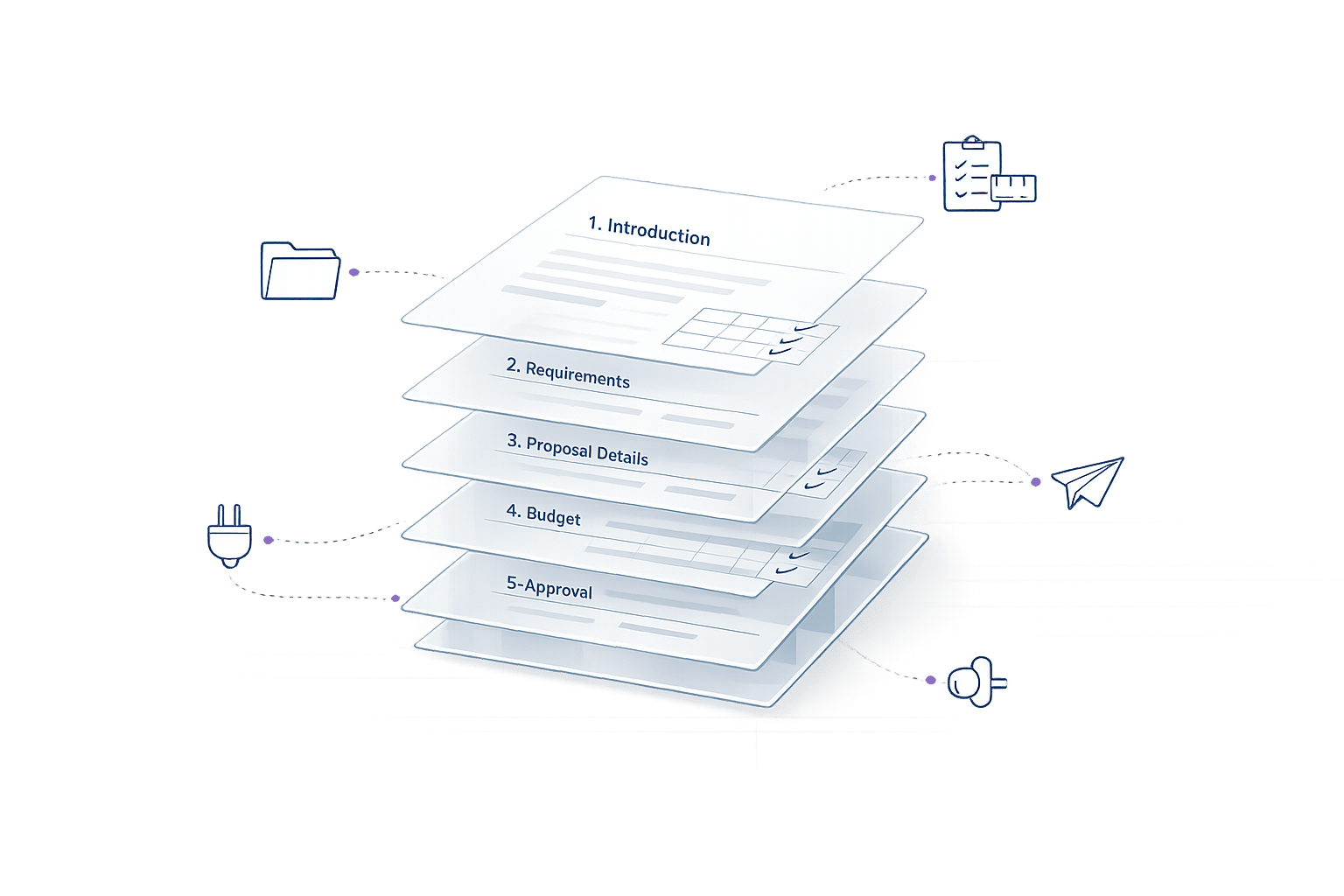
Automating proposal formatting saves time, improves accuracy, and simplifies collaboration. Teams can cut proposal creation time by up to 83%, reducing hours of manual work to just 5 per RFP. With tools like AI-driven software, centralized content libraries, and pre-designed templates, you can focus on strategy and client engagement instead of tedious formatting tasks.
Key Benefits:
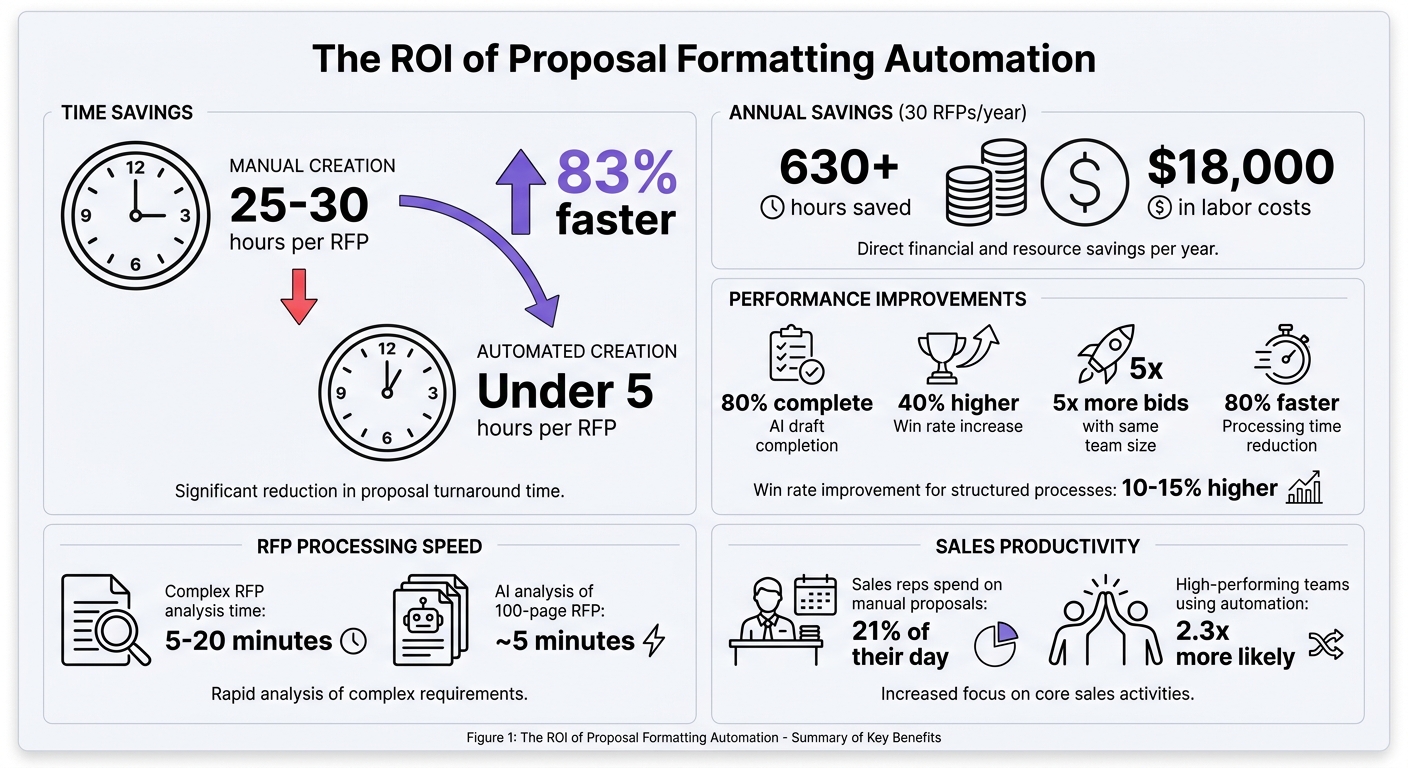
- Time Savings: Automating 30 RFPs annually saves over 630 hours, equivalent to $18,000 in labor costs.
- Improved Accuracy: Eliminate errors by pulling data directly from CRMs and using compliance checks.
- Simplified Collaboration: Centralized templates and shared workspaces make teamwork easier.
Essential Features to Look For:
- Pre-formatted templates for Word, PDF, and PowerPoint.
- AI tools for auto-filling repetitive sections and generating drafts.
- Compliance checking to flag gaps before submission.
- Integration with CRMs, Google Drive, and Slack for seamless workflows.
Example Tool: Narwin.ai
Narwin.ai processes complex RFPs in minutes, auto-filling sections with accurate data from a secure knowledge base. It also provides win probability scores, compliance checks, and export options for polished, ready-to-submit proposals.
Takeaway: Automation transforms how teams handle proposals – saving time, reducing errors, and boosting productivity. If you’re not using these tools yet, now’s the time to start.
Proposal Automation ROI: Time Savings and Cost Benefits
Benefits of Automating Proposal Formatting
Automating proposal formatting offers three game-changing advantages: saving time, improving accuracy and consistency, and simplifying team collaboration. These benefits don’t just streamline the process – they fundamentally shift how teams approach RFP responses, turning a reactive task into a proactive strategy. Here’s a closer look at how these improvements play out.
Time Savings
Manual formatting can eat up 25 to 30 hours per RFP. With automation, this time drops dramatically. Tools can export content into pre-formatted templates (Word, PDF, InDesign, or PowerPoint) in just seconds, cutting the process down to under five hours.
AI platforms take it further by generating drafts that are 80% complete. This means writers can focus on strategy instead of starting from scratch. Repetitive sections, like team resumes or case studies, are instantly filled in by pulling data from a centralized, searchable database.
The savings add up quickly. Automating 30 RFPs a year can save over 630 hours of work – equivalent to more than $18,000 annually. For instance, WSB Engineers reduced their proposal creation time by 20% while tripling their operations through acquisitions. And the benefits go beyond time: automation also improves the quality and consistency of proposals.
Better Accuracy and Consistency
Speed doesn’t have to come at the expense of quality. Automation eliminates manual errors, like typos or mismatched client details, by pulling data directly from CRM systems. This ensures that names, pricing, and terms are always accurate.
A centralized content library acts as a single source of truth, keeping resumes, case studies, and project data up-to-date and standardized. Pre-designed templates handle logos, colors, fonts, and even industry-specific formatting requirements like SF 330, ensuring every proposal looks polished and professional.
AI tools also flag compliance gaps or missing information before submission, reducing the risk of costly mistakes. They even learn your company’s writing style, ensuring the brand voice stays consistent across proposals. As Alexander Georges, Founder & CEO of Bidara, explains:
"The AI doesn’t just retrieve pre-written content; it writes new content tailored to each specific RFP."
This attention to detail pays off. Companies using automation often see a 40% higher win rate and can handle five times more bids with the same team size.
Easier Team Collaboration
Automation simplifies collaboration by centralizing content, templates, and data in one shared workspace. No more hunting through email threads or shared drives to find the latest version – everything is accessible and up-to-date.
This streamlined approach lets teams focus on strategy and personalization instead of administrative tasks. Sales reps, for example, typically spend about 21% of their day on tasks like manual proposal creation. Automation frees up that time, allowing them to engage more with clients and close deals. In fact, high-performing sales teams are 2.3 times more likely to use automation, giving them the flexibility to focus on high-impact work instead of repetitive tasks.
sbb-itb-bb3960c
Tools for Proposal Formatting Automation
Modern tools have transformed proposal formatting into a streamlined process. These platforms leverage advanced technology like Large Language Models (e.g., GPT-4.1), Retrieval-Augmented Generation (RAG), and Vector Databases to ensure proposals remain accurate and aligned with your company’s specific data.
The typical tech stack includes three main categories: RFP response software, which centralizes content and collaboration; document automation tools for tasks like auto-filling and template management; and AI content assistants that help with drafting and providing contextually relevant recommendations. The best tools integrate smoothly with your existing systems, connecting with platforms like Slack for notifications, Google Drive for managing files, and CRM/ERP systems to sync proposal data with customer records. This integration lays the foundation for the key features discussed below.
Features to Look For
When choosing an automation platform, look for template management that supports both branded templates (with your company’s logos, fonts, and identity) and templates tailored to specific needs, such as government submissions like SF 330. A centralized archive for resumes, case studies, and project details serves as a single source of truth, reducing version control issues.
Compliance checking is another must-have. Tools should be able to automatically extract requirements, clauses, and questions from RFPs, map compliance, and flag any risks or gaps before submission. AI-powered drafting tools should generate drafts that are about 80% complete using your company’s data. Export options are also critical – you’ll need to produce formatted proposals in Word, PDF, InDesign, or PowerPoint, depending on client preferences.
Integration capabilities are what set exceptional tools apart. The platform should connect effortlessly with collaboration tools like Slack and Notion, cloud storage solutions like Google Drive, and procurement portals through Chrome extensions (e.g., SAM.gov, Merx, and CanadaBuys). Additionally, specialized modules for formatting repetitive elements like CVs, resumes, and case studies can save hours of manual work, ensuring consistency across all proposals.
One standout example of these features in action is Narwin.ai.
Narwin.ai Formatting Capabilities
Narwin.ai simplifies proposal formatting with AI-driven templates and contextual drafting, ensuring consistency and saving time. It includes system templates for tasks like pitch decks, case studies, and battle cards, while also allowing you to create custom templates that standardize tone, structure, and formatting across your organization.
The platform processes complex RFP documents (PDF, DOCX, XLSX) in just 5 to 20 minutes, organizing requirements into structured tasks and eliminating the need to manually sift through lengthy files. From there, users can jump straight into drafting by using the "Draft Proposal" button, which pre-fills the AI Writer with relevant context from the opportunity.
Narwin’s RAG-based system pulls data from your private AI Knowledge Base – such as past projects, certifications, and safety records – to auto-fill proposal sections with accurate, formatted content. It integrates seamlessly with tools like Google Drive, Slack, Notion, and major CRMs via daily-sync App Connectors. Finalized proposals can be exported directly into Word or PDF for submission. The platform also includes a Qualification Analyzer, which provides Win Probability scores and color-coded risk assessments, helping you make informed bid/no-bid decisions before investing time into formatting.
How to Set Up Proposal Automation
Setting up proposal automation requires best practices and AI strategies that simplify your workflow while keeping a personalized touch. By focusing on three key elements – base templates, dynamic fields, and branding and compliance standards – you can significantly cut down the time needed to create proposals. In fact, automation can reduce proposal creation time from an average of 25 hours to under 5 hours, delivering an impressive 83% time savings.
When implemented thoughtfully, automation can also lead to an 80% reduction in processing times and help organizations using structured RFP processes achieve 10% to 15% higher win rates.
Building Base Templates
Start by analyzing your top five to ten proposals to pinpoint common sections, such as executive summaries, pricing tables, or compliance details. This will help you identify patterns that resonate with evaluators. Break these templates into modular sections (like "Company Overview", "Security Standards", or "Project Methodology") that can be easily swapped to suit specific opportunities.
To save time during assembly, set consistent formatting rules for fonts, headers, and spacing. Separate static branding elements – such as logos, legal disclaimers, and color schemes – from dynamic sections that require client-specific data. If you already have Word or PowerPoint templates, upload them to preserve your brand’s identity.
Store all templates in a centralized location and assign clear roles:
- Owners: Keep content updated.
- Approvers: Ensure the content aligns with strategic goals.
- Contributors: Provide technical expertise.
Plan quarterly reviews to ensure certifications, pricing structures, and case studies remain current. Outdated information can quickly undermine your credibility with evaluators.
Once your templates are ready, enhance them with dynamic fields for personalized data.
Adding Dynamic Fields
Dynamic fields, also known as "smart variables" or "tokens", act as placeholders for specific data points like client names, project values, or deadlines. Link these fields to your CRM system (e.g., Salesforce or HubSpot) to ensure they update automatically, eliminating the need for manual input.
For example, platforms like Narwin.ai allow you to provide "Special Instructions" during the RFP analysis phase, guiding how the system populates these fields. If you specify "Focus on solar or BIPV sections", the AI will prioritize relevant technical capabilities when filling out responses. Narwin.ai’s requirement mapping also identifies RFP questions and matches them with stored capabilities, pulling in case studies, resumes, or project summaries tailored to the opportunity.
To ensure high-quality automated responses, use successful past proposals as training data. While AI can analyze a 100-page RFP in about 5 minutes, the accuracy of its outputs depends on the quality of the source material.
After integrating dynamic fields, focus on maintaining consistent branding and compliance across all proposals.
Adding Branding and Compliance Standards
Adopt a dual-template strategy to address different needs: one set of templates for your visual branding (logos, colors, fonts) and another for strict regulatory formats, such as government SF 330 forms. This ensures you can adapt to various submission requirements without sacrificing professionalism.
Centralize your company’s certifications, safety records, and project experience in a secure AI knowledge base. This ensures automated responses stay accurate and compliant. Use AI compliance tools to detect gaps early, flagging any missing certifications or outdated information.
Establish clear authority levels for approving changes to templates. This prevents outdated branding or expired certifications from being included in submissions. Additionally, integrate your proposal tools with platforms like Slack and Google Drive to streamline collaboration. Instant alerts can notify your team when stakeholders view proposals or when compliance issues arise. This creates a seamless workflow where formatting, branding, and compliance checks happen in the background, allowing your team to focus on crafting personalized, strategic proposals.
Best Practices for AI-Powered Proposal Formatting
Once your automation system is up and running, the next step is to fine-tune your process to get better results with every proposal. AI tools thrive on high-quality input, secure data handling, and consistent feedback loops to improve over time. Interestingly, teams that excel in these areas report up to a 40% increase in win rates.
Creating Reusable Content Modules
Efficient AI-driven formatting starts with a well-organized, searchable knowledge base. Centralizing critical content ensures the AI can quickly access the information it needs.
Break your content into modular sections like "Company Overview", "Technical Approach", or "Safety Records." These modules can be tailored and reused for different proposals. For instance, when using a tool like Narwin.ai, you can provide specific instructions such as "Focus on structural steel, ignore mechanical" to ensure the AI selects only the most relevant sections for a particular bid.
To maintain consistency, create standardized AI prompt templates for frequently used sections, such as executive summaries or project methodologies. This ensures your proposals maintain a uniform tone and structure.
Start by uploading your best-performing past proposals. The quality of the input directly impacts the AI’s output, so select your source material carefully. A strong content foundation is essential for reliable results, but protecting this data is just as important.
Protecting Data and Maintaining Compliance
When working with sensitive company and client information, security and compliance should be top priorities. A secure, private knowledge base is key to safeguarding your data.
Use workspace-level access controls through "Super Admin" settings to limit who can view or edit sensitive content. Enable features like "Anonymize Names" to prevent personally identifiable information (PII) from being unnecessarily processed during initial drafts.
Compliance matrices are another essential tool. They help ensure every RFP requirement is addressed by cross-referencing section numbers from the original document. This makes it easier for evaluators to verify compliance and reduces common mistakes in proposal writing that could lead to disqualification. AI tools can also assist by extracting requirements, compliance clauses, and legal questions from RFPs, mapping them to your company’s capabilities, and flagging potential gaps early.
Always include a human review step – typically every 2–4 hours – to ensure AI-generated content aligns with your strategic goals and meets quality standards.
Once your data is secure and compliant, the next step is to focus on continuous improvement.
Improving Your Process Over Time
AI platforms get smarter as they learn from human edits, so refining your process is an ongoing effort. The more you tweak AI-generated content, the better the system becomes at delivering polished results. Track metrics like win rates and response times to measure progress. For example, teams using AI automation have reduced proposal completion times by an average of 83%, cutting the process from 25 hours to just 4–5 hours.
Establish formal feedback loops between sales teams, subject matter experts, and proposal writers. This ensures AI outputs stay aligned with buyer expectations and changing market demands. Update your company profile and knowledge base whenever you win new contracts or earn certifications, so the AI always reflects your latest strengths.
Keep an eye on how often AI-generated content requires major rewrites versus minor adjustments. This will help identify areas where your knowledge base might need better training data. Regular, small updates are far more effective than large, infrequent overhauls in keeping your process optimized.
Conclusion
Automating proposal formatting has revolutionized how teams respond to RFPs, cutting formatting time from 25–30 hours to as little as 30 minutes to 5 hours. With this extra time, teams can focus on refining strategies, engaging with clients, and ensuring brand consistency. The result? Teams save time, improve win rates, and can chase more opportunities without sacrificing quality or compliance.
The real game-changer is selecting tools that do more than just streamline templates. Platforms like Narwin.ai integrate AI-powered formatting with strategic tools, including automated requirement extraction, win probability scoring, and instant bid/no-bid recommendations. This means you’re not just working faster – you’re making smarter choices about which opportunities to pursue. It’s a shift from tedious manual work to a more focused, results-oriented approach.
To get started with automation, centralize your key templates and build a library of reusable content modules. Organize your best past proposals, create modular sections for common responses, and use branded templates to maintain consistency across all submissions.
Whether you’re a small team overwhelmed by manual tasks or a growing firm looking to scale, proposal automation is more than a productivity boost – it’s a must-have in 2026. The question isn’t whether to adopt it, but how soon you can start using it to win more bids. Now’s the time to make the leap from manual effort to strategic success.
FAQs
What should I automate first in my proposal workflow?
Automate those repetitive, time-draining tasks – like formatting and assembling content – to free up valuable time and ensure your documents maintain a consistent structure. By automating standard sections and creating initial drafts, your team can shift their focus to the more critical aspect: personalization. Personalization plays a key role in crafting proposals that stand out and win bids. These small steps not only boost efficiency right away but also set the stage for more advanced automation in managing content and analyzing proposals.
How do I keep AI-generated proposals accurate and compliant?
To make sure AI-generated proposals hit the mark and meet compliance standards, start by keeping your company profile up-to-date. Include details like certifications, safety records, and completed projects. This information helps the AI generate proposals that accurately reflect your capabilities.
Don’t stop there – regularly review and verify AI outputs. Check that they align with your compliance requirements and the services or products you offer. Staying informed about regulations is also key. Build compliance checks directly into your workflows to catch potential issues early.
By combining detailed updates, consistent human oversight, and a strong focus on compliance, you can improve the accuracy of proposals while ensuring they meet required standards.
What data is needed to set up proposal formatting automation?
To streamline proposal formatting automation, gather essential data such as your company profile (including certifications, safety records, past projects, and capabilities), along with your existing proposal templates and content libraries. Adding information like past RFP responses and bid strategies allows the system to suggest the best responses, evaluate compliance, and address potential risks. This approach ensures the platform creates proposals that are accurate, compliant, and customized to meet specific needs efficiently.