
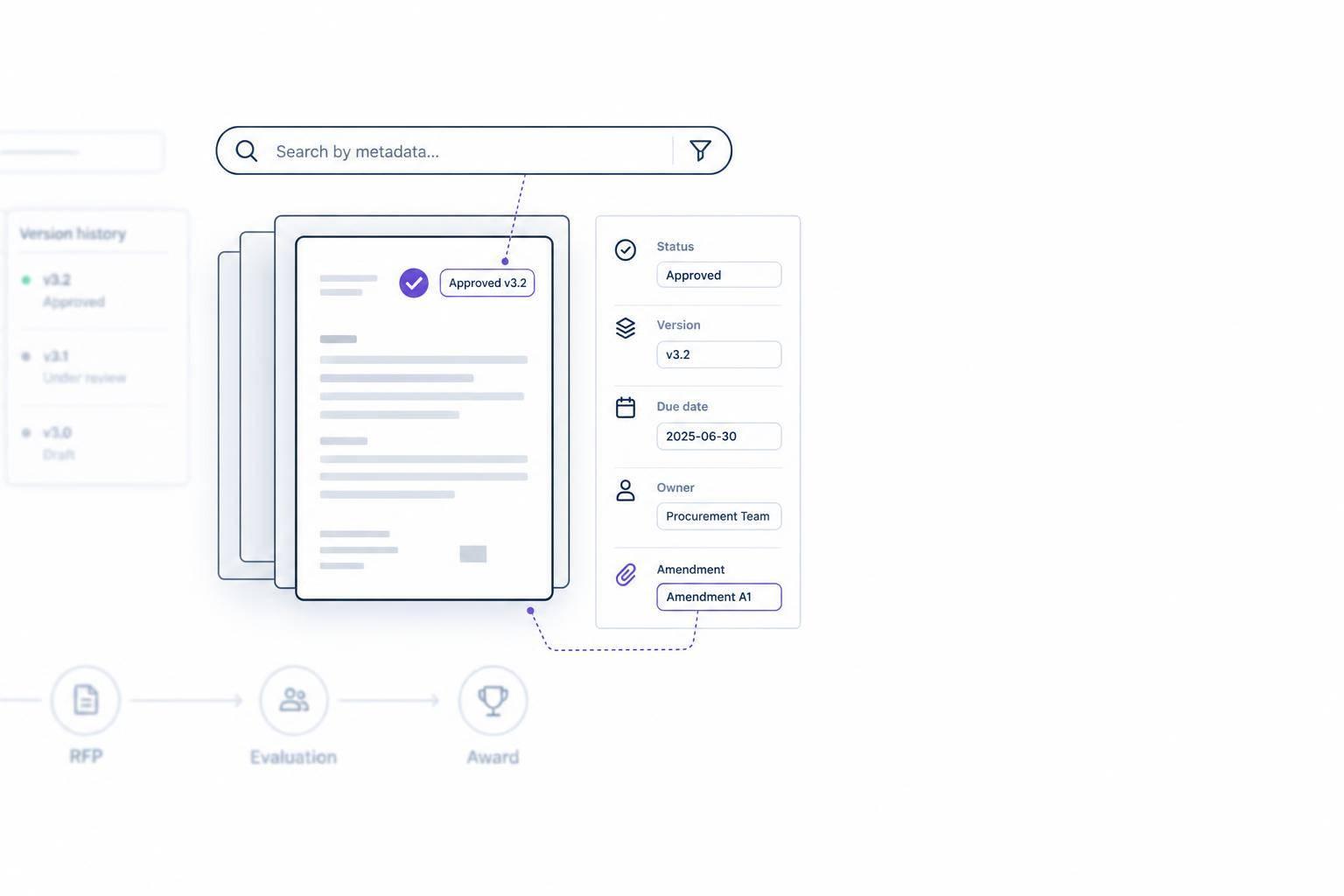
To find the right bid document, I filter by solicitation ID, current version, and approval status – then search the file’s text. A matching filename alone isn’t enough. <u>Current does not mean approved.</u>
I use the same process from intake through retention:
- Preserve source files and check required metadata.
- Set field rules, owners, and access permissions.
- Track versions, amendments, deadlines, and acknowledgment tasks.
- Link approved requirements to proposal assignments and supporting records.
- Save the submitted package and apply retention and legal-hold rules.
Before expanding the process, I test one bid. My suggested targets include 95% required-field completion and zero obsolete documents in the final submission – test goals, not industry benchmarks.
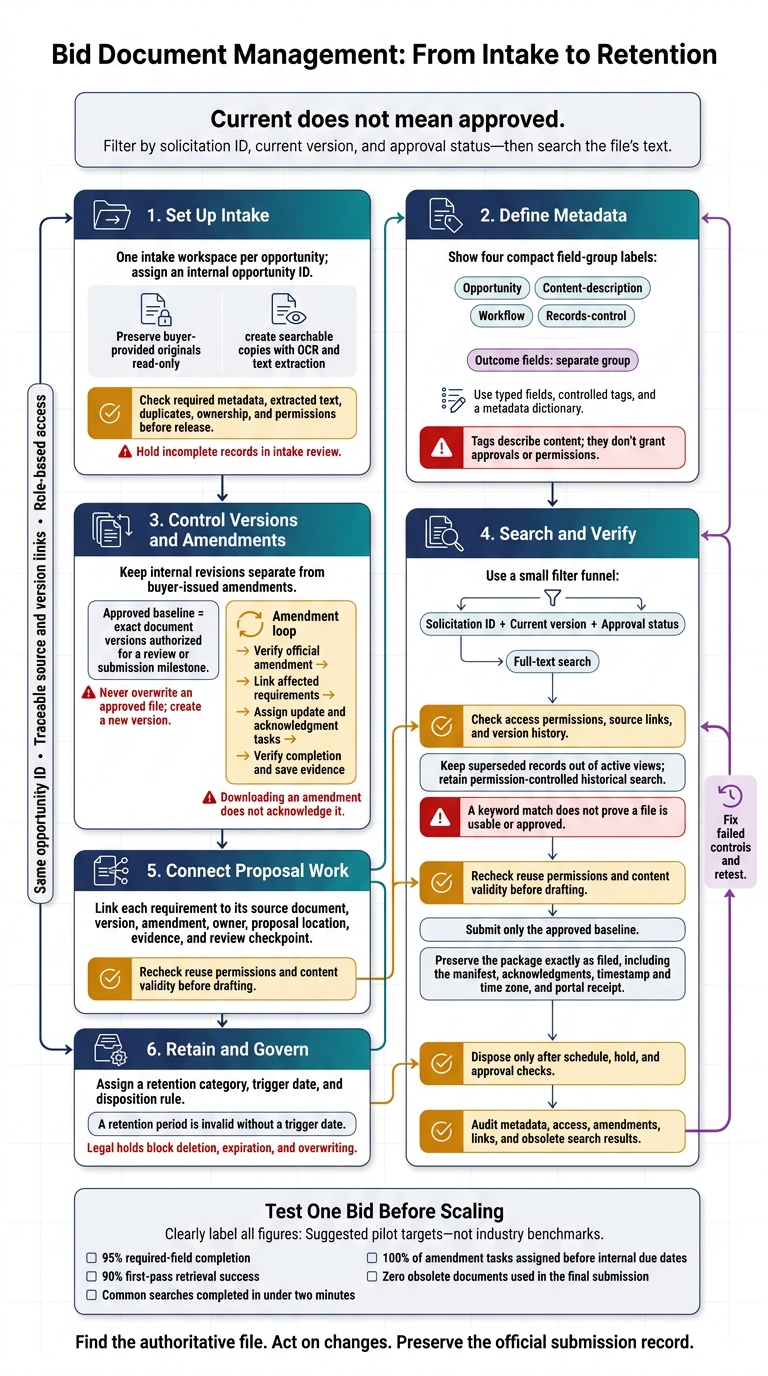
Bid Document Management: From Intake to Retention
Set Up Bid Document Intake
Metadata defines what a bid file is. Intake turns its source documents into controlled records.
Create one intake workspace per opportunity before collecting files. Assign an internal opportunity ID, and keep buyer-provided originals separate from working documents. Set accepted formats, name an intake owner, and define access groups up front. Attach every file to its opportunity record – not an unclassified folder.
Collect Files and Required Details
Gather the full package from procurement portals, email, shared drives, internal repositories, and contributors. Require these details for each file:
- Title, solicitation number paired with the issuing organization, and department
- Source URL or path and received timestamp
- Scope, deadline, and time zone
- Document type and amendment/version status
- Confidentiality level and owner
- Format and size
- Amendment number and parent opportunity, when relevant
These fields let users search by solicitation, amendment, and status. Hold records with missing required information in intake review. Optional details, such as estimated value and keywords, can wait.
Prepare Files for Search and Classification
Create searchable copies using OCR and text extraction so users can find requirements inside each file. Keep every original read-only, preserve its filename, format, and size, and record a SHA-256 checksum.
Check for missing pages, incomplete tables, and misread characters. Review duplicates without losing separate source histories. Use consistent filenames, and classify solicitations, amendments, buyer responses, pricing forms, contract templates, technical specifications, drawings, résumés, past-performance evidence, and other proposal evidence separately.
Classify files by role, not just format. Accept PDF, DOCX, XLSX, PPTX, CSV, TXT, TIFF, PNG, JPEG, ZIP, and required CAD formats. Preserve workbook formulas and the links between archives and their files. Send encrypted, corrupted, or unsupported files for manual review.
Display deadlines as MM/DD/YYYY, h:mm a, with time zone, and retain timezone-aware timestamps internally.
Assign Owners and Check Access
Put proposal operations in charge of intake quality, contracts in charge of terms, legal in charge of confidentiality and legal risks, pricing in charge of cost files, and executives in charge of decisions and approvals. Owners control intake decisions and release for search – not just file handling.
Apply least-privilege access controls. Contributors upload to a controlled intake area, reviewers access their assigned materials, and pricing files stay restricted.
Release a record only after its original is preserved, text is checked, duplicates are reviewed, required fields are complete, ownership is assigned, and permissions pass testing. Use the intake fields to build tags and saved searches.
sbb-itb-bb3960c
Define Metadata Fields and Tag Rules
Map intake data from every opportunity across the Canadian government procurement lifecycle to one controlled schema before users search for or route documents.
Group Fields by Purpose
Organize metadata into four groups, each with a clear purpose:
- Opportunity: Solicitation IDs, buyers or issuing agencies, place of performance, source URLs, and deadlines.
- Content-description: Document types, titles, subjects, capabilities, proposal sections, keywords, language, and short summaries.
- Workflow: Review status, approval status, next action, priority, bid stage, and owner and team assignments.
- Records-control: Version number, superseded status, access classification, legal hold, retention category, retention start date, and disposition date.
Keep outcome fields – bid result, award status, contract value, currency code, and lessons learned – in a separate group. Also, keep descriptive tags separate from approval states and access controls. Tags describe content; they don’t grant approvals or permissions.
These boundaries keep search filters precise and help users find reliable current-state results.
Use Typed Fields and Controlled Tags
Use typed fields for identifiers, dates, owners, statuses, amounts, and retention categories. Use controlled, multi-value tags for capabilities, industries, proposal sections, and themes. Leave notes and summaries as free text, but don’t use them for compliance checks or reporting.
Use title case for display labels. Map aliases to one preferred term, and document how parent-child tags work. If tags roll up automatically, store one canonical value and let search inherit the parent.
Allow multiple distinct concepts, but reject near-duplicates. Assign a vocabulary owner to approve additions, retire outdated terms, and preserve mappings when terms change.
Build a Metadata Dictionary
Define every field before building forms, search filters, or approval logic. The dictionary should state each field’s purpose, type, allowed values, required stage, accountable owner, and validation rule.
Solicitation identifiers belong to opportunity records. Link multiple documents to the same opportunity rather than treating their shared identifier as a duplicate-ID error.
| Field | Purpose | Type | Allowed Values | Required? | Owner | Validation Rule |
|---|---|---|---|---|---|---|
| Solicitation ID | Link files to an opportunity | Identifier | Agency-issued ID or internal opportunity ID | Yes | Bid manager | Must be unique within the repository unless explicitly linked as a duplicate or archive |
| Response deadline | Control submission timing | Date-time | Timestamp with time zone | When the solicitation includes a deadline | Bid manager | Require date, time, and time zone |
| Document type | Support retrieval | Controlled tag | Solicitation, amendment, buyer responses, proposal draft, evidence | Yes | Records administrator | Match the approved vocabulary |
| Approval status | Record authorization | Enumerated status | Draft, In Review, Approved, Rejected, Superseded | Required for proposal artifacts | Proposal manager | Approved requires an authorized approver, timestamp, and approval record |
| Version number | Identify iteration | Structured text | Defined version sequence | Yes | Document owner | Do not reuse a version number unless it replaces the file |
| Retention category | Assign lifecycle rule | Controlled value | Approved retention categories | Yes | Records manager | Map to an approved retention schedule |
| Contract value | Support outcome analysis | Number + currency code | Nonnegative amount; approved ISO code | After award | Finance or contracts | Require award status, result date, and currency code |
Track missing or conflicting values in a separate validation-state field, with an assigned owner and resolution date. Resolve conflicts using the issuing authority’s source and latest authorized amendment. Preserve the prior value, then rerun validation.
Manage Versions and Solicitation Amendments
Keep Version History and Approved Baselines
Apply the defined schema to every revision and amendment record. Keep internal revisions separate from buyer-issued amendments, and use the same document ID across versions.
An approved baseline is the exact set of document versions authorized for a review or submission milestone. Before locking it, record its ID, included versions, approval timestamp, approvers, and exceptions. Replace a baseline only after a documented review and approval.
The document owner manages internal revisions, while the bid owner verifies buyer-issued amendments. Save each change with its author, reviewer, and approver. Never overwrite an approved file. Create a new version instead.
Use these statuses consistently:
- Draft: Editable files.
- In Review: Locked review copies.
- Approved: Read-only files.
- Submitted: Immutable filings.
- Superseded: Audit-only records.
- Archived: Retention-managed records.
Keep superseded files read-only and searchable for audits, but remove them from active views. Their version number, amendment number, status, and source must remain searchable.
Save the submitted package exactly as filed, including files, manifest, signed forms, amendment acknowledgments, submission timestamp and time zone, portal receipt, and any acceptance or error messages. Use this baseline to compare every later amendment.
Track Amendment Changes and Tasks
Keep an amendment register with the solicitation and amendment numbers, issuing agency, official source and retrieval timestamp, publication and effective dates, affected sections, change summary, revised deadline, and acknowledgment requirements. Assign one bid owner to monitor the official source, a document-control owner to preserve each amendment, and task owners to make the changes.
Compare each amendment with the preceding solicitation baseline. Link affected requirements to compliance-matrix rows, proposal sections, pricing updates, and review tasks. Track completion separately from verification. Downloading an amendment does not acknowledge it.
If an amendment changes the deadline, verify the official file before updating any schedule. Check the solicitation number, amendment number, revised date, time, and time zone. Keep the old deadline in the history, then update the master calendar, proposal plan, submission reminders, review milestones, and executive status report.
Notify affected reviewers and assign any required acknowledgment by the buyer’s stated deadline. Close the amendment only after a reviewer verifies that linked tasks are complete and acknowledgment evidence is saved. Treat pre-bid comments that affect proposal preparation as unofficial until they appear in a formal amendment.
Use these version records to populate the search filters and saved views in the next step.
Set Up Metadata Search and Retrieval
Use the version and amendment fields from the prior section to return only current, approved documents.
Create Search Filters and Saved Views
Add filters for the controlled fields: solicitation number, agency, department, geography, industry, contract vehicle, bid stage, document type, owner, deadline, amendment number, approval state, and version status. Use the typed fields already defined in the metadata schema – not free-text labels.
Let users narrow results with facets and result counts that respect access permissions. Keep applied filters visible and include a reset option.
Create saved views for Active Bids, Pending Amendments, Current Solicitation Documents, Expiring Certifications and Resumes, Approved Reusable Content, and Submission Records. For certifications and resumes, offer 30-, 60-, or 90-day expiration filters.
Active drafting views should exclude superseded, rejected, withdrawn, and archived files. Require current versions. Reusable content must also have approval and valid reuse permissions. Keep historical records in a separate, permission-controlled view.
Use these saved views to select the right record set before searching file text.
Combine Filters with Full-Text Search
Start with exact identifiers and controlled tags. Then search document text for clauses or capabilities. Follow your repository’s search syntax; the examples below are illustrative. Map agency aliases, such as “Department of Transportation” and “DOT,” to one agency value.
A keyword match does not prove a file is usable or approved. Every result must also pass access, status, version, and approval checks.
Missing fields, OCR errors, stale indexes, and restrictive filters can hide valid results. Mark unresolved metadata as Unverified, check extracted text in scanned PDFs, and offer filename or source-ID lookup when indexing is delayed.
Method Best task Strength Limit Hypothetical query Metadata Find known records Precise; easy to filter Depends on complete, correct fields Agency = GSA AND Approval State = Approved AND Version = CurrentFull-text Locate wording inside files Finds concepts not captured in tags OCR errors and obsolete wording can distort results text contains "zero trust architecture"Combined Retrieve usable proposal evidence Checks context and content together Restrictive filters can hide relevant files Tag = past-performance AND Approval State = Approved AND Version = Current AND text contains "cloud migration"
Next, verify that each role sees only the records it has permission to retrieve.
Test Access, Document Status, and Source Links
Test current, superseded, restricted, scanned, and archived documents across capture manager, proposal writer, subject-matter expert, executive approver, and records administrator roles. Confirm that each role retrieves the correct current bid record. Restricted files must not leak through titles, snippets, previews, downloads, or source links.
Every permitted result should display its version, approval state, owner, and last-indexed time. Include links to the authoritative file and version history. After an amendment, test searches by amendment number and changed wording within the expected index-update interval.
Measure median and 95th-percentile retrieval time, retrieval rate, broken links, and stale-content incidents. Calculate retrieval rate by dividing documents found by expected documents for authorized users.
Suggested release targets – not industry benchmarks – are at least 95% retrieval of known current documents, zero unauthorized exposure, and zero broken source links. Log any superseded content selected for drafting as a process-control failure, then check the filters, metadata, and index.
Connect Documents to Proposal Workflows
Once current documents are searchable, connect them to the work they support.
Link Requirements, Assignments, and Evidence
Use one opportunity ID from discovery through qualification, planning, drafting, review, and submission. Keep each source file’s document ID attached. During qualification, link requirements, deadlines, risks, and supporting company evidence to the opportunity record. For every handoff, record the owner, decision, timestamp, and source version so the team can trace the go/no-go call.
Build assignments and evidence links from the approved baseline returned by search. Give each actionable requirement its own compliance-matrix ID, linked to its source document, version, amendment, page or section, assigned owner, proposal location, evidence, and review checkpoint.
Include requirements from attachments, buyer responses, and amendments – not just the main RFP. Writers should add response locations as they draft. Flag missing owners, evidence, or reviewers before work moves forward.
Once the compliance matrix is ready, lock the reuse rules before drafting begins.
Reuse Approved Content and Save Submission Records
Do not reuse content from one bid on another without rechecking certification dates, resume accuracy, personnel availability, reference permissions, pricing assumptions, customer permissions, and contract restrictions. Keep source and version links attached to reused passages.
Treat AI-assisted text as a draft until a human checks the source facts and records both the approval date and final text version.
Submit only the approved baseline. Under the opportunity ID, keep separate links for drafts, approved files, and the transmitted package. Save submission evidence, approval records, the final outcome, and later clarifications as related records. Don’t overwrite what was submitted.
Use Narwin.ai for Discovery and Proposal Handoffs
Keep the same opportunity ID and approval rules when moving from source discovery into drafting tools.
Narwin.ai supports U.S. and Canadian bid discovery, RFP analysis, requirement extraction, go/no-go support, and proposal drafting. Map each discovered opportunity to your internal opportunity ID. Move extracted requirements into the compliance matrix, and link approved source content before drafting.
For Google Drive, Slack, or other connected systems, check the Narwin.ai documentation for current connector availability, permissions, sync behavior, and data handling terms. Clearly assign responsibility for retention and amendment synchronization rather than assuming an integration handles them.
Set Document Retention and Governance Rules
After submission, classify each file by its final state. Then apply the matching retention and disposal rules.
Define Retention Categories and Start Dates
Give each record a retention category, trigger, and disposition rule. Store trigger_date, scheduled_disposition_date, legal_hold_status, and disposition_approval_id as searchable metadata. A retention period is invalid without a trigger date.
Use the same document states used in search and submission to determine how long to keep each record.
| Category | Purpose | Editing rights | Search visibility | Retention trigger | Disposition rule |
|---|---|---|---|---|---|
| Working files | Drafts and working notes | Assigned bid team | Working team only | End of business use or bid closure | Delete or archive after preserving the official record |
| Approved reusable content | Validated reuse material | Content owner only | Authorized teams | Review date, supersession, or loss of validity | Archive, revise, or remove obsolete content |
| Submitted records | Final proposal package and receipt | Read-only | Restricted but retrievable | Submission, award, protest resolution, or contract completion | Preserve as the official submission record |
| Superseded versions | Replaced drafts and amendment-related files | Read-only | Audit or reconstruction | Replacement approval or case closure | Retain required decision, change, or compliance evidence |
| Archived records | Historical bids and closeout records | Read-only | Limited historical search | Award, final payment, cancellation, or contract completion | Dispose only after schedule, hold, and approval checks |
Set separate retention schedules for awarded bids, unsuccessful bids, contracts, and reusable content. Each class needs its own trigger date.
Awarded bids and contracts may use final payment or completion. Unsuccessful bids may use award, debriefing completion, or protest resolution. Use submission only when the schedule names it. Reusable content needs a review or expiration date.
For U.S. federal contractors, FAR 4.703 generally requires covered records to remain available for three years after final payment, subject to specific schedules and exceptions.
Manage Legal Holds and Record Disposal
Place records on hold for active or threatened matters. Legal counsel or an authorized records officer should define the hold’s scope across bid files, submissions, supporting evidence, and amendment history. Notify custodians and record their acknowledgments. Block deletion, expiration, and overwriting across affected repositories and integrations.
Releasing a hold requires documented authorization. Disposal needs separate approval after checking dates, open matters, and retention exceptions. Require two-person approval for high-risk records. Log the disposal scope, method, date, approvers, and results.
Review role access at bid close, when staff changes, and during scheduled reviews. Keep archives searchable without reopening broad access. Log file activity, metadata changes, permission changes, and sync failures.
Check how deletion works across Google Drive, Slack, email, local copies, and other connected repositories. Backups support recovery only. Record their expiration cycles and hold exceptions.
Audit Metadata and Document Controls
Check that retention rules still match the metadata in use. Assign one governance owner, review high-risk controls monthly or quarterly, and review the full retention schedule at least annually.
Use a checklist covering:
- Missing metadata and uncontrolled or duplicate tags
- Stale owners and inactive accounts
- Broken links, failed integrations, and sync errors
- Incorrect permissions or excessive access
- Unresolved amendments and incomplete acknowledgment tasks
- Retention exceptions without approval
- Records past their disposition date
- Records under legal hold scheduled for deletion
- Reusable content past its review date
- Obsolete or duplicated content returned in search results
Track required-field completeness, amendment-task completion, median retrieval time, and obsolete-content incidents per bid submitted. Give each finding an owner and deadline, and record its closure evidence. Update validation rules, the metadata dictionary, and staff guidance, then retest the failed control.
Conclusion: Test the Process on One Bid
Once intake through retention is in place, test one opportunity with one accountable document owner. Limit the scope to the authoritative solicitation record, controlled metadata, version history, amendment handling, evidence links, and retention controls.
Have a reviewer who wasn’t involved test retrieval and approval traceability from start to finish. Ask them to find the authoritative solicitation record. Check that results distinguish superseded versions, show sources, and respect access permissions. Then process an actual amendment – or simulate one – through requirement updates, named task owners, acknowledgment, and the revised proposal package.
Measure metadata completeness, first-pass retrieval success, median retrieval time, amendment-task closure, acknowledgment timeliness, and obsolete-content use. These suggested targets are not industry benchmarks:
- 95% required-field completion
- 90% first-pass retrieval success
- Common searches completed in under two minutes
- 100% of amendment tasks assigned before internal due dates
- Zero obsolete documents used in the final submission
Check that amendment tasks have due dates, acknowledgments arrive on time, and evidence links open the correct approved files.
Fix failed searches or handoffs, then retest the same opportunity. Expand only when contributors can find the authoritative file, act on changes, and preserve the official submission record under the approved retention schedule.
FAQs
How can I fix metadata in an existing bid archive?
Re-upload the original PDF, Word, Excel, or PowerPoint files to your Narwin RFP/Workspace. Then run analysis to re-parse the content into Markdown and rebuild the Workspace index. Re-uploaded files are versioned automatically.
If missing context caused the issues, update “Special Instructions” in your Company Profile with the correct scope, certifications, region, currency, or exclusions. Then rerun analysis so requirement metadata, search indexing, and traceability reflect the corrected information.
How do I handle amendments received after submission?
Use the amendment as the latest version and compare it with your submitted bid package before making final submission decisions. Narwin.ai monitors updates, flags additions and deletions, and updates your compliance matrix in real time so you can reconcile requirements, Q&A, and deadline changes.
Make amendment tracking part of your final compliance check. Then confirm filenames, file formats, and the exact submission deadline and time zone.
What should I do when search results show conflicting approvals?
Keep requirements in one place – not scattered across files and email threads. Use a centralized platform like Narwin.ai as your single source of truth. Give each requirement one named owner who drafts responses, coordinates evidence, and signs off on compliance.
If approvals remain inconsistent, ask compliance leads to interpret requirements and resolve conflicts. Before submission, check the latest documentation against the official buyer portal, especially after amendments, to confirm which requirements govern the submission.