
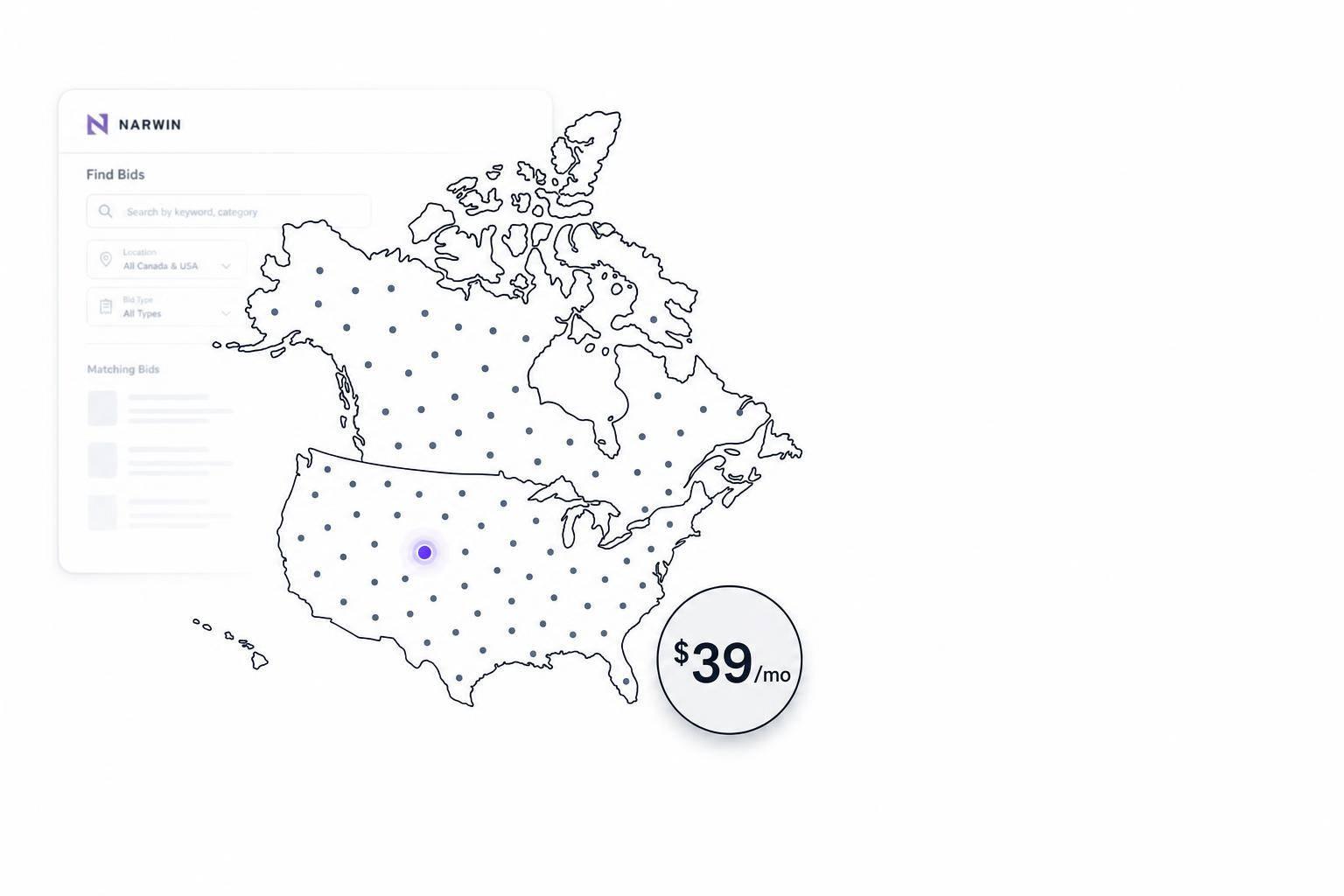
If you want the short answer: Narwin Basic is a low-cost entry point for AI bid search in the U.S. and Canada at $39/month ($468/year), but it’s built for one person and light usage.
I’d sum it up like this: you get access to 160,836+ active opportunities, coverage across all 50 U.S. states and 10 Canadian provinces, and 1 AI bid analysis report per month. If you need team access, more reports, alerts, or workflow tools, the higher Narwin plans – or other platforms like Cleatus, BidPrime, or GovWin – fit better.
Here’s the article in plain English:
- Narwin Basic: $39/month, 1 user, manual search, 1 AI report/month, 7-day free trial
- Cleatus: starts at $39/user/month, more team tools and matching features
- BidPrime: quote-based pricing, broad public-sector source coverage, 30-day free trial
- GovWin: quote-based pricing, deeper U.S. market data, built for larger teams
- Narwin Starter/Growth/Business Pro: from $199/month to custom pricing, with more users, more reports, and team features
Quick Comparison
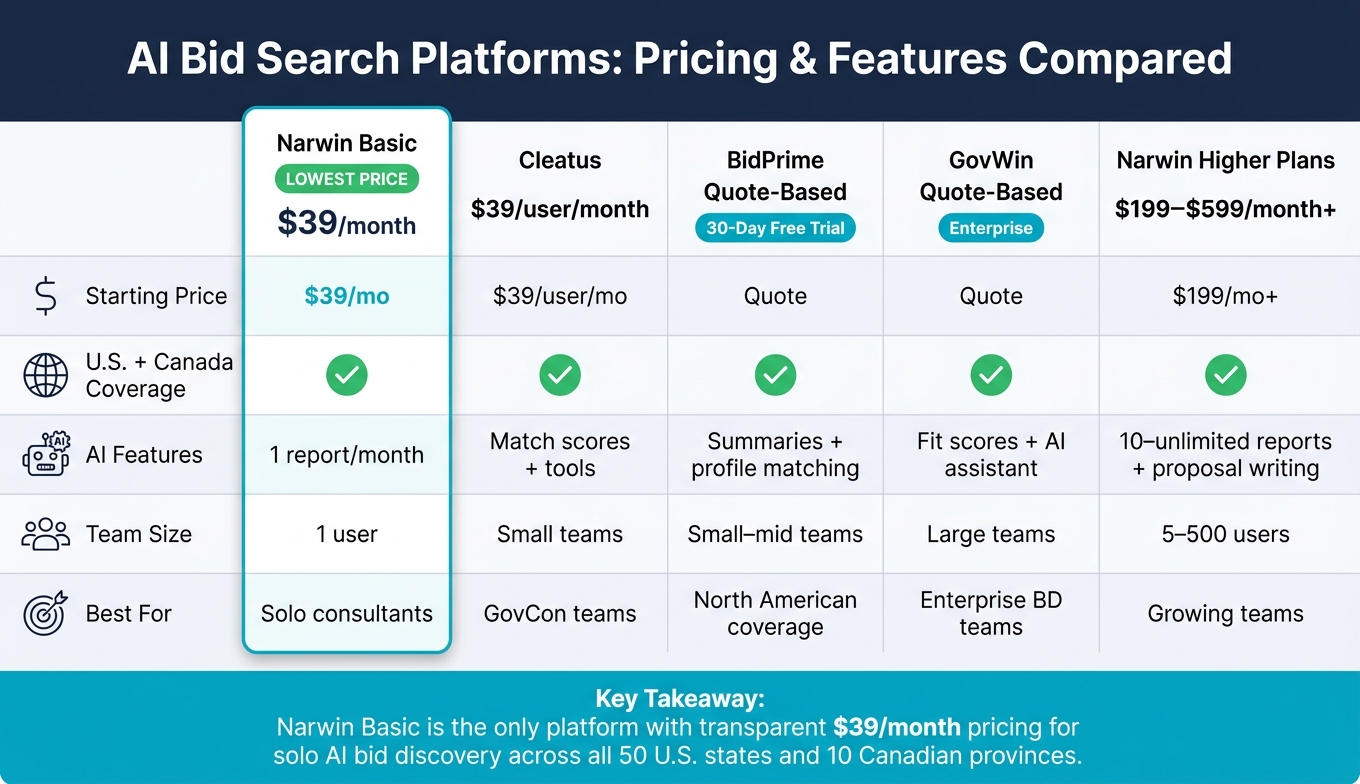
AI Bid Search Platforms Compared: Pricing, Features & Best Fit (2024)
| Platform | Starting price | U.S. + Canada coverage | AI features | Best fit |
|---|---|---|---|---|
| Narwin Basic | $39/month | Yes | 1 report/month | Solo users |
| Cleatus | $39/user/month | Yes | Matching scores, more tools on higher tiers | Small teams |
| BidPrime | Quote-based | Yes | Summaries and profile-based matching | Small to mid-size teams |
| GovWin | Quote-based | Yes | Fit scores, summaries, AI assistant ko | Large teams |
| Narwin higher plans | $199/month+ | Yes | 10 to unlimited reports, proposal writing, alerts | Growing teams |
My takeaway: if you mostly want to search bids in one place and check one deal each month with AI, Narwin Basic is the low-price option. If you handle more bids or work with a team, you’ll hit its limits fast.
1. Narwin Basic
Starting Price
Narwin Basic costs $39/month when billed annually, for a total of $468 per year. You also get a 7-day free trial, so you can try it before paying.
U.S. + Canada Coverage
The Basic plan gives you access to more than 160,000 active government opportunities across federal sources such as SAM.gov in the U.S. and CanadaBuys in Canada.
You can narrow results by U.S. state or Canadian province, which helps if you only want to track work in certain areas. It also covers a broad mix of opportunity types, including RFPs, RFIs, RFQs, contracts, grants, and sub-contracting leads.
That broad reach is a big part of why Basic makes sense as an entry-level search plan.
AI Bid Matching
At this tier, Narwin Basic is mostly about search access. You can use plain-English search to find opportunities without messing with stiff filters or clunky query rules.
Basic also includes one AI analysis report per month. That report covers a bid/no-go decision, buyer intelligence, and risk analysis. In plain terms, you’ll want to save that monthly report for your biggest or most promising opportunity, since the rest of the plan stays pretty light.
Team and Workflow Depth
Basic is built for one user only. It does not include smart matching, Slack, Google Drive, or deeper workflow features.
You do get email support. On the data side, information is protected with AES-256 encryption. User data is not sold or used for AI training.
So this plan is best seen as a search-first option, not a full automation stack.
2. Cleatus
Cleatus leans more toward teams, especially once you move up the pricing ladder. The focus isn’t just finding bids. It’s also helping people work through them together.
Starting Price
Cleatus starts at $39 per user/month billed annually ($468 per user/year). The DATA plan includes one seat, unlimited discovery, and smart matching.
Compared with Narwin Basic, Cleatus puts less emphasis on a cheap starting point and more on matching quality and team workflows. As you move to higher tiers, you get GovCon AI Chat, a GovCon CRM, and a Document Hub. Full proposal automation is also available, but only on a custom-priced plan.
U.S. + Canada Coverage
Cleatus covers federal, state, county, city, school district, and cooperative purchasing opportunities across all 50 U.S. states.
It also connects with CanadaBuys for Canadian federal opportunities. So if your team watches both U.S. and Canadian public sector work, that extra coverage matters.
AI Bid Matching
The DATA plan uses Match Quality scoring to rank opportunities against a company profile.
Higher tiers add AI-guided daily matching to help with bid decisions and requirement review. That can save teams time when they need to sort through a large batch of opportunities and decide what’s worth a closer look.
Team and Workflow Depth
As plans increase, Cleatus expands into CRM, document management, proposal support, workflows, and API access.
That makes Cleatus a better fit for teams that want built-in pursuit management, not just a search tool.
3. BidPrime
BidPrime pulls from a broad set of public-sector sources across the U.S. and Canada. That said, its base plan leans more heavily toward U.S. coverage than Canadian coverage. The platform includes federal, state, and local sources, plus education, healthcare, transit, and utilities. So once you’ve looked at source coverage, the next thing to check is price clarity.
Pricing is quote-based, which means you’ll need to contact the company for a custom quote. BidPrime also offers a free 30-day trial with no credit card required, and that makes it pretty easy to try the platform before you sign anything. It’s smart to confirm a few details up front:
- seat minimums
- contract terms
- alert limits
- whether U.S. and Canada coverage come bundled together
BidPrime’s AI tool, BidPrime Genie, is built to summarize dense opportunities and improve match quality based on your company profile. On lower tiers, though, the platform leans more on keyword, category, and alert filters than on semantic matching. Users can search by keyword, agency, or state, and they can send custom notifications to multiple email addresses.
Lower tiers also have clear usage caps. Those plans include up to 3 categories and up to 30 documents per month through Docs on Demand. Past matching, the main difference from one tier to another is how much workflow help, support, and training you get.
The lowest-priced plan works best for solo users or small teams that mainly need bid discovery and alerts. Higher tiers add more hands-on support and training.
4. GovWin
GovWin sits at the other end of the market from Narwin Basic. You get deeper data, more process, and a much higher price tag. Deltek built it as an enterprise government market intelligence platform, and it fits best with firms that already have dedicated capture or proposal teams.
Starting Price
GovWin uses custom pricing with annual contracts. Pricing is not listed in public.
U.S. + Canada Coverage
GovWin’s main strength is its deep U.S. public-sector coverage. That includes federal agencies, state governments, municipalities, school districts, and other public agencies.
It also includes Canadian opportunities, though the coverage is usually more selective than what you get in the U.S.
AI Bid Matching
GovWin includes Smart Fit Scores, Smart Summaries, and Ask Dela. Even so, entry-level users still lean a lot on saved searches, detailed filters, and manual alerts.
That setup matters. GovWin is built less for fast searching and more for managed pursuit work. So if you’re new to the platform, expect a learning curve that can take several weeks.
Team and Workflow Depth
GovWin is built for multi-person BD and capture teams. It supports shared opportunity lists, pipeline tracking, agency contacts, and notes.
In plain English, this is a platform for teams that want depth and structure, not simplicity. If your team runs a formal pursuit process, that tradeoff may make sense.
sbb-itb-bb3960c
5. Narwin Higher Plans
Narwin’s higher plans give teams more seats, more automation, and deeper workflow support. The core idea is simple: more scale. More users. More reports. More help with day-to-day bid work.
Starting Price
The Starter plan starts at $199/month. It’s aimed at small teams that need extra seats and stronger automation.
The Growth plan costs $599/month. It’s built for teams handling a high volume of bids across the U.S. and Canada.
Business Pro uses custom pricing based on volume.
U.S. + Canada Coverage
These higher plans keep the same U.S. and Canada coverage, but add more automation on top. Teams can also add optional provincial and municipal sources.
Starter sends AI-matched opportunities straight to your inbox. Growth takes that a step further with priority daily AI-curated emails.
AI Bid Matching
Report access jumps quite a bit on these plans:
- 10 reports per month on Starter
- 100 reports per month on Growth
- Unlimited reports on Business Pro
Higher tiers also add AI proposal writing with custom brand templates.
Team and Workflow Depth
This is where the higher plans do the heavy lifting.
Starter supports 5 team members and includes shared workspaces, Google Drive and Slack integrations, and unlimited report viewers.
Growth expands that to 20 team members. It also adds a dedicated account manager, same-day support, and 5 strategy sessions per year.
Business Pro supports up to 500 users. It also includes API access for custom integrations, plus SOC 2 compliance for organizations with stricter security requirements.
Next, here’s what the $39/month Basic plan includes in practice.
What Narwin Basic Includes at $39/Month
At $39/month (billed annually at $468), Narwin Basic is aimed at solo users like independent consultants, small vendors, and new contractors. You get broad bid search access and one solid AI decision tool, without a big upfront spend.
It tracks more than 160,836 active opportunities across 10,000+ sources, all in one interface. That includes coverage across all 50 U.S. states and 10 Canadian provinces.
The standout here is the 1 full AI analysis report per month. It gives you a bid/no-bid recommendation, buyer insight, and key risk flags. It can also work through long solicitation documents fast, which matters when you’re short on time and don’t want to dig through pages of fine print by hand.
Because Basic only includes one report each month, the best approach is pretty simple: use manual search to narrow your options first, then run the AI analysis on the opportunity that looks strongest. That makes this plan a good match if you’d rather look at fewer deals and focus on the ones with the best shot.
Narwin also protects data with AES-256 encryption, and uploaded files are not used to train the model. For most solo users, that’s enough peace of mind to get started.
From here, the main question is whether Basic covers what you need, or if moving up to a higher plan makes more sense.
Narwin Plan Comparison and Best Fit
Use the tiers below to line up your search volume, team size, and how much work you want the platform to handle for you.
| Plan | Monthly Price | Target Team Size | Included features |
|---|---|---|---|
| Basic | $39/month | 1 user | Manual bid search, 1 AI analysis report/month, standard email support |
| Starter | $199/month | Up to 5 users + unlimited viewers | 10 AI analysis reports/month, unlimited AI proposal writing, Smart Matching email alerts, Slack & Google Drive integrations |
| Growth | $599/month | Up to 20 users + unlimited viewers | 100 AI analysis reports/month, priority daily matching, 5 expert strategy sessions/year, same-day support and an account manager |
| Business Pro | Custom pricing | Up to 500 users | Unlimited reports, API access, SOC 2 compliance, dedicated account manager |
The big choice comes down to this: are you still searching on your own, or do you need a shared workflow for a team?
Basic works best for solo consultants and very small businesses that look at a limited number of bids by hand. If your pipeline is still light, this plan should cover the basics without adding extra cost.
Once one monthly report stops being enough, Starter starts to make more sense. The 10 AI analysis reports, Smart Matching email alerts, and unlimited AI proposal writing can cut down on manual work. Shared access also becomes much more useful when even a small team gets involved.
Growth is a better fit for teams dealing with a higher volume of bids. With 100 AI analysis reports, priority daily matching, and 5 expert strategy sessions per year, it gives growing teams more room to move without slowing down.
Business Pro is aimed at large organizations that need unlimited reporting, custom integrations, and compliance features like SOC 2. API access and a dedicated account manager also make it a stronger fit for companies running this across a much larger group.
Pros, Cons, and Final Verdict
| Option | Pros | Cons | Best For |
|---|---|---|---|
| Narwin Basic | $39/month, transparent pricing; 7-day free trial | 1 user only; 1 AI report/month; no automated alerts | Solo consultants, small agencies, and early-stage vendors |
| Cleatus | AI-assisted features available; tiered pricing structure | Per-user pricing rises quickly | Small-to-mid GovCon teams needing lifecycle tools |
| BidPrime | Broad U.S. federal, state, local, and Canadian bid aggregation; bid alerts | No published pricing; quote required | Teams that need wide North American coverage |
| GovWin | Deep government market intelligence; federal, SLED, and Canadian coverage | Premium, enterprise-oriented pricing | Large organizations and dedicated GovCon sales teams |
| Narwin Higher Plans | More automation, collaboration, and higher report limits | Higher monthly cost ($199–$599/month), with custom pricing for enterprise volume | Growing teams handling multiple bids per month |
The tradeoff here is pretty straightforward: lower cost usually means fewer automated features, while higher-priced plans add more seats, more workflow support, and more room to handle a heavier bid load.
Bottom line: If price is your first filter, Narwin Basic stands out as the clearest starting point. At $39/month, it has the lowest published entry price for U.S.- and Canada-wide AI bid discovery. That matters, because several other options either require a custom quote or come in at a much higher cost, which can be tough for smaller firms to justify.
That said, Narwin Basic has clear limits. It gives you 1 user, 1 AI report per month, and no automated alerts. So it’s not built for busy team workflows or firms juggling a high number of bids. But for solo users and small firms that want to test AI bid discovery without spending much upfront, it’s the most practical place to begin.
FAQs
Is Narwin Basic enough for me?
Narwin Basic is built for people who want access to bid data and a first look at what the platform can do. At $39/month, it gives you access to thousands of government tenders, one full RFP analysis report per month, and standard security features.
This plan makes sense if you want to try the platform with the 7-day free trial, have lighter usage needs, and mostly want help finding government opportunities that match what you’re after.
How does the 1 AI report work?
The 1 AI report in the Basic plan gives you a clear bid analysis. When you pick an opportunity, Narwin’s AI reviews documents up to 2,000 pages in under 10 minutes and pulls out technical details and compliance requirements.
It also includes a win probability score, risk analysis, and a clear Go/No-Go recommendation based on buyer intent and your company profile. That way, you can make the call before spending time and money on a proposal.
When should I upgrade from Basic?
Consider upgrading when your team starts to hit the limits of the Basic plan. That usually happens when you need seats for more people or a larger number of monthly RFP analysis reports.
An upgrade gives you access to added features like priority daily matching, dedicated account management, and expert strategy sessions. You can upgrade anytime in your account settings.
Related Blog Posts
- Narwin vs BidPrime, 1/10 price for same bids data and more advanced matching
- How tools like Narwin AI build an index of bids and then match bids with your company profile based on your location, credentials and preferences
- AI Tools for Finding Government Tenders
- Top 7 AI Tools for Canadian and US Bids