
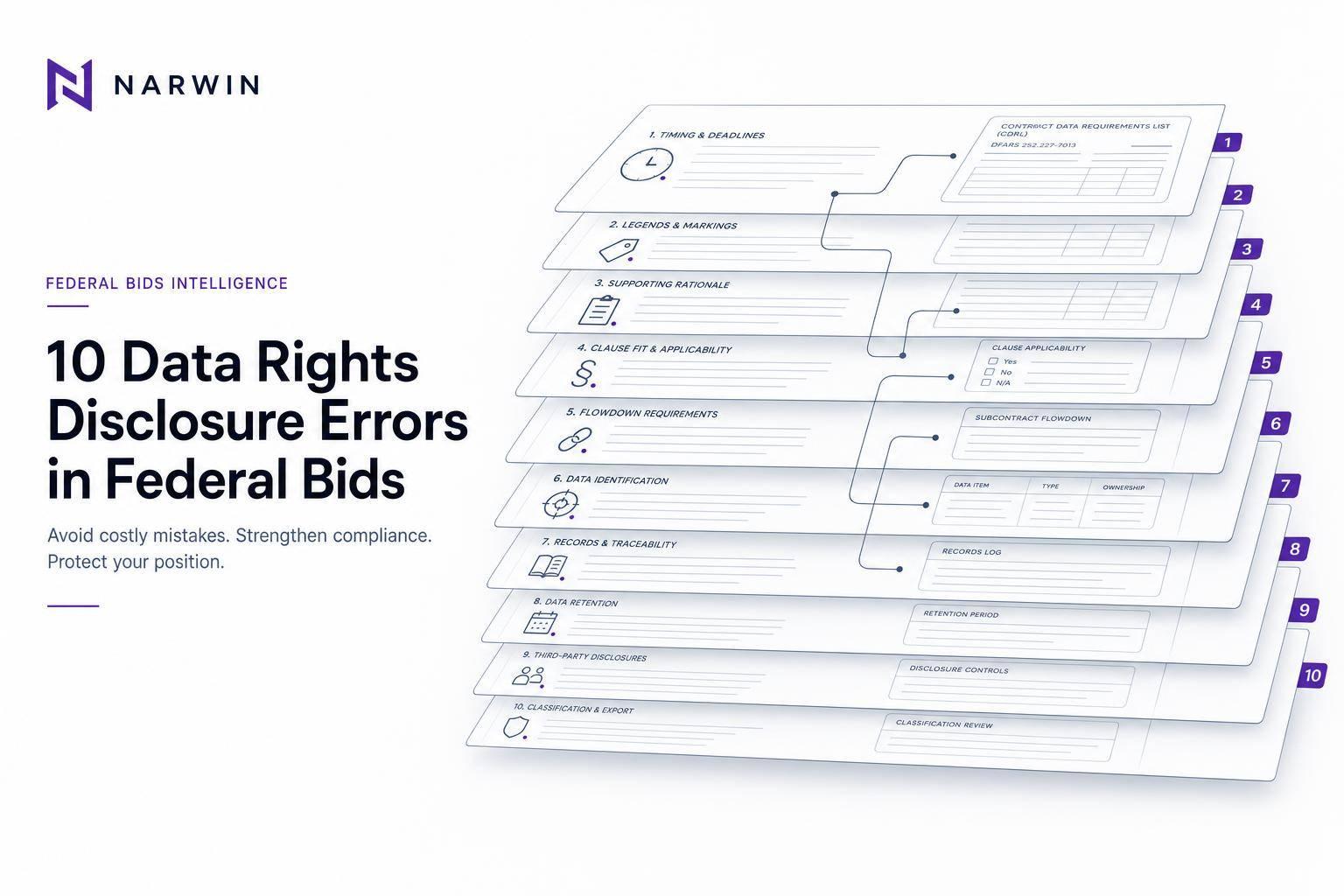
If you miss the disclosure rules in a federal bid, you can lose control of your data before the contract even starts.
I’d boil this article down to one point: your bid has to match the solicitation, list every known restricted item, use the right legend, and include support for each claim. If one of those pieces is off, the Government may treat the data or software as having broader rights than you meant to give.
Here’s the short version of the 10 errors covered:
- Late assertions filed after the offer deadline
- Missing or wrong legends on data or software
- Weak support for the claimed restriction
- Clause mismatch between the bid and the solicitation
- Poor flowdown to subcontractors and suppliers
- Confusing data type with rights type
- Leaving out known restricted items
- Inconsistent names, versions, or rights statements
- Poor recordkeeping for proof and procedures
- Mixing up copyright, export controls, and data rights
A few points stand out right away:
- Under DFARS 252.227-7017, assertions must go in with the offer
- The rules for technical data and software are not the same
- A generic “proprietary” stamp is not enough
- Supplier issues can break the prime’s disclosure if they are not handled before submission
- The final review should check item inventory, clause fit, support, and flowdown
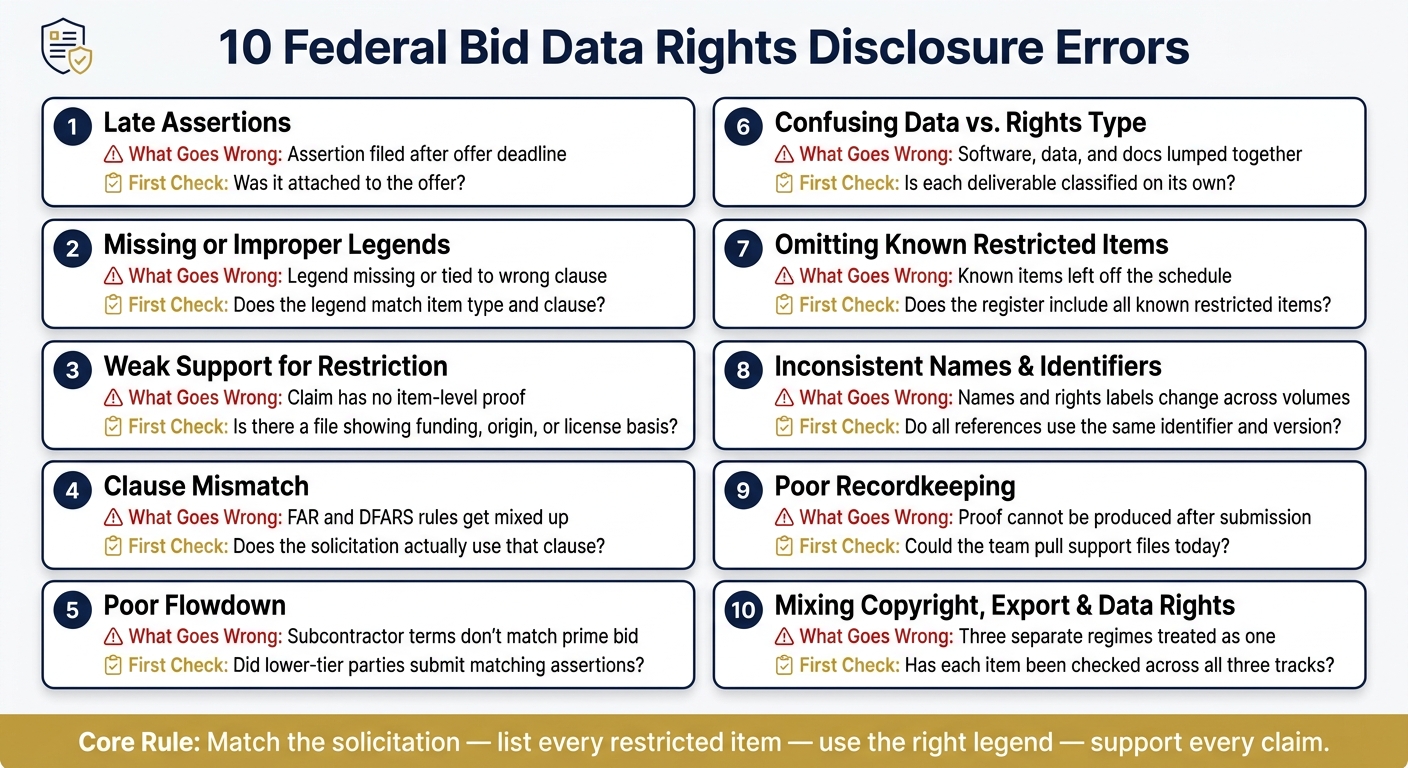
10 Federal Bid Data Rights Errors: What Goes Wrong & How to Fix It
Quick Comparison
| Error area | What goes wrong | What I’d check first |
|---|---|---|
| Timing | Assertion is late or incomplete | Was it attached to the offer? |
| Legends | Marking is missing or uses the wrong clause text | Does the legend match the item type and clause? |
| Support | Claim has no item-level proof | Is there a file showing funding, origin, or license basis? |
| Clause fit | FAR and DFARS rules get mixed | Does the solicitation actually use that clause? |
| Supply chain | Subcontractor terms do not match the prime bid | Did lower-tier parties submit matching assertions? |
| Classification | Software, data, and documentation get lumped together | Is each deliverable classified on its own? |
| Completeness | Known items are left off the schedule | Does the register include all known restricted items? |
| Consistency | Names and rights labels change across volumes | Do all references use the same identifier and version? |
| Records | Proof cannot be produced later | Could the team pull support files today? |
| Separate regimes | Copyright, export, and data rights are treated as one issue | Has each item been checked across all three tracks? |
In short: this is a proposal-control problem as much as a legal one. I’d treat the disclosure like a required deliverable, not an attachment to finish at the last minute.
sbb-itb-bb3960c
Why Bid-Stage Data Rights Disclosures Matter
A weak disclosure can do damage in two places: during award and later, when data rights are challenged.
Why? Because this disclosure is a pre-award control point. It locks in, before award, which technical data or software the offeror plans to deliver with restrictions.
If that disclosure is missing pieces or backed by thin support, the government can reject the assertion. That can weaken protection for proprietary information and even affect pricing assumptions. And when the disclosure doesn’t line up across the proposal, it often leads to contracting officer questions that slow down award.
Those are the same breakdowns behind the errors covered later in this article: late assertions, weak support, and marking mismatches.
Supplier issues can make things worse. If a supplier waits too long to surface a claim, the prime may need to renegotiate terms, rewrite parts of the proposal, or deal with delivery delays because the original submission didn’t account for the restriction. That’s why supplier coordination has to happen before the proposal goes in. It’s a proposal-team job, not something to clean up later.
There’s also a simple but strict distinction here. The proposal-stage assertion identifies the item and the rights being claimed before award. The deliverable legend marks the actual file during contract performance. If those two don’t match, trouble tends to follow.
For other-than-commercial software and documentation, missing or faulty markings can lead to unlimited-rights treatment. The clause framework below explains which rules govern each disclosure and marking.
Key Clause Framework
Before you draft the disclosure, map each deliverable to the clause that controls it. That sounds simple, but it’s where a lot of teams slip. The rule that governs a deliverable turns on three things: the item itself, the agency, and how the item was developed. Get that call wrong, and the disclosure tends to go off track fast.
Technical data and computer software do not follow the same rules. So don’t lump drawings, test procedures, source code, object code, executables, and manuals into one catch-all bucket like “proprietary data.” That shortcut causes trouble.
FAR and DFARS aren’t the same thing either. Civilian-agency solicitations usually point to FAR 52.227-14, Rights in Data – General. DoD solicitations often use DFARS clauses that tie each deliverable to a specific rights category.
A clause map that matches each deliverable to the exact solicitation clause can help you avoid three common problems:
- using the wrong rights category
- leaving out part of the legend
- claiming a restriction you can’t support
The ten errors below show where that mapping tends to break down.
1. Late Assertions Before Award
First up: late assertions before award. If you want to lose restricted-rights protection before award, this is one of the fastest ways to do it.
This usually happens when the proposal team waits too long to add the data-rights attachment and misses the solicitation deadline. And that timing matters. DFARS 252.227-7017 says assertions must be submitted with the offer and must identify restricted items known at the time of submission, including items from subcontractors and suppliers.
Why is this such a big deal? Because late assertions can keep the contracting officer from reviewing the rights structure during evaluation. That can lead to rejection, disputes, or higher licensing costs. Even if the attachment goes in on time, it still falls short if it’s incomplete or unsigned.
The attachment needs to include:
- each restricted item
- the rights category
- the basis for restriction
- the asserting party
- the date and signature of an authorized official
Bid-stage control to prevent it
Start the data-rights inventory at the very beginning of proposal development. Don’t treat it like a last-minute form. Think of it more like a running checklist that follows the proposal from draft to submission.
Each technical contributor should flag restricted deliverables, embedded software, background technology, and third-party components. Set an internal deadline a few business days before the actual submission date. Then require written confirmation from all responsible functions, plus each relevant subcontractor, that the inventory is complete.
Bid review check
Before the proposal goes out the door, confirm that every known restricted item appears in the required attachment. Check that the attachment matches the solicitation format and identifiers, and make sure an authorized official has signed it.
If a new restriction shows up late, escalate it right away. If the submission is complete, move to legend compliance.
2. Missing or Improper Restrictive Legends
Once you’ve made a timely assertion, the next place things can go sideways is the mark itself.
A restrictive legend is the authorized notice placed on technical data, computer software, or related documentation to show limits on the Government’s rights to use, release, reproduce, or disclose that material. If the legend is missing or off the mark, the restriction may not hold.
Why it creates compliance risk
Missing or incorrect legends create two clear risks.
If you leave the legend out, the Government may treat the deliverable as if it has broader rights than you meant to grant. And if you use the wrong legend tied to the wrong clause, the contracting officer can reject the marking under FAR 52.227-14.
A generic company footer won’t save you here. It does not replace the clause-specific legend, and it can be rejected at any point.
What the solicitation or clause requires
The exact rule depends on the clause that governs the deliverable.
For technical data in DoD procurements, DFARS 252.227-7013 requires the legend to be visible on the transmittal, the container, and each page that includes restricted technical data. If only part of a page is restricted, mark that material clearly instead of putting a blanket legend on the whole page.
For noncommercial computer software and related documentation, use the legend required by DFARS 252.227-7014. Don’t paste a technical-data legend into a software disclosure. Use only the legend allowed by the clause.
That distinction matters more than people think. Technical data, software, and documentation may sit in the same submission, but they don’t all follow the same marking rule.
Bid-stage control to prevent it
A simple way to avoid this problem is to build a clause-to-legend matrix. Map each restricted deliverable to:
- the governing clause
- the rights claimed
- the exact legend text
- the required placement
Then match each legend to the item listed in the assertion attachment.
Before submission, require sign-off from both the technical owner and contracts counsel. For electronic submissions, check the files that were actually submitted after PDF conversion and portal upload. Markings sometimes vanish during packaging, and that’s the kind of small slip that turns into a big mess later.
Use the same review steps for material coming from subcontractors.
Bid review check
Before the proposal goes out, review every restricted item in the disclosure against this checklist:
| Check | What to verify |
|---|---|
| Text | Matches the exact wording authorized by the incorporated clause |
| Location | Appears on the transmittal, container, and each applicable page |
| Clause | Correct clause used for technical data vs. software vs. documentation |
| Upload check | Markings survived PDF conversion, file extraction, and portal upload |
| Third-party items | Supplier legends reviewed and reconciled before submission |
If any item fails this check, fix it before submission. A legend that’s almost right is still wrong.
A correct legend can still fail if the claimed restriction isn’t backed up.
3. Weak Support for the Restriction
A restriction can be timely and still fall apart if there’s no proof behind it. That’s what weak support looks like: a claim about restricted rights with no item-level facts tying that claim to the rights category. The good news is that this mistake is avoidable.
For example, saying "proprietary software developed by our company" doesn’t give the government much to work with. Under DFARS 252.227-7017, each assertion has to identify the item, basis, rights category, and asserting party. A broad label by itself doesn’t meet that standard.
Why it creates compliance risk
Assertions without support are easy targets during evaluation, negotiation, administration, or delivery. If the file doesn’t clearly show the item, the basis for the rights claim, and the evidence behind it, the restriction can be rejected. That’s why the evidence record belongs in the bid file. It’s not something to patch up after award.
The risk gets even sharper with computer software documentation. User manuals, interface descriptions, and similar materials are often tougher to restrict than the software itself. So if a contractor makes one broad software claim and assumes it also covers related documentation, that claim is easy to challenge.
What the solicitation or clause requires
Use item-specific facts.
If the basis is private expense, say whether the funding was exclusive or mixed. If the claim depends on a third-party license, identify that license and line it up with the solicitation’s rights terms. If those two don’t match, the problem won’t fix itself.
Bid-stage control to prevent it
Before submission, put together an item-level support file for every asserted restriction. That file should show the facts behind the claim, not just the conclusion.
Focus extra attention on claims that are:
- incomplete
- based on mixed funding
- stated in broad or generic terms
Those should be escalated before the proposal is submitted, not after.
Bid review check
Before the proposal goes out, confirm that every non-copyright restriction has:
- a matching item-level entry
- documentary support
- a rights category that fits the current solicitation’s clause framework
Keep the signed assertion, evidence index, and approval record in the proposal file.
Support answers whether the claim is defensible. Clause choice decides whether it applies at all.
4. Clause Mismatch Between the Disclosure and Solicitation
A clause mismatch can turn a correct disclosure into the wrong disclosure. Even if the assertion itself is complete, it can still fail if it points to the wrong clause. In practice, this often happens when a team reuses an older template and assumes the same clause still applies.
Why it creates compliance risk
The solicitation package controls the clause, format, and timing for each assertion. Not the template. So if a proposal cites FAR 52.227-14 when the solicitation calls for DFARS 252.227-7017, the assertion may be incomplete, defective, or both. It can also create conflicts between the written narrative, the assertion table, and the legend.
What the solicitation or clause requires
The governing clause comes from the solicitation in front of you, not from what the team used on the last bid. The rule set changes based on the type of deliverable.
| Deliverable / Situation | Possible governing framework |
|---|---|
| Technical data with restrictions | DFARS 252.227-7013 + 252.227-7017 assertion requirement |
| Software and software documentation | DFARS Part 227.72 and the applicable software-rights clause |
| FAR data | FAR 52.227-14 |
| Limited-rights data or restricted software claims | FAR 52.227-15, used with FAR 52.227-14 |
| SBIR/STTR data | Follow the solicitation’s SBIR/STTR data-rights terms |
Under DFARS 252.227-7017, the offer must identify, if known at submission, any technical data or computer software that the offeror, subcontractors, suppliers, or potential subcontractors or suppliers believe should be delivered with restrictions. That identification must be attached to the offer. It does not belong in the narrative as a substitute for the attachment.
There’s also one point teams often miss: restrictions based only on copyright are handled separately. They do not trigger this identification requirement.
Once the team has the right clause, the next problem is making sure the same restriction reaches each lower-tier seller and subcontractor.
Bid-stage control to prevent it
Set up a solicitation-to-assertion crosswalk before anyone starts drafting. For each deliverable, list:
- clause number
- rights category
- assertion basis
- owner
Use the exact solicitation text, including amendment number and date. If the solicitation blends FAR, DFARS, agency supplements, or commercial-item terms, contracts counsel should check the mapping before submission. And every amendment should trigger a fresh review. A small change to a deliverable or clause can knock out an earlier mapping that looked fine at first glance.
Bid review check
Before submission, confirm that every cited clause appears in the current solicitation or incorporated supplement and matches the deliverable type. Check that all known subcontractor and supplier restrictions are included. Also separate copyright-only restrictions from restrictions on Government use, modification, reproduction, release, or disclosure.
If any of those checks fail, fix the disclosure before the deadline.
If the clause map is right, the next step is to check whether the same terms flow down to subcontractors and suppliers.
5. Failure to Flow Terms to Subcontractors and Suppliers
Once you’ve mapped the clause the right way, the next risk is simpler than it sounds: did that clause make it all the way down the chain?
The prime contract clause doesn’t do much on its own if those same terms never reach the subcontractors and suppliers building the deliverable.
Why it creates compliance risk
If a subcontract leaves out the required data-rights terms, the prime may end up receiving deliverables with no valid restrictive legend, the wrong rights statement, or rights that clash with the prime contract.
That can lead to Government rejection, disputes about the scope of rights, and treatment of legends as invalid. It can also leave the prime’s bid disclosure incomplete or out of sync with the source deliverable. In plain English: the paperwork says one thing, but the supplier deliverable says another. That’s where problems start.
What the solicitation or clause requires
For example, DFARS 252.227-7015 requires the clause to be flowed into qualifying subcontracts. And DFARS 252.227-7014 requires the authorized software legend on restricted software from contractors and lower-tier sources.
A generic "confidential" or "proprietary" stamp is not enough. It does not meet the clause.
Bid-stage control to prevent it
A practical way to control this is to build a deliverable-by-supplier matrix and send written instructions that spell out:
- the deliverable
- the clause
- the legend
- the assertion format
- the deadline
Then collect signed assertions and match them against the prime’s disclosure before submission.
If a supplier refuses to provide an assertion, don’t make one up for them. Document the issue and send it to contracts counsel before submission.
Bid review check
Before submitting, confirm a few basic points.
- Every Government data or software deliverable has an identified source
- The applicable clause was flowed down with no unauthorized changes
- The supplier’s assertion matches the prime’s disclosure in item name, rights category, and legend text
- Each relevant subcontract requires further flow-down to lower-tier contributors
Also document any unresolved supplier positions and escalate them before submission.
If flowdown is correct, the next check is whether the disclosure keeps data categories and rights categories separate.
6. Confusing Data Categories and Rights Categories
Even if the clause is right, teams can still lose rights when they put the deliverable in the wrong bucket. Data category and rights category are not the same thing. Mixing them up is a major bid-stage error.
Why it creates compliance risk
A right clause won’t save a bad classification. If the item is tagged the wrong way, everything that follows can go off track: the clause, the legend, and the assertion itself. For example, calling software technical data or calling technical data software creates an internal mismatch that can weaken the disclosure.
Commercial status creates a separate risk. It does not decide the status of every related document, drawing, or embedded software item. Each item needs its own commercial-status call before the assertion is written.
What the solicitation or clause requires
The main DFARS clauses change based on the type of deliverable:
| Deliverable Type | Likely Governing Clause | Common Mistake |
|---|---|---|
| Technical data for a noncommercial product or service | DFARS 252.227-7013 | Treating all product information as commercial |
| Technical data pertaining to a commercial product or commercial service | DFARS 252.227-7015 | Assuming commercial product status covers all associated documents |
| Other-than-commercial computer software and software documentation | DFARS 252.227-7014 | Applying technical-data rights language to source code or object code |
| Commercial computer software and commercial software documentation | Commercial software license terms or other solicitation-specific terms | Using 7014 for commercial software by default |
Get the classification right first. The assertion format and legend come after that.
Bid-stage control to prevent it
Before anyone drafts an assertion, build a deliverable classification matrix. For each line item, track three separate fields:
- Item
- Governing clause
- Rights tier
Use engineering to classify the item. Have contracts counsel check the clause. Then have the proposal manager line up the rights tier with the solicitation.
Bid review check
Before submission, confirm that no deliverable carries a rights statement pulled from the wrong category. Software documentation is a common trouble spot. It may show up in technical-data identification requirements under 252.227-7017, but its rights treatment still turns on whether it is tied to commercial or other-than-commercial software.
Reject any assertion where the cited clause does not match the deliverable type.
Once each item is classified the right way, the next step is making sure every known restricted item is actually included in the submission.
7. Omitting Items Known at Proposal Submission
Classification only works if every known restricted item makes it into the offer. The next risk isn’t misclassification. It’s leaving something out.
DFARS 252.227-7017 says offerors must identify, with the offer, each restricted item known at the time of submission. That makes the proposal file the main checkpoint for completeness.
Why it creates compliance risk
If an item is left off the proposal-stage attachment, it may not get the same contract-level recognition as an item that was properly listed at submission. For items known before submission – such as interface documentation, automated test scripts, or manufacturing drawings – the Government may later question the restriction after award. The omission does not automatically cancel the claim, but it does make later enforcement harder.
That same risk extends to assertions from subcontractors, suppliers, and even potential subcontractors or suppliers.
What the solicitation or clause requires
The attachment must identify:
- each item
- the rights category
- the basis for the restriction
- the asserting party
It also must be signed by an authorized official.
Restrictions based only on copyright do not have to be identified under this requirement. Even so, separate marking or notice duties under the applicable clause may still apply.
Bid-stage control to prevent it
Create a known-deliverables rights register before final proposal approval. At a minimum, record the deliverable name, owner, rights category, basis for restriction, and whether the item comes from a subcontractor or supplier.
Then have engineering, contracts, intellectual-property counsel, and the proposal manager review that register before the attachment is prepared.
Screen every named or implied deliverable for any expected restriction. If the answer is yes – or even maybe – put it on the register. An open classification issue is not a good reason to leave a known item off the list.
Bid review check
Before submission, confirm that every known restricted deliverable is:
- listed
- supported
- dated
- signed
- included with the offer
Do not treat copyright-only items as DFARS 252.227-7017 assertions. At the same time, make sure any separate copyright or marking duties are handled under the applicable clause.
Then check for matching names, identifiers, and rights statements.
Once every known item is on the record, the next problem is inconsistency across names, identifiers, and rights statements.
8. Inconsistent Names, Identifiers, and Rights Statements
Once you’ve listed every known item, the next step is simple: make sure each one is named the same way everywhere. If one document says "Mission Planning Software" and another says "MPS v3.2", you’ve created confusion that didn’t need to exist. The fix is a single master register with one approved identifier for each item.
DFARS 252.227-7017 expects the offer-stage schedule to line up with the item descriptions and rights category used in the rest of the proposal. When names or rights categories shift from one section to another, the assertion can look unclear or detached from the item being offered. That’s a bad look. It suggests loose control and makes the assertion easier to question.
Bid-stage control to prevent it
Use one master register, and have the proposal manager own it. For example: "Flight Operations Software, Part No. FOS-200, Version 4.1 – restricted rights; basis: private expense." That exact identifier and rights statement should appear the same way in the technical volume, deliverables matrix, and assertion schedule.
A few ground rules help here:
- Lock the register before submission.
- Require approval for any change to an item name, version, or rights category.
- Have subcontractors and suppliers use the prime’s identifier, or give them a mapping table that ties their internal part numbers to the prime’s schedule entries.
Bid review check
Before submission, reconcile every mention of each restricted item. A good gut check is this: if a contracting officer can’t match each entry to one deliverable without inside knowledge, fix the schedule before the offer goes out.
9. Failing to Preserve Evidence and Written Procedures
Once item names and rights statements line up, you hit the next hurdle: proof. It’s not enough to make a claim. You need to back it up after submission. Clean schedules fall apart when the support records aren’t there.
Why it creates compliance risk
Every restricted-rights claim carries a proof burden behind it. DFARS 252.227-7037 requires contractors and subcontractors at any tier to keep records that are enough to justify the validity of restrictive markings. If those records don’t exist – or you can’t pull them when asked – even a proper restriction can look weak.
This gets even trickier when the restriction turns on development funding. In that case, you may need to show whether the work was funded only with private dollars or with mixed funding. Trying to piece that story together later is a bad bet. Cost records, version histories, and supplier certifications often end up incomplete or spread across different systems.
What the solicitation or clause requires
DFARS 252.227-7017 requires the offer to:
- identify each restricted item
- state the rights category
- explain the basis for the assertion
- name the person making it
DFARS recordkeeping rules also require written procedures and retained support records for delivered or to-be-delivered data.
Bid-stage control to prevent it
Build an evidence file for each proposed restricted deliverable before the offer goes out. Each file should connect the deliverable identifier to the assertion table entry, the rights category, the funding basis, and the approving official.
Save the source records that support the claim, such as:
- development contracts
- funding records
- version histories
- license terms
- supplier certifications
You also need a written SOP that sets the rules for classification, approval, version control, and record storage. Think of it as the company’s paper trail map. If someone asks for proof, your team shouldn’t have to hunt through old folders and inboxes.
Bid review check
Before submission, pressure-test the record file just as hard as the assertion itself. Ask one blunt question for every restricted item: Could the company produce the file tomorrow if asked? If the answer is no for even one entry, that assertion isn’t ready.
Also check subcontractor and supplier assertions with the same care. They need support from actual records, not language pasted into the proposal from an informal email. Lower-tier assertions should be traceable to the same evidence standard as your own.
10. Treating Copyright, Export Controls, and Data Rights as the Same Restriction
Once you’ve separated legends, assertions, and support records, there’s one more step: don’t lump copyright, export controls, and FAR/DFARS data rights into one bucket.
They are not the same thing.
Each one deals with a different issue, and one label will not cover the others. A single deliverable might involve all three. If it does, you need to handle each track on its own.
Why it creates compliance risk
Copyright deals with reproduction and distribution. Data-rights clauses deal with the Government’s contract-based use. Export controls deal with foreign access and transfers.
Those lines matter. A copyright notice does not replace an export-control legend. An export-control legend does not replace a DFARS restrictive legend. And a DFARS legend does not handle copyright.
DFARS 252.227-7017 also separates restrictions based only on copyright from other restrictions that need identification and assertion. So if a team uses one blanket statement for everything, that won’t do the job.
What the solicitation or clause requires
Under FAR 52.227-14, a permitted copyright notice and Government sponsorship acknowledgment stand apart from the Government’s contract-based data rights. They also stand apart from export authorization.
For export-controlled material, you need to identify:
- The controlling regime
- Any limits on Government access
- Any limits on subcontractor access
- Any limits on foreign-person access
- Any limits on overseas access
The practical fix is simple: classify each deliverable across three separate tracks before the proposal goes out.
Bid-stage control to prevent it
Build a three-field classification entry for every proposed deliverable:
| Field | What it captures |
|---|---|
| FAR/DFARS data rights | Clause, rights category, basis, assertion, legend |
| Copyright | Owner, license, permitted uses |
| Export controls | Regime, access limits, authorization, transmission method |
Bid review check
Before submission, verify the Government’s contract rights, the copyright owner’s permitted uses, and the export status for every restricted item.
If anything is missing or unclear, send it to contracts, IP, or export counsel right away.
Deliverable Type vs. Clause Treatment: Quick Reference Table
Use this table to match each deliverable to the governing clause before you draft assertions. First, classify the deliverable the right way. Then use the table as a pre-submission check, not as a stand-in for the solicitation.
Screening aid only. Confirm clause applicability against the solicitation, amendments, development funding, commercial status, and the exact deliverable.
Use the table to sort each deliverable before you apply the clause-specific legend or assertion format.
| Deliverable Type | Typical Governing Clause(s) | Rights or Restriction Issue | Bid-Stage Assertion Approach |
|---|---|---|---|
| Technical data – noncommercial items | DFARS 252.227-7013; DFARS 252.227-7017; FAR 52.227-14 may apply in some civilian-agency procurements | Rights depend on development funding for the data or underlying item | Identify each restricted item before award, state the basis for restriction, and use the solicitation-prescribed legend and format |
| Technical data – commercial products or services | DFARS 252.227-7015; confirm whether another clause applies to noncommercial portions | Private-expense portions may receive separate treatment | Distinguish commercial from noncommercial technical data and identify the specific commercial item, component, or data set covered |
| Computer software and software documentation | DFARS 252.227-7014 for noncommercial software; DFARS 252.227-7017 for pre-award identification; applicable clauses under DFARS Subpart 227.72; FAR 52.227-19 may be relevant to commercial computer software licenses | Software rights are distinct from technical-data rights; third-party software requires an appropriate Government license | List the software name, version or module, documentation, asserted restriction, and supporting license or development basis. Source code, object code, executables, and documentation can each carry different rights; do not bundle them |
| SBIR/STTR technical data and computer software | DFARS 252.227-7018; DFARS 252.227-7017 also applies for identification and assertion of restrictions | During the protection period, the Government generally receives limited rights in covered SBIR/STTR technical data and restricted rights in covered SBIR/STTR computer software | Identify the SBIR/STTR phase and originating award, use the prescribed SBIR/STTR legend rather than a generic proprietary label, and reflect the same treatment in subcontract deliverables |
A single contract can mix commercial and noncommercial items, software, and SBIR/STTR material. That’s where teams get tripped up. One file may look similar to another, but the clause treatment can change based on funding, item status, or the type of deliverable.
So check each item on its own. Once you’ve classified it, carry that same logic through the proposal workflow.
Workflow Support for Proposal Teams
Once you’ve classified each deliverable using the table above, the next job is keeping tabs on clauses, assertions, subcontractor inputs, legends, and deadlines across a proposal package that can run hundreds of pages. Automation can help sort that mess out. But it can’t take the place of clause-by-clause review.
Narwin.ai can help proposal teams handle this part of the workflow, especially around the same trouble spots covered earlier: late assertions, missing legends, weak support, and deliverables that don’t line up. Its solicitation analysis can process large packages and surface data-rights requirements buried in amendments and attachments.
Upload the full solicitation package, including all amendments and attachments, before running any analysis.
Use the platform to triage the package, then check each output against the solicitation text.
| Workflow Stage | Where a Platform Can Help | Where Human Review Is Required |
|---|---|---|
| Clause identification | Flags relevant data-rights clauses in the solicitation package | Confirms applicability based on the actual clause text and item category |
| Requirement extraction | Pulls assertion tables, legend requirements, and deliverable schedules | Verifies accuracy against the actual solicitation text and amendments |
| Deadline tracking | Monitors submission dates and flags amendment-driven changes | Revalidates the schedule when amendments alter scope or dates |
| Subcontractor coordination | Tracks whether subcontractor assertion inputs have been received | Reviews the sufficiency of each assertion and any flow-down term |
| Pre-submission check | Flags missing fields, unsigned attachments, or unmatched deliverables | Conducts the final clause-by-clause review and approves the submission package |
Use the output as input to the final pre-submission check, not as the final decision.
Narwin is a workflow aid, not the final authority. Automation can miss a requirement tucked into an amendment or fail to sort out an unclear rights clause. A contracts professional or attorney must approve the final submission package. DFARS data-rights rules still require qualified human review of identification, marking, attachment, and flow-down requirements.
Final Pre-Submission Check
Before you lock the proposal, give every data-rights assertion one last clause-and-evidence review. This is your final chance to catch mistakes before submission, so treat it like the last gate before release.
Start by confirming whether the solicitation includes FAR 52.227-14, DFARS 252.227-7013, DFARS 252.227-7014, and DFARS 252.227-7017, along with any solicitation-specific alternates. Then confirm that you’re working from the current clause text and the correct alternates in the solicitation package.
After that, check the record against the four required points: item inventory, rights category, support, and flowdown.
Use this table as the final submission check:
| Check Item | What to Verify |
|---|---|
| Clause alignment | Every applicable FAR/DFARS data-rights clause confirmed, including alternates and amendments |
| Item inventory | All restricted items listed by exact name, identifier, and version |
| Rights category | Asserted category matches the deliverable type and governing clause; do not default to "proprietary" |
| Factual basis | Document development funding, origin, commercial status, and supporting agreements for each assertion |
| Legend language | Use clause-authorized wording and required placement |
| Supply chain | Collect written assertions from subcontractors, suppliers, and lower-tier sources |
| Attachment | Attach the signed assertion in the required format |
| Consistency | Match item names, identifiers, rights categories, and legend language across all volumes |
Then run the final human review and file check.
Use a two-person review. One reviewer should trace each assertion back to the solicitation and the supporting evidence. The other should reconcile each assertion against the deliverables list and supplier inputs. It helps to set an internal deadline several business days before the Government’s submission deadline. That gives legal, contracts, and the authorized signatory time to review and approve without a last-minute scramble.
Last, confirm the attachment is present, readable, signed, and uploaded in the correct location. A correct assertion can still fail if it’s unsigned, unreadable, or uploaded to the wrong place.
Conclusion
After the final pre-submission check, the main point is pretty simple: most bid-stage data rights mistakes happen because proposal controls are weak, not because the legal side is too hard to handle.
A controlled process spots restricted items early, uses the right clause and legend, and keeps support records and flowdown terms in place. That kind of discipline cuts both pre-award disclosure risk and post-award dispute risk. Treat data rights disclosure as a proposal deliverable, not just a formatting task.
FAQs
What happens if a data rights assertion is submitted after the bid deadline?
In federal contracting, data rights assertions sent after the bid deadline usually won’t be accepted. Deadlines are strict, and evaluators tend to review only what’s included in the final proposal.
If a required assertion is missing, that can lead to disqualification. In most cases, you can’t fix that after the deadline passes.
The safest move is simple:
- Use the Q&A period to clear up any requirement that seems vague
- Include all needed assertions in your initial proposal
This is one of those areas where being late by even a little can cost you the whole opportunity.
How do I know which legend applies to technical data versus software?
Check the data rights clauses in Section I of the solicitation. For example, FAR 52.227-14 applies to technical data, while FAR 52.227-19 applies to commercial computer software.
Also confirm whether the solicitation includes alternates or agency supplements that change the standard legends.
What records should I keep to support a restricted rights claim?
Keep concrete evidence, not vague claims. Use a confidentiality request form that includes:
- an index of the specific pages
- a clear legal basis for the restriction
- an explanation of the competitive harm that could result from disclosure
Also keep records showing the information is not public. And document agency interactions, including pre-proposal conferences and written clarifications, so you have a clear audit trail.