
Miss one mandatory item, and your bid can be out before review starts. That’s the big takeaway here.
If I had to boil this article down into a short checklist, it would be this:
- I make sure my business is set up before I bid
- I confirm registrations, tax IDs, portal access, insurance, and security items
- I separate mandatory requirements from rated requirements
- I build a line-by-line compliance matrix from the RFP text
- I track forms, amendments, deadlines, page limits, and upload rules
- I keep pricing out of the technical file
- I do a final review with a person who did not write the bid
- I submit early – 24 hours before closing if I can
The article also makes one point very clear: the solicitation rules win every time. Internal templates do not matter if the buyer asks for something else.
A few hard facts stand out:
- Federal bids often run through CanadaBuys and SAP Ariba
- Bid validity periods are often 30 to 120 days
- A 9-digit CRA Business Number is part of supplier setup
- Even one missing form, certification, or signature can lead to a nonresponsive bid
Here’s the simple split I’d keep in mind:
| Requirement | How I treat it | Risk if missed |
|---|---|---|
| Mandatory | Pass/fail check first | Disqualification |
| Rated | Score and improve after compliance is set | Lower score |
So this piece is not just about writing a good proposal. It is about avoiding admin mistakes, matching the RFP line by line, and using the same review process every time.
If I were using this article as a working guide, I’d treat it as a short process: readiness -> go/no-go -> matrix -> document check -> final audit -> early submission.
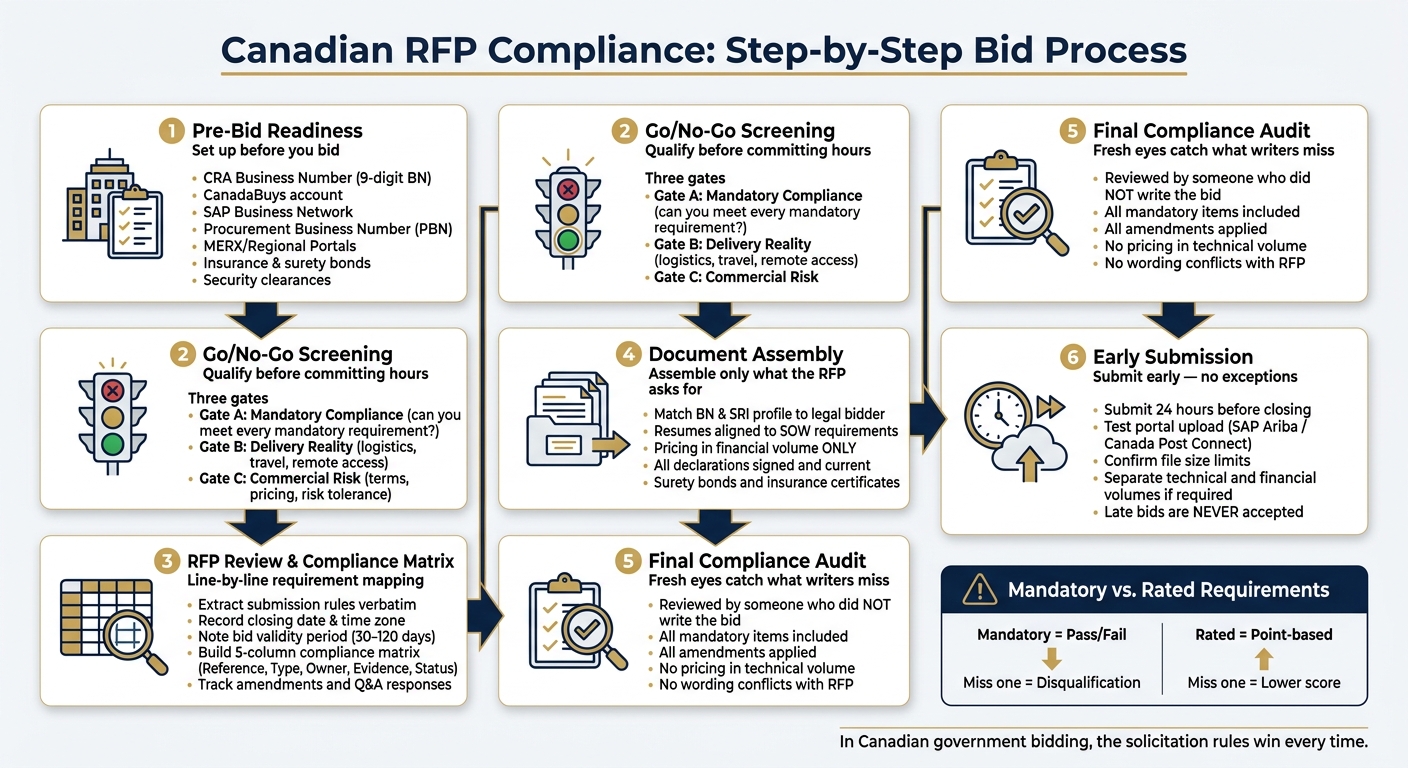
Canadian RFP Compliance: Step-by-Step Bid Process
Pre-Bid Readiness Checklist
Before you even dig into an RFP, make sure your organization is ready to bid. A missing registration, an expired certificate, or a dead portal account can knock you out for admin reasons before anyone reads your technical response. If any item below is missing, pause and fix that first.
Corporate Registration, Tax, and Supplier Setup
Everything starts with your legal entity name and a 9-digit Business Number (BN) from the Canada Revenue Agency (CRA). For federal bidding, use CanadaBuys to track opportunities and SAP Business Network to submit PSPC bids. If you’re going after contracts outside the Ariba network, like ProServices or SELECT, you’ll also need a Procurement Business Number (PBN) through the Supplier Registration Information (SRI) system.
| Account / Registration | What It’s For |
|---|---|
| CRA Business Number (BN) | Core legal and tax identity |
| CanadaBuys Account | Federal tender monitoring and alerts |
| SAP Business Network | Electronic bid submission for PSPC |
| Procurement Business Number (PBN) | Non-Ariba contracts and specific sourcing tools |
| MERX / Regional Portals | Provincial, municipal, and MASH sector bids |
Set up 5 to 10 UNSPSC codes that match what you actually sell. That helps you filter bid notices and set cleaner alerts, so you’re not chasing the wrong work.
If the buyer asks for security, insurance, or bonding, check those next.
Security, Insurance, and Policy Requirements
Some compliance items can’t be thrown together at the last minute. They need to be in place before you bid.
- Confirm security clearance before bidding if the work involves protected information, assets, or protected sites. If an RFP requires clearance through the Contract Security Program, start that process right away and contact the contracting officer if you don’t already have it.
- Keep a current bid proof pack with insurance, safety, references, certifications, and a one-page capability statement.
- Confirm surety bond availability before bidding on construction work.
- Check Federal Contractors Program status and disclose any former public servants on the team. Both require accurate certifications at submission.
Once those items are current, you’re ready for go/no-go screening.
Go/No-Go Screening Before You Commit
A clear go/no-go check saves your team time and helps protect your win rate. Before you assign proposal hours, run through these three gates.
Gate A – Mandatory Compliance: Can you meet every mandatory technical and administrative requirement? Miss one, and the bid becomes non-responsive. Go through the Statement of Work line by line.
Gate B – Delivery Reality: Can your team actually do the work as described, including logistics, travel, and any remote or Northern region access needs?
Gate C – Commercial Risk: Do the terms, pricing, and risk split fit your risk tolerance?
sbb-itb-bb3960c
RFP Review and Compliance Matrix Checklist
Once your pre-bid readiness is set, take the solicitation apart piece by piece. That’s how you keep small misses from turning into last-minute problems during drafting or final review.
Extract Submission Rules, Forms, and Deadlines
Start with the Instructions to Offerors section and pull out every submission rule. The mistakes that trip teams up most often are often the plain administrative ones: the closing date and exact time zone, the delivery method, whether that’s a portal or email, the file format, usually PDF, the file naming rules, and the page limits.
Also note the bid validity period, which is often 30 to 120 days, and the deadline for clarification questions. Those dates are hard stops. Record each mandatory form and certification listed in the RFP. And keep watching the portal for every amendment, because formal amendments and Q&A responses can change the original rules.
Submit 24 hours early to give yourself a cushion for portal delays.
Add all of these items to the compliance matrix before you draft any response text.
Build a Requirement-by-Requirement Compliance Matrix
Next, turn those extracted rules into a line-by-line compliance matrix. Use one matrix to track every administrative and technical requirement in one place.
Pull requirements verbatim from the RFP instead of rewriting them in your own words. Evaluators score against their checklist. If your wording drifts from the source, small gaps can show up, and those gaps can cost points or even lead to a non-responsive ruling.
Use this six-column table:
| Column | What Goes Here |
|---|---|
| Requirement Reference | Exact RFP text + page/section number |
| Requirement Type | Mandatory (pass/fail) or Rated (point-based) |
| Owner | The specific person responsible for this item |
| Evidence Source | Link or reference to the document or proposal paragraph |
| Status | Open, In Progress, Locked – include QA sign-off date and name when complete |
Track cross-references inside the matrix too. For example, a reference limit may show up on one page, while the recency rule for those same references appears three sections later. That’s the kind of detail that can slip by if no one ties it together. The matrix is there to help prevent administrative disqualification.
Check Trade Agreement and Language Conditions
Once the matrix is built, pin down the nontechnical conditions that can still knock a bid out.
Check the solicitation header or preamble to confirm which trade agreements apply, such as CFTA, CETA, or WTO GPA.
Confirm whether Canadian Content Certification applies to the solicitation.
If the RFP calls for work in English, French, or both, make sure your team can attest to the needed language capability before you commit.
For pricing, use CAD, show GST/HST separately, and keep pricing out of the technical section.
Documentation and Proposal Submission Checklist
Corporate, Financial, and Personnel Documents
Start with the compliance matrix and use it as your control sheet. Pull in only the documents the RFP asks for. Then turn each requirement into a simple check:
- document check
- signature check
- upload check
Once that’s done, the matrix becomes your submission package.
At the corporate level, make sure the BN and SRI profile match the legal bidder name shown on the proposal. Many solicitations also ask for incorporation records, a corporate profile, and an authorization letter that confirms who can sign for the company. Before you assemble anything, match each item against the RFP’s mandatory document list. No guesswork.
For personnel, use resumes that line up with the experience and education the RFP asks for. If the solicitation calls for a set number of hours or days on similar projects, show that detail clearly in each resume. Don’t make evaluators hunt for it. Attach proof of active clearance only if the RFP says it’s required.
On the financial side, keep all pricing in the financial volume only. If surety bonds or insurance certificates are required, they must come from the surety providers named in the RFP and meet the stated coverage amounts.
| Document Category | Key Items to Include | Verification Method |
|---|---|---|
| Corporate | BN and SRI profile matching legal bidder name, incorporation records | Match each item to the RFP mandatory document list |
| Personnel | Resumes, certifications, security clearances | Verify expiry dates and match against SOW requirements |
| Financial | Pricing tables, surety bonds, required financial statements | Confirm no pricing appears in the technical volume |
| Compliance | All required declarations listed in the RFP | Confirm all forms are current, signed, and complete |
Next, check the format and portal rules before you upload a single file.
Formatting, Signatures, and Portal Submission Checks
Formatting mistakes can cost you points or knock the bid out altogether. Follow the page limits, font rules, and margin requirements exactly as written in the RFP. Pages past the limit may be ignored or rejected. Submit files as PDFs unless the solicitation clearly allows another format. And don’t send links instead of files.
Every signature block counts. Your bid cover page should include the solicitation number, reference number, date, and full business contact details. Sign every declaration the RFP asks for. An unsigned certification is treated the same as a missing one. That’s a painful way to lose a bid.
If the solicitation runs through SAP Ariba or Canada Post Connect, test the upload process before the deadline and confirm the closing time. Check file size limits too. Also confirm whether the technical and financial volumes need to be uploaded separately. Late bids are never accepted, no matter what went wrong.
After the format and upload review, do one more pass against the matrix.
Final Compliance Review Before Submission
The last review should be done by someone who didn’t help write the proposal. A new reviewer spots gaps, mixed messages, and missing pieces that the core team may miss after staring at the same files for hours.
Do a line-by-line check against the RFP:
- all mandatory items included
- all amendments applied
- no pricing in the technical volume
- no wording that conflicts with the RFP
This last review is where you catch omissions, contradictions, and late amendments before submission. Narwin.ai can flag missing documents and requirement gaps before submission.
Conclusion: Building a Repeatable Canadian RFP Compliance Process
When you use this checklist every time, it helps you avoid the mistakes that knock bids out early. In Canadian government bidding, a lot of success comes down to one thing: avoiding preventable non-compliance.
Stick with the same go/no-go gates from the readiness check. Confirm the delivery fit, separate mandatory criteria from rated criteria, and stop right away if you can’t meet even one mandatory item.
After every amendment and every Q&A response, update the compliance matrix at once. Don’t let old notes sit around and trip you up later.
Keep pricing in the financial section only. And submit at least 24 hours before closing.
The simplest way to handle this is to treat eligibility checks, the compliance matrix, document assembly, and the final audit as a fixed workflow. Narwin.ai can automate requirement extraction, flag compliance gaps, and generate go/no-go signals. That’s how Canadian RFP compliance turns into a repeatable habit instead of a last-minute scramble.
FAQs
What makes a bid nonresponsive?
A bid is nonresponsive when it misses any mandatory requirement. In most cases, that call is made on a strict pass/fail basis.
Common reasons include:
- Missing required documents
- Submitting after the deadline
- Failing to answer exactly what was requested
- Changing commercial terms
- Not acknowledging addenda
- Contacting someone other than the designated contracting officer
- Leaving out required financial or solicitation details
Even small mistakes can knock a bid out. If the solicitation says something must be included, buyers usually don’t have much room to overlook it.
How do I build a compliance matrix?
Start by pulling out every mandatory requirement from the RFP, especially any line that uses shall, must, or will. Then place each one into a structured tracker that includes the requirement ID, the exact text, the source reference, the proposal location, the compliance status, and the owner.
Next, tie each requirement to the evaluator’s scorecard. Give each row one clear owner, and track status so the team can keep traceability from the RFP all the way to the final proposal.
What should I verify before submitting?
Before you submit, double-check every solicitation requirement. Missing just one can knock you out of the running.
Focus first on all mandatory items, especially anything marked shall or must. Make sure those points are covered and that any required certifications are complete.
Then review the rest of the package:
- Confirm any security clearance requirements
- Check that pricing lines up with the scope of work
- Make sure your submission follows the stated formatting rules
- Verify it will arrive before the deadline
Narwin.ai can help you keep track of these requirements and make the final review process a lot smoother.