
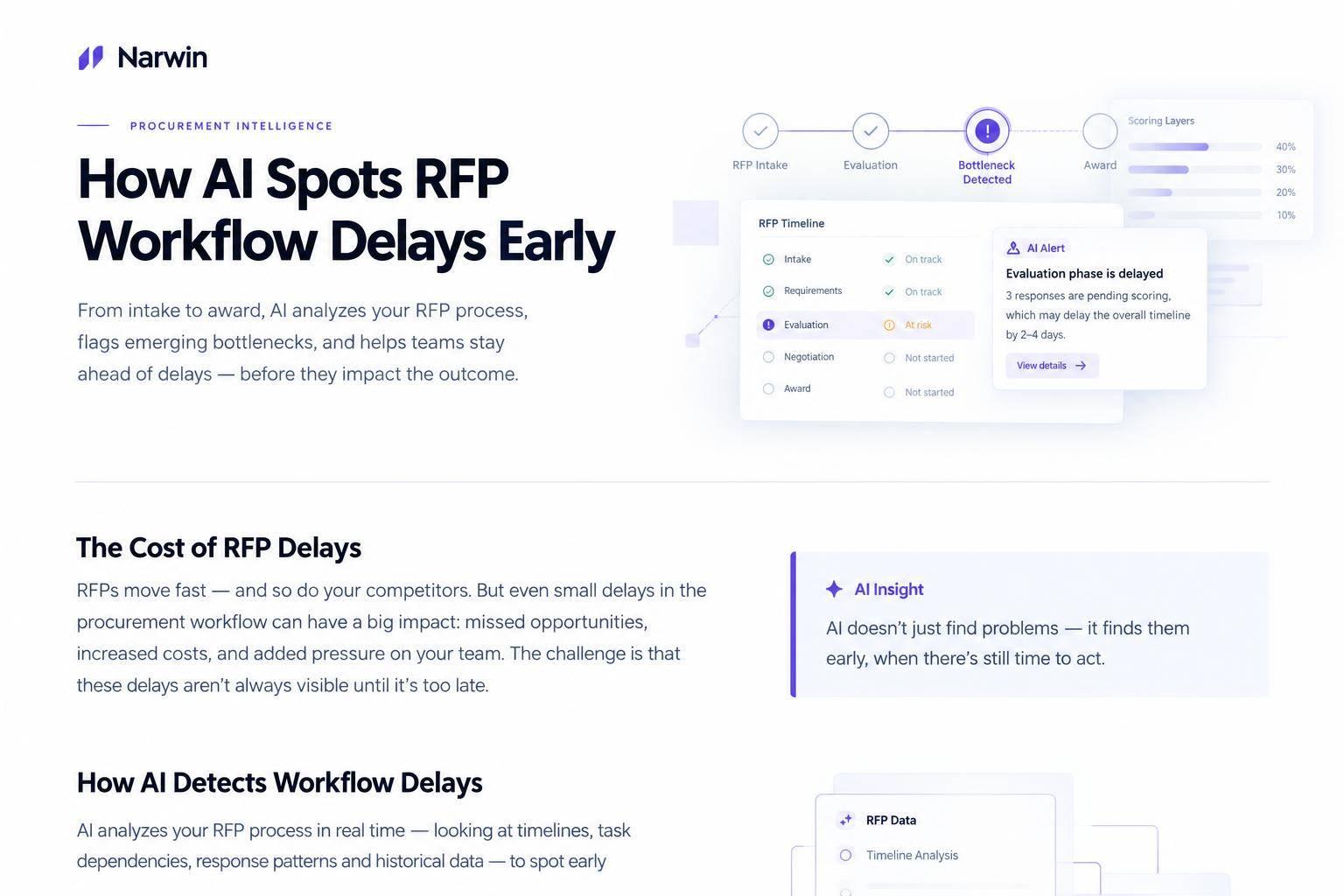
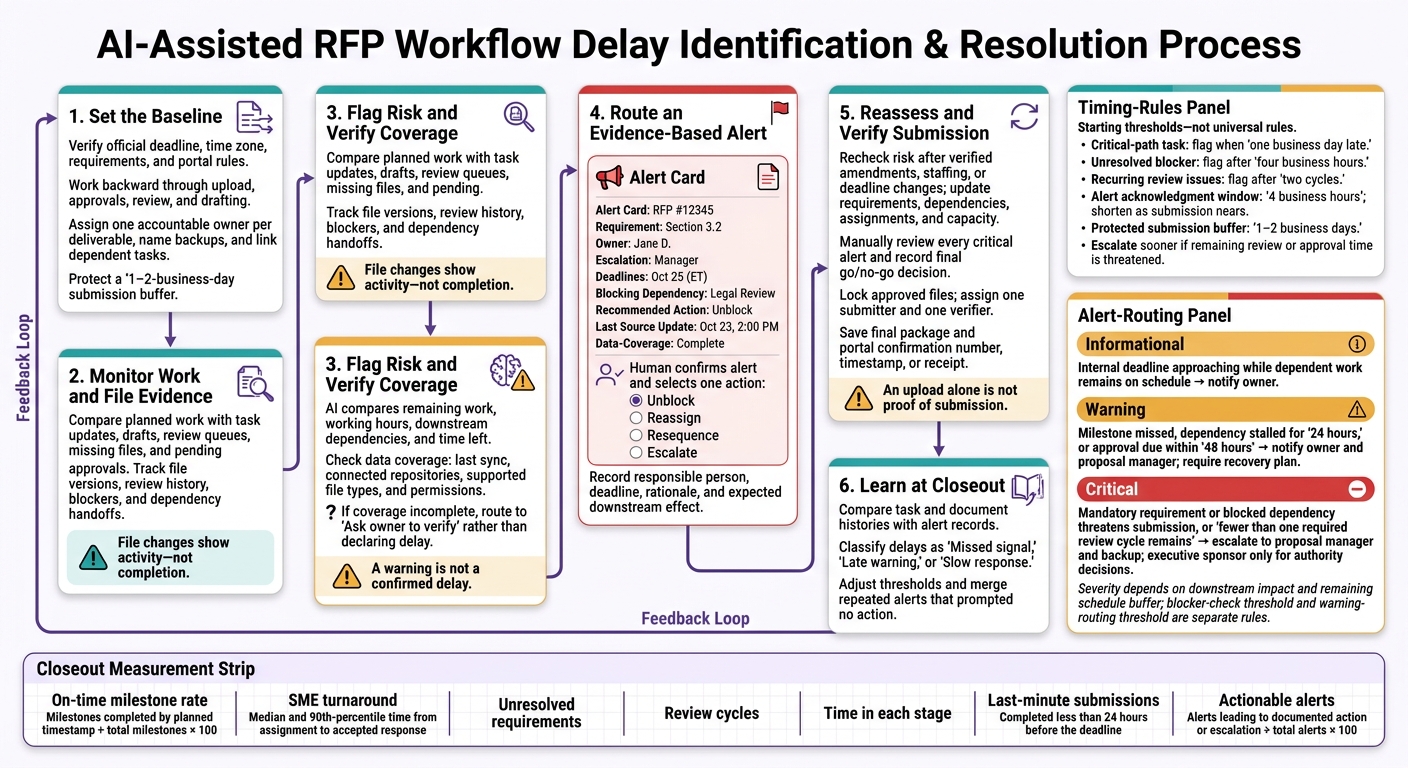
AI spots RFP delay risks by comparing planned work with task updates, file activity, and time left before submission. A starting rule: flag a critical-path task that is one business day late, then have its owner check the status before escalating.
The process depends on a few clear steps:
- Set deadlines, assign one owner per deliverable, and link tasks that depend on each other.
- Track drafts, review queues, missing files, and pending approvals.
- Send alerts with source details, data gaps, and a next action.
- Recheck risk when requirements, staffing, or deadlines change.
- Verify submission readiness, save the receipt, and use closeout results to improve future alerts.
A warning is not a confirmed delay. Human checks keep incomplete data from driving the wrong response, while a protected 1–2-business-day submission buffer leaves time for final checks and upload problems.
How AI Spots RFP Workflow Delays Early
Set the Schedule, Delay Signals, and Owners
Work Backward From the Submission Deadline
Tie each task to the submission clock so predicted risks become measurable triggers. This gives AI a baseline for spotting delays early.
Check the buyer’s submission deadline, question deadline, time zone, addenda, required forms, signatures, and portal rules against the current RFP. Record the deadline as Month Day, YYYY, h:mm AM/PM, time zone, along with the source and verification date. Record the time zone separately from device settings.
Work backward from receipt confirmation and final upload through approvals, review, drafting, kickoff, and go/no-go. Reserve 1–2 business days for final production and submission. Account for file conversion, signatures, portal rejections, holidays, and approver availability. Save the agreed schedule at kickoff as the baseline AI will use to compare planned and actual progress.
Then set the signals that tell AI when work is slipping.
Choose Delay Signals and Alert Thresholds
Set up AI checks based on remaining work, working hours, priority, and effects on later tasks. Track how late tasks, blockers, and stalled updates affect bid progress.
Start by flagging a critical-path task when it’s one business day late, a blocker after four business hours without resolution, or recurring review issues after two cycles. Escalate sooner if a delay puts the remaining review or approval window at risk.
| Signal | Likely workflow meaning | Recommended response |
|---|---|---|
| Overdue task | Owner has not updated status or missed a commitment | Confirm status, estimated completion, cause, and affected milestones. |
| Approaching deadline | Remaining work and review may take more time than is available | Recalculate remaining effort and protect the next gate. |
| Missing owner | No one is clearly accountable for the work | Assign one owner and one backup. |
| Stalled status | Progress updates have stopped | Request the next deliverable, blocker, and update time. |
| Unanswered question | Drafting or pricing needs input | Assign a question owner and response deadline; record assumptions. |
| Blocked dependency | An earlier task is holding up work | Notify both owners and set the latest safe handoff time. |
| Repeated reviews | Revisions are not fixing defects | Name a decision-maker and define acceptance criteria. |
For alerts to lead to action, each task needs one accountable owner and clear handoffs.
Assign Owners and Link Task Dependencies
Assign one owner to every requirement, section, attachment, review, and approval. Keep ownership separate from review and approval roles, and name backups for critical work.
Maintain a shared compliance matrix with source references, response locations, due dates, effort, dependencies, and evidence. Done means the work meets requirements and has passed review.
Link prerequisite work to the tasks that depend on it instead of giving everyone the same deadline. A delayed task puts submission at risk when it affects a later gate. Track task age, time in status, question response times, handoff duration, and dependency wait time.
Put mandatory forms, pricing, signatures, and other pass/fail requirements ahead of low-priority formatting edits. The proposal manager owns the master schedule, ownership gaps, dependency conflicts, and plan updates.
sbb-itb-bb3960c
Track Document Movement and Review Progress
Once owners and dependencies are mapped, check whether work is moving through the file system – not just appearing in status updates. AI uses file evidence to check task status and separate activity from progress.
Compare File Activity With Task Status
Link each requirement or section ID to its task record, file versions, review history, and approved Slack threads. Follow each file from upload through review, approval, and final assembly.
File changes show activity – not completion. An edited draft may still be missing required content or approval. Count it as progress only when it moves the next dependent task forward.
| Workflow evidence | Possible AI interpretation | Owner action |
|---|---|---|
| A task was assigned, but no file was uploaded or edited by the planned start date | The handoff may not have started, or work may be happening outside the connected system | Check approved external repositories and verify file activity. |
| A file has edits, but no recorded review | Drafting may be underway, but review may be unassigned or skipped | Assign a reviewer. |
| A required attachment has no linked file | The deliverable may be missing or incorrectly named | Verify the requirement and upload or link the correct attachment. |
| A draft predates major requirement changes | The team may be using an outdated version | Check the draft against the current solicitation and replace it. |
| Approval is pending near the deadline | Approval may be a bottleneck | Escalate the pending approval. |
Before identifying red flags in RFPs that signal a delay, check the last sync, connected repositories or channels, supported file types, and permissions. Include a data-coverage indicator with every alert. When coverage is incomplete, ask the owner to verify rather than label the task delayed.
Confirm that AI can see current working files, not archived copies. Limit restricted legal, pricing, and security content to users with permission to access it.
Feed these file signals into the live alert rules in the next step.
Spot Review Backlogs and Repeated Revisions
When files are moving, check whether reviewers are keeping pace. Measure review turnaround time, the age of unresolved comments, returned drafts, and handoffs between reviewers. Group waiting documents by reviewer to see where workloads are holding up review.
Compare these measures with the planned review window. Routine drafting activity shouldn’t mask a growing approval queue.
Conflicting edits and unsupported claims add review work. Use AI to group recurring comments, compare versions, and flag inconsistent figures or missing sources. Assign a decision-maker to settle disagreements. Before closing the review, require source checks and qualified human validation for technical, legal, security, pricing, and compliance content.
Use platform context to help prioritize the review queue – not to replace task telemetry.
Use Narwin.ai to Review Requirements and Risks
Use Narwin.ai to extract requirements, flag compliance gaps, and bring permitted Drive and Slack context into the review queue. Keep that context separate from actual task telemetry, and verify which files, tasks, and approvals the platform monitors.
Route Alerts and Address Delays During Live Responses
When file movement stalls, use severity-based alerts rather than waiting for the submission deadline to be at risk.
Define Alert Levels and Escalation Rules
At kickoff, set exception-based alerts that notify people when work threatens a dependency, review window, or submission readiness – not every time a task changes. Base severity on the remaining schedule buffer and the effect on downstream work.
| Level | Trigger | Routing |
|---|---|---|
| Informational | An internal deadline is approaching, but dependent work remains on schedule | Notify the owner. |
| Warning | A milestone is missed, a dependency stalls for 24 hours, or an approval is due within 48 hours | Notify the owner and proposal manager; require a recovery plan. |
| Critical | A mandatory requirement or blocked dependency threatens submission, or fewer than one required review cycle remains | Escalate to the proposal manager and backup; involve the executive sponsor only for authority decisions. |
Treat these thresholds as defaults. Set a 4-business-hour acknowledgment window, and shorten it as submission nears.
Use the alert record to guide the next action, not just send a notification.
Include Evidence and a Next Step in Each Alert
Each alert should include the RFP number, requirement, owner, escalation contact, deadlines with time zones, blocking dependency, recommended action, and last source update time. Separate observed evidence from AI estimates. Don’t present a forecast as a confirmed missed deadline.
At each checkpoint, confirm the alert and choose one action: unblock missing access or information, reassign work to qualified people with available capacity, resequence independent tasks, or escalate a decision.
Record who’s responsible, the action deadline, the rationale, and the expected effect on downstream work. Merge duplicate alerts for the same dependency until the issue worsens or the recovery deadline passes.
Carry that record forward unchanged when the schedule shifts.
Reassess Risk After RFP or Schedule Changes
Check amendments against the official solicitation before changing the plan. Record the amendment number, date, affected provisions, revised deadline, and any acknowledgment requirement. Update the plan only after verifying the new deadline, dependency, and approval path.
Update the compliance matrix, dependencies, milestones, and assignments. Then compare the remaining effort with team capacity and protected review and upload time.
Close the alert only after a person verifies that the changed requirement is covered, approvals are recorded, and the revised schedule still works.
Check Submission Readiness and Refine Delay Detection
Resolve Critical Risks Before Submitting
Once the last live alerts are resolved, run a final readiness check. Confirm that no AI-flagged bottleneck still blocks submission.
Check the final package against the solicitation and every amendment. Each requirement needs a response, supporting evidence, a reviewer, and a final status, such as approved or ready to submit. Check pricing, signatures, certifications, attachments, formatting, file names, page limits, file sizes, registration requirements, and portal rules.
Review every critical alert manually. Record the time left before the deadline and the final go/no-go decision. For any unresolved critical risk, document the affected requirement, business impact, workaround, responsible executive, and decision time. Accepting a risk does not replace a mandatory buyer requirement.
Lock approved files before uploading. Assign one submitter and one verifier. Save the final package and the portal confirmation number, timestamp, or receipt. An upload alone is not proof of submission.
Measure Delays and Adjust Alert Thresholds
Once the package is ready, use the closeout record to improve future delay detection. Review task and document histories to pinpoint delays and compare them with alert records. The metrics below help show which delays the model caught early and which it missed.
A last-minute submission is one completed less than 24 hours before the submission deadline.
| Metric | Measurement | Diagnostic use |
|---|---|---|
| On-time milestone rate | Milestones completed by their planned timestamp ÷ total milestones × 100 | Reveals planning or handoff problems |
| SME turnaround | Median and 90th-percentile time from assignment to accepted response | Shows expert capacity or response delays |
| Unresolved requirements | Requirements without approved responses or required evidence at each checkpoint | Exposes late compliance gaps |
| Review cycles | Substantive revision rounds per section | Flags unclear criteria or conflicting reviews |
| Time in each stage | Elapsed time in drafting, review, approval, routing, and compliance | Locates bottlenecks |
| Last-minute submissions | Percentage submitted less than 24 hours before the deadline | Shows whether planned submission time is holding |
| Actionable alerts | Alerts leading to a documented action or escalation ÷ total alerts × 100 | Evaluates alert usefulness at closeout |
At closeout, group delays by stage and compare them with alert history. Classify each as a missed signal, late warning, or slow response. Lower thresholds where warnings arrived too late, and merge repeated alerts that prompted no action. Keep ownership changes, version timestamps, and response times so the next response cycle uses evidence to detect delays.
FAQs
Can AI spot RFP delays without historical data?
Yes. AI can flag RFP delay risks without historical data by reviewing the current RFP, addenda, and Q&A logs. Warning signs include several amendments issued close together, deadline extensions, repeated bidder questions about scope or requirements, and conflicting descriptions.
These signals can point to an unstable schedule or internal bottlenecks, even without long-term records on the buyer. Historical data, though, helps improve accuracy.
How should we adjust alerts for short RFP deadlines?
Treat AI alerts as urgent when response windows are shorter than your historical averages. Use AI to make go/no-go decisions faster and put mandatory, high-impact content first.
Use Narwin.ai to monitor opportunities in real time and automatically update risk scores when addenda or extensions appear. Keep a compliant baseline ready by the original deadline, and set aside review time for schedule changes or last-minute requirements.
How can we track progress on work done offline?
Use a structured compliance matrix to track RFP requirements. After parsing an RFP, the AI creates a matrix with a named owner, due date, and priority for each requirement. Update each item’s status manually as work gets done.
Narwin.ai’s integrations with Slack, Google Drive, and major CRMs can sync updates and assignments. This gives the proposal team a live, centralized view of requirement coverage – even when work happens offline.