
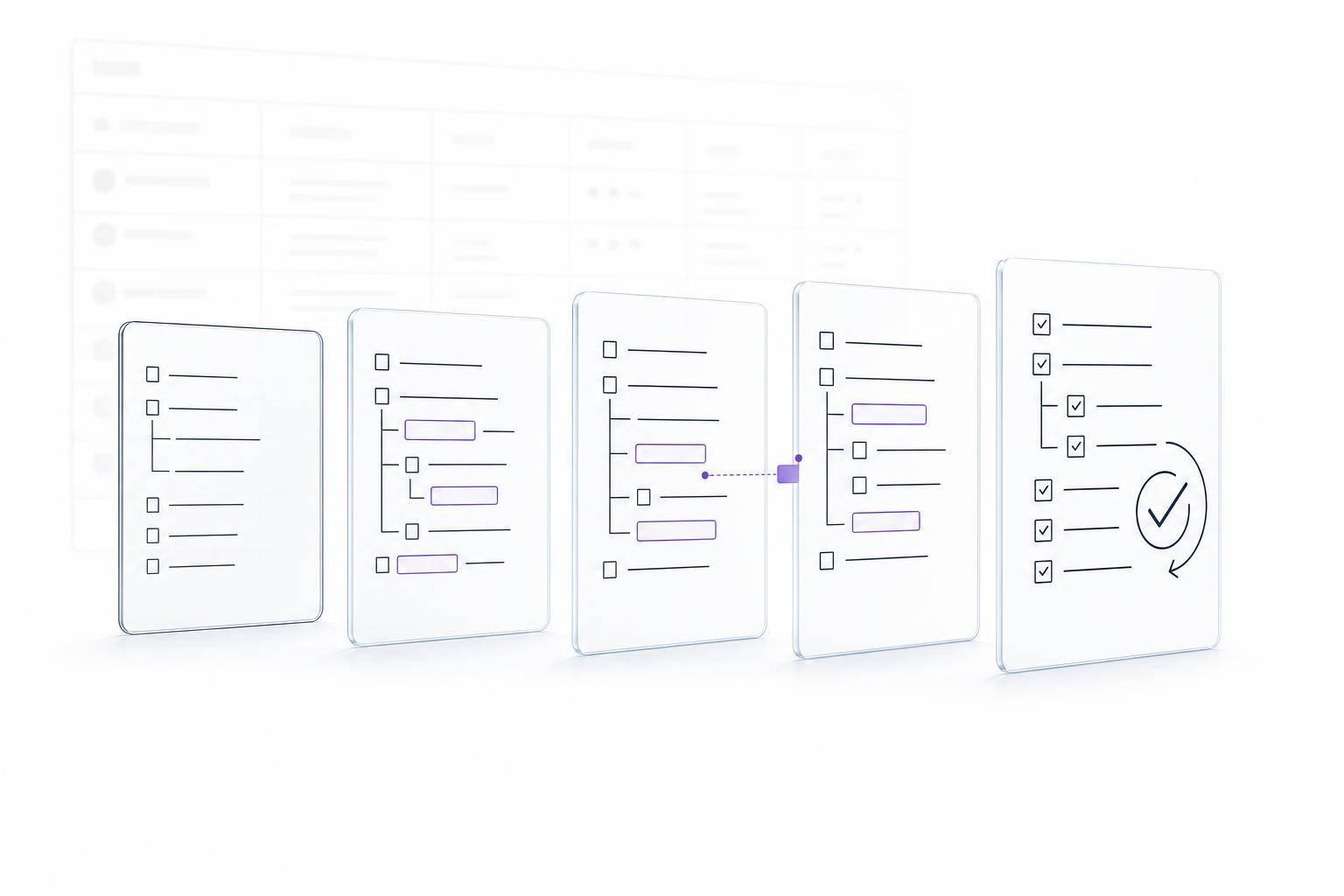
If I run AI gap analysis the right way, I can catch missing requirements, weak proof, conflicting statements, and submission-rule problems before I submit. That is the main point.
Here’s the short version:
- I review the entire solicitation package, not just the main RFP
- I compare each requirement to the exact proposal location
- I sort issues into clear gap types, like missing, partial, unclear, or noncompliant
- I check both content quality and submission rules
- I fix high-risk items first, then run a targeted recheck and a full sweep
- I use AI for review support, but people still approve the final submission
That matters because small mistakes can cause big problems. A missing certification, wrong file name, bad page count, or unsupported claim can hurt scoring or block acceptance. In many proposal teams, even a single P1 issue can outweigh 10+ minor edits.
The process is simple when I keep it disciplined:
- Build one locked source file set
- Create a traceable requirement list
- Map each requirement to a response
- test proof, consistency, and rule-following
- Rank fixes by risk
- Recheck after edits
- Use a final human gate before upload
Bottom line: AI helps me find likely gaps fast, but it does not replace contracts, pricing, legal, security, or proposal leadership review.
This guide explains how I would use that process in a clean, repeatable way.
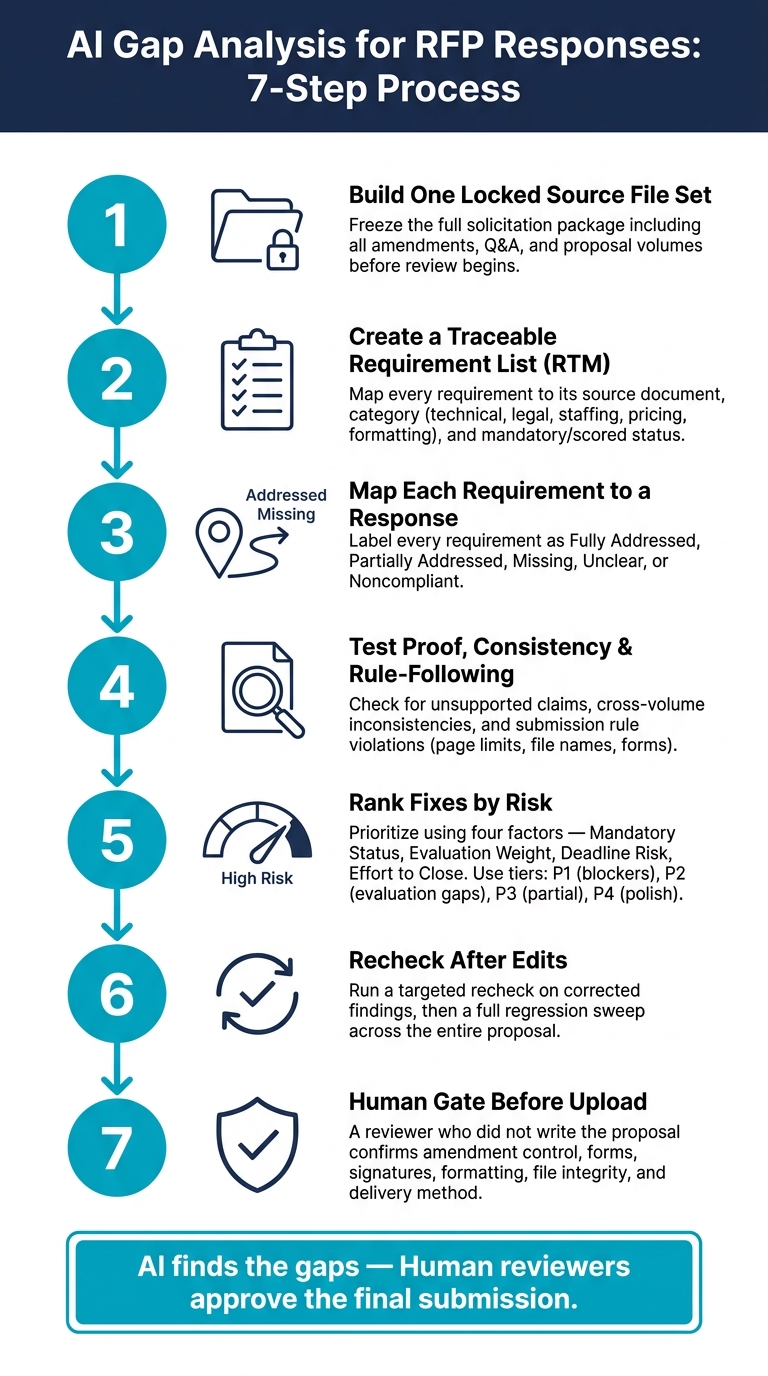
AI Gap Analysis for RFP Responses: 7-Step Process
Prepare Your Source Documents and Inputs
Before you run any AI review, put together one controlled source package. This step matters more than people think. If you miss an amendment or leave out the official Q&A, the review can show gaps that don’t exist – or worse, miss gaps that do.
Required inputs for a reliable review
Start with the full solicitation package. That includes the RFP, instructions to offerors, evaluation factors and subfactors, statement of work or performance work statement, contract terms and conditions, all required forms, exhibits, pricing schedules, and any security or technical attachments. Then add every amendment and the official Q&A.
On the proposal side, include your current draft across all volumes:
- Technical
- Management
- Staffing
- Past performance
- Pricing
- Administrative
You should also include approved support material, such as certifications, resumes, reference details, security documentation, subcontractor commitments, and pricing calculations.
Version control is a big deal here. Use a consistent naming format, such as Solicitation_Amendment-02_2026-09-15.pdf, and keep a simple manifest that logs each file’s document type, amendment number, publication date, and status: active, superseded, or reference only.
Keep page numbers, headings, subsection IDs, table labels, attachment names, and paragraph numbering intact. That way, every finding can be traced back to the source. And don’t overwrite original files. Amendments can change requirements, deadlines, and page limits, so you need a clean record.
Once the source package is complete, freeze the file set before you start extracting requirements.
Build a traceable requirement set
Next, turn each requirement into a requirements traceability matrix (RTM). Each row should show the source, requirement type, owner, evidence needed, and proposal location.
Group requirements into clear buckets: technical, legal and contractual, security and privacy, staffing and key personnel, pricing and financial, formatting and page limits, and submission administration.
For each requirement, mark whether it is:
- Mandatory
- Scored
- Informational
- Conditional
That distinction matters. A missing mandatory form is not the same problem as a weak narrative response.
| RTM Field | What It Captures |
|---|---|
| Requirement ID | A stable reference for ownership and discussion |
| Source citation | Document, section, page, and paragraph |
| Category | Technical, legal, security, staffing, pricing, formatting, or administrative |
| Mandatory or scored | Pass/fail compliance vs. evaluated content |
| Owner | The proposal lead or subject-matter expert responsible |
| Required evidence | Certification, resume, reference, calculation, or attachment needed |
| Proposal location | Draft volume, section, and page where the response appears |
| Compliance status | Open, drafted, compliant, partial, or not applicable |
A good RTM helps the AI answer three plain questions for every row: What does the buyer require? Where is it stated? Where does the proposal respond?
With the RTM in place, the review can move from file intake to requirement-by-requirement analysis.
Where Narwin.ai fits in the process
Narwin.ai can support the intake and analysis step once the source package and RTM are already in place. It can help organize solicitation information, analyze requirements, and flag compliance gaps. But the controlled source package and RTM are still the records you rely on.
sbb-itb-bb3960c
How to Run an AI Gap Analysis Step by Step
Once your RTM is ready, run the review in three passes: requirement mapping, content validation, and submission compliance. Start with an exact match between each requirement and the draft response.
Map requirements to exact proposal locations
The first pass is simple matching. For every row in your RTM, the AI should find the exact spot in the draft that answers it. Not just a general section. You want a precise location: volume, section, page, table, attachment, or completed form.
Each requirement should get one of five labels:
| Classification | What It Means |
|---|---|
| Fully addressed | Direct, complete answer with the right proof in the right location |
| Partially addressed | Some parts are answered, but needed detail, roles, dates, or metrics are missing |
| Missing | No meaningful response appears anywhere in the draft |
| Unclear | Related content is there, but the connection to the requirement is vague |
| Noncompliant | The response conflicts with an instruction or breaks an explicit rule |
Mark a requirement as unclear when the draft mentions the topic but does not answer the exact requirement. For example, a security paragraph that says the company "prioritizes data protection" does not meet a requirement to describe encryption at rest, encryption in transit, incident notification timelines, and control ownership. The AI should point out those missing sub-elements instead of treating the paragraph as compliant just because it includes security terms.
Check quality, evidence, and consistency
The second pass checks substance, not just whether something exists on the page. Flag claims that are missing dates, metrics, scope, or proof. A line like "we provide rapid implementation" sounds nice, but it falls short if the requirement calls for deployment within 30 calendar days. It does not give the schedule, milestones, staffing, dependencies, or acceptance criteria. The AI should flag that gap and say exactly why it misses the mark.
Consistency across volumes matters just as much. If the technical volume promises 24/7 support but the staffing plan shows only business-hours coverage, that’s a problem evaluators will spot fast. Same with a management volume naming one project manager while the résumé appendix names another. Or a pricing volume using labor categories that don’t line up with the technical staffing model. Every material claim should tie back to approved proof, such as a past contract, certification, customer-approved case study, or a similar source.
Use those findings to decide what needs fixing before the compliance pass.
Test submission rules and buyer instructions
The third pass is a separate pass/fail review against the solicitation instructions. Check required forms, authorized signatures, certifications, representations, section order, file format, file naming conventions, page limits, font and margin rules, and attachment completeness. Amendment updates can ripple across multiple volumes. If the period of performance changes, you may need to update the executive summary, staffing plan, schedule, transition approach, and pricing. Run this pass last, after edits, because late changes can push a volume over page limits or break required formatting.
Record every finding so the next step can rank fixes and rerun the review. Feed the compliance findings into the fix list, then run the analysis again after edits.
Review Outputs, Prioritize Fixes, and Recheck
A complete AI gap analysis should leave you with more than a list of issues. It should give the team a requirements traceability matrix, a gap and risk register, flagged passages, evidence requests, consistency alerts, and a prioritized action queue.
A short status view helps too. It lets the team see, at a glance:
- Open mandatory items
- Heavily weighted evaluation gaps
- Findings waiting on outside input
- Overdue actions
- Verified closures
Use the findings register to turn each gap into an assigned fix.
Use a findings table to assign corrective action
The findings table is the working document for review meetings. It turns AI output into something people can act on. Each row should include enough detail so that anyone who picks it up can see what’s wrong, where it appears, who owns it, and what “done” means.
| Field | What to record |
|---|---|
| Requirement reference | RFP section, clause, amendment, or Q&A item number |
| Finding type | Missing, partial, unsupported, inconsistent, unclear, or noncompliant |
| Source location | Where the requirement appears in the solicitation |
| Proposal location | Page, section, table, figure, or volume affected |
| Severity | Critical, high, medium, or low |
| Evaluator impact | Effect on compliance, technical scoring, confidence, or price evaluation |
| Corrective action | The exact change needed – not "improve section", but a specific fix |
| Owner | Proposal manager, SME, contracts, pricing, editor, or executive reviewer |
| Supporting evidence | Approved source, such as a contract record, résumé, past-performance reference, cost model, certificate, or technical artifact |
| Completion status | Open, in progress, ready for review, verified, or accepted with documented risk |
Prioritize by impact, not volume. One missing mandatory certification can create more submission risk than a dozen small wording edits.
Rank each finding using four factors:
- Mandatory status
- Evaluation weight
- Deadline risk
- Effort to close
A simple tier system works well:
- P1 for submission blockers
- P2 for heavily weighted evaluation gaps
- P3 for partial or inconsistent responses
- P4 for polish
Escalate anything that has high impact and takes time to close. For example, a missing customer reference that needs client permission and contract verification should move ahead of a simple sentence rewrite, even if both carry the same severity label.
Close the loop with a repeatable review cycle
Once owners update the proposal, recheck the edited items before you run a full sweep. Use this cycle: extract → map → classify → prioritize → assign → revise → recheck → approve. Each step should have a clear owner and a defined completion signal.
After revisions are made, start with a targeted recheck for every corrected finding. Confirm that the requirement is answered, the proposal location is right, and the evidence supports the claim.
Then run a full regression sweep across the entire proposal. Why? Because one change often triggers others somewhere else. Add a senior engineer to the technical approach, for example, and you may also need to update the staffing plan, résumé appendix, labor-category mapping, workload assumptions, and pricing workbook.
The recheck should compare the full response against the latest solicitation and all amendments – not just the edited paragraph.
Only mark a finding closed when the answer is present, traceable, evidence-supported, internally consistent, and compliant with submission rules. A status update alone is not enough for P1 or P2 items.
Every closed finding should link to objective evidence, such as a revised page reference, reconciled spreadsheet, signed form, or recorded approval. That gives you an audit trail and helps stop optimistic status updates from hiding real submission risk.
Limits of AI Review and Final Submission Control
After the recheck, shift from AI findings to human submission control. AI can point out likely gaps. But only people can confirm compliance, approve pricing, and give final sign-off.
What AI may miss or misread
Some content is just hard for AI to read correctly. Scans, handwritten notes, merged tables, rotated text, multi-column layouts, and split requirements can all throw off extraction. Footnotes, headers, footers, and text inside graphics are common trouble spots too.
Cross-references are another weak area. A clause may point to a separate attachment, form, statement of work, or another solicitation section. AI may not link that back to the original requirement, which can leave a hole in the review.
Conditional language is a big risk. Phrases like "if applicable", "as requested", "when exercised", "unless otherwise specified," and "or equivalent" can change whether a requirement applies to your offer at all. AI may read a conditional item as mandatory, or miss the condition altogether. A human reviewer needs to check the trigger and decide whether the condition applies.
Amendment precedence needs extra care. If an AI system is working from an older RFP version, its findings may reflect old page limits, deadlines, or clauses. Use the latest official solicitation package, including every amendment, attachment, question-and-answer notice, and revised form. Then re-run the requirements matrix after each amendment.
There’s also the risk of unsupported assumptions in AI-generated drafts. A draft may say a proposed engineer holds a required clearance, or that a subcontractor accepted certain terms, even when there is no proof behind it. Every material claim needs approved source support, such as:
- a résumé
- a certification
- a signed agreement
- a pricing workbook
- a policy
If that evidence doesn’t exist, the statement should be removed, qualified, or sent to the right owner for review, not accepted just because it sounds right.
Final approval checklist before submission
Use a final human gate, not the AI report by itself. The last check before upload should come from someone who did not write the proposal. Fresh eyes often catch things the writing team no longer sees: old amendment versions, missing acknowledgments, wrong file names, or page-count mistakes. And yes, formatting and page-limit violations can still knock out a strong proposal.
| Final check area | What to confirm |
|---|---|
| Amendment control | Latest amendment number, closing date, and acknowledgment of every required amendment |
| High-risk findings | Each high-risk finding validated by the responsible technical, pricing, contracts, legal, or security reviewer |
| Forms and signatures | All required certifications, representations, acknowledgments, and signature blocks are complete |
| Formatting rules | Page limits, margins, font size, volume structure, file names, and file formats match solicitation instructions |
| Coverage | Every requirement has a final proposal location or a documented "not applicable" rationale |
| Delivery | Submission deadline, time zone, authorized delivery method, portal, recipient, and receipt process confirmed |
| File integrity | Opened after export to verify no pages, tables, signatures, hyperlinks, or attachments were corrupted |
The completed matrix is more than a working document. It is proof that the review took place. It should show who reviewed each requirement, when the review happened, what evidence supported the response, and how open issues were resolved or escalated. A requirement should be marked closed only after a human reviewer has checked the final file and confirmed that the supporting evidence is there.
AI can show where a proposal may be incomplete. Only authorized human reviewers can confirm that the final response is accurate, supportable, compliant, and ready to submit.
Once those checks are done, the proposal is ready for final sign-off.
Conclusion: Key Steps to Use AI Gap Analysis Well
AI gap analysis works best as a submission check, not as the final word. Its job is to help your team spot missing answers, thin support, and formatting issues before the deadline. It should not replace the judgment that only people can bring to a proposal review.
Start with complete, up-to-date source files and a traceable set of requirements. If the inputs are missing pieces, the findings will miss things too. When you run the review, focus first on the items that can cause the most trouble:
- Missing requirements
- Mandatory clauses
- Unsigned forms
- Formatting violations
Handle lower-impact issues after that. Once your team makes fixes, rerun the checks that matter and confirm each finding is closed in both the proposal and the compliance matrix. That close-and-check-again loop is what turns a simple scan into a disciplined review.
For teams that begin earlier in the capture process, Narwin.ai can help with solicitation analysis and risk signals before proposal work starts. The same guardrails still matter: verified source files, traceable requirements, prioritized fixes, and human sign-off before submission.
AI surfaces missing or weak requirements; human reviewers approve the final response.
FAQs
How accurate is AI gap analysis for RFPs?
AI gap analysis for RFPs is usually very effective. Accuracy rates often fall between 75% and 97%, which is often better than the 80% to 85% range common in manual reviews.
It works best when RFPs are clearly structured and well formatted. In those cases, AI can move through the document fast and spot missing items with a high level of precision.
Where AI tends to shine is in finding:
- Mandatory requirements
- Technical specifications
- Compliance gaps
That said, unusual formatting or requirements buried across different sections can make the results less precise. So while AI does a strong first pass, human review still matters for final accuracy.
What should I include before running the review?
Before you run a review in Narwin.ai, set up your workspace with your organization name and website. If you want better gap checks and stronger proposal drafts, add a bit more detail too: certifications, safety records, core expertise, past projects, and case studies or references.
It also helps to gather all solicitation documents before you start. That includes the base RFP, amendments, Q&A releases, and any referenced attachments.
If even one document is missing, compliance tracking can miss key requirements. And that can leave critical gaps in your review.
Who should approve the final proposal?
The final proposal should go through a strict, multi-stage review by experienced professionals before it gets approved. AI can spot gaps and flag risks, but the last call still belongs to people.
Before submission, the team should run a final compliance audit to make sure every requirement is fully addressed, all references are correct, page and paragraph numbers line up with the final document, and any amendments are fully reconciled.