
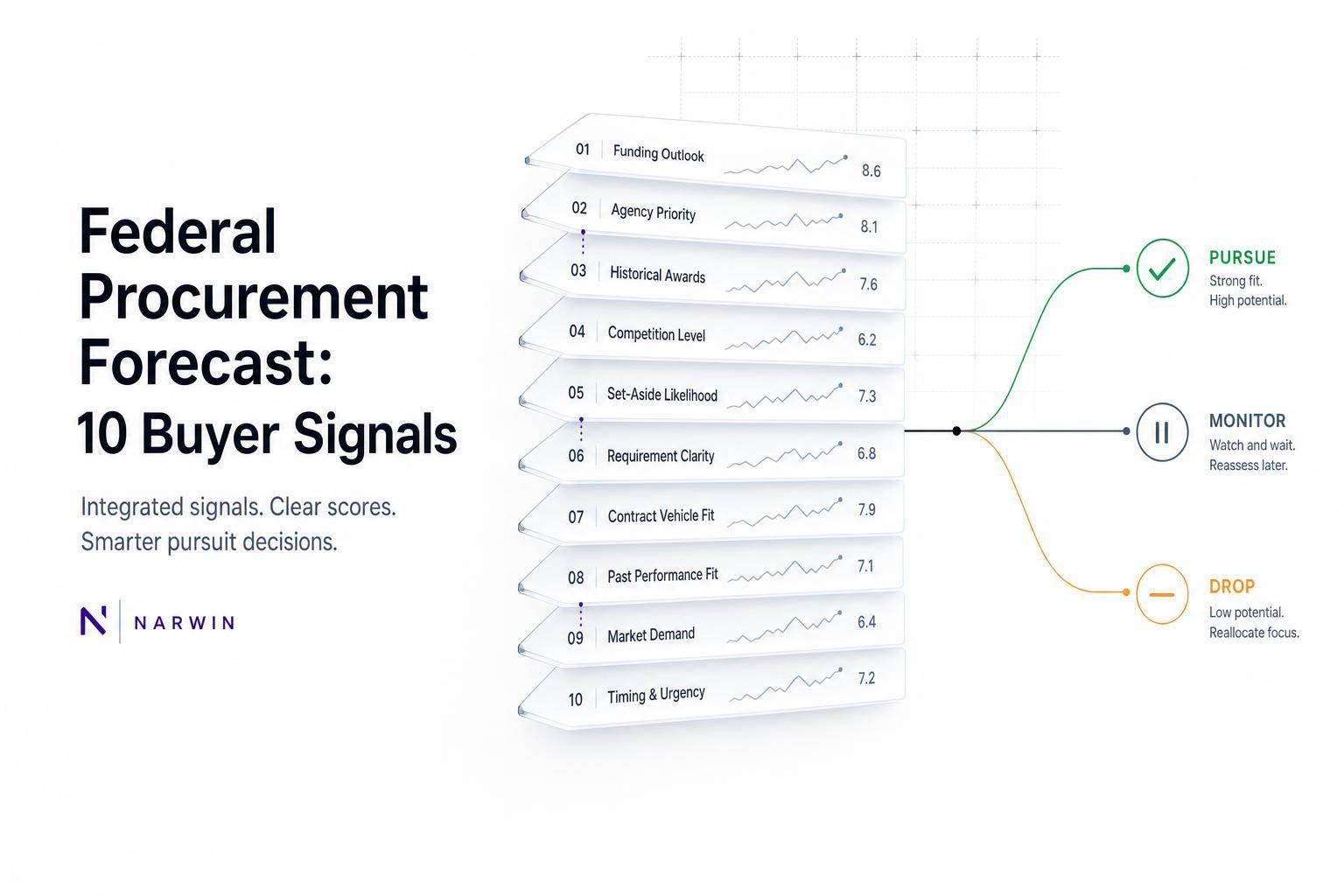
A federal forecast is a maybe, not a bid. I’d only move a record toward pursuit when timing, access, fit, and recent buyer activity line up.
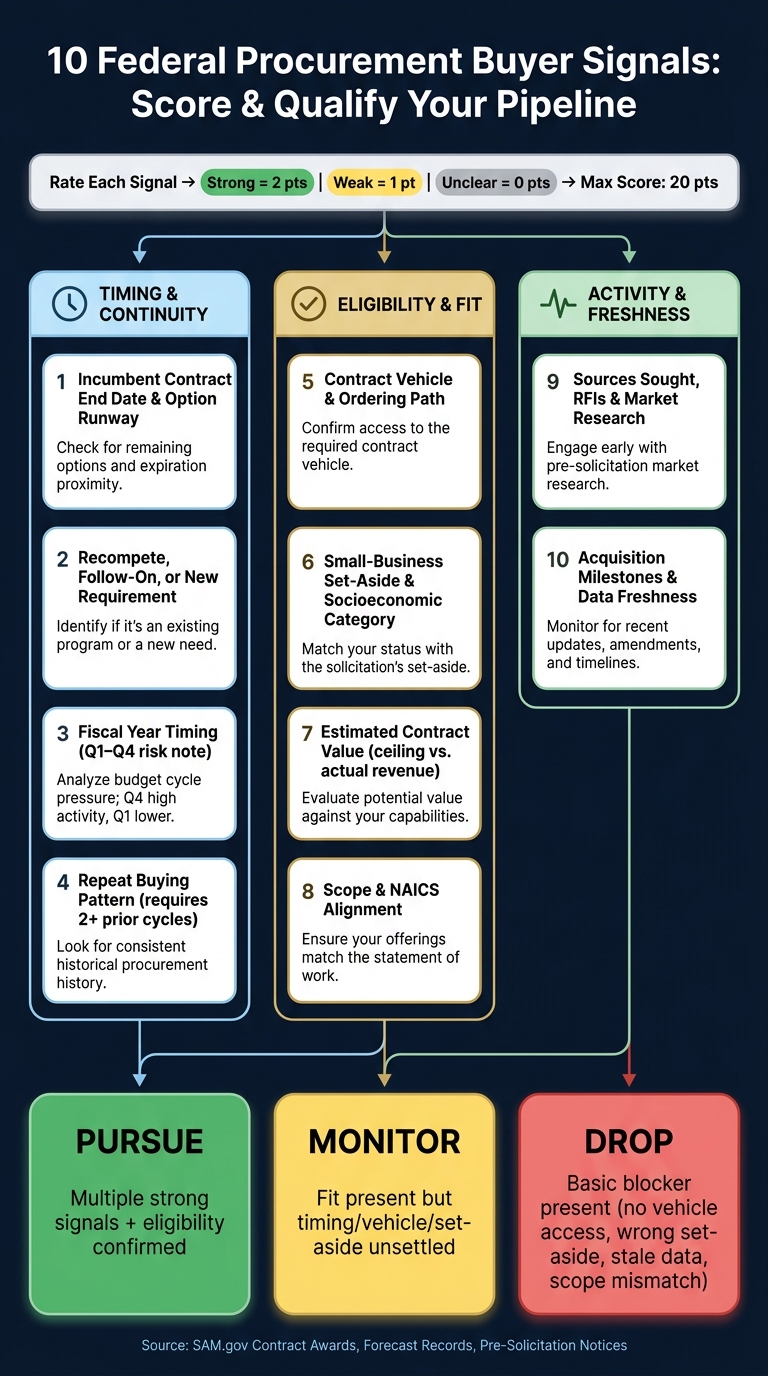
Here’s the short version: I use 10 signals to sort each record into pursue, monitor, or drop. The strongest signs are an expiring incumbent contract, a clear follow-on need, a vehicle I can use, a set-aside I match, and recent SAM.gov market research or milestone updates. If those signs are missing, I treat the forecast as planning noise.
What I check first:
- Timing: incumbent end date, recompete status, fiscal-year quarter, repeat buying pattern
- Eligibility: vehicle access, set-aside status, value, scope, NAICS fit
- Activity: sources-sought/RFI activity, milestone dates, last update date
A simple way to score it is 2 points for strong, 1 for weak, 0 for unclear. Across 10 signals, that gives me a 0–20-point screen before I spend bid hours, pricing time, or teaming effort.
| Signal group | What I’m looking for | What it tells me |
|---|---|---|
| Timing | End dates, follow-on need, quarter, repeat buys | Whether the buy is likely to move |
| Eligibility | Vehicle, set-aside, value, scope, NAICS | Whether I can compete at all |
| Activity | RFIs, sources-sought, milestones, updates | Whether the agency is still moving |
If I see a missed quarter, no update, and no related SAM.gov notice, I lower the score fast. If I see repeat buying, a near-term contract end, and recent market research, that record moves much higher on my list.
Bottom line: I don’t treat a forecast like revenue. I treat it like an early signal that must be checked against current public records.
10 Federal Procurement Buyer Signals: Pursue, Monitor, or Drop
Checklist Part 1: Timing and Buying Continuity Signals
These first four signals tell you whether a forecast is likely to move. But don’t take the forecast at face value. Each signal should be backed by evidence you can verify in forecasts, award records, or pre-solicitation notices.
1. Incumbent Contract End Date and Option Runway
Start with the incumbent award in SAM.gov Contract Awards. Pull the award number, incumbent, period-of-performance start and end dates, base period, option periods, total potential value, and the date of the latest modification. Your main timing anchor is the final exercised option end date – not the forecast date.
Put simply: use the award record to ground your timing before you trust what’s in the forecast.
| Runway stage | Remaining time | Action |
|---|---|---|
| Early runway | More than 12 months to final option end | Monitor forecast and market research activity |
| Planning window | 6–12 months remaining | Validate the vehicle, acquisition strategy, and likely solicitation path |
| Active pursuit window | Fewer than 6 months remaining, or presolicitation posted | Assign capture resources and track amendments closely |
Also watch for bridge contracts and short extensions. They usually mean the agency still needs the service, but the full recompete got pushed. So yes, the opportunity may be real – it may just land later than the forecast says.
As a quick gut check, use the five-year service-contract limit, while keeping in mind that exceptions do exist.
2. Recompete, Follow-On, or New Requirement
Once timing looks plausible, figure out whether the action continues an existing requirement or starts from scratch. This matters a lot. A recompete tied to an expiring award is a much stronger signal than a vague new requirement with no predecessor and no market-research trail behind it.
Check the forecast, any sources-sought notice, and SAM.gov award records for terms like recompete, follow-on, renewal, or replacement. Then compare the forecasted requirement to the predecessor award across four points:
- Scope
- Contract type
- Estimated value
- Timing
If those line up closely, you’ve got continuity. If they don’t, the old award may not tell you much about what’s next.
Classify each forecast into one of five buckets: recompete, follow-on, renewal, replacement, or net-new. Net-new requirements should stay in monitoring status until you see support from a sources-sought notice, a budget reference, or a named program office. Without that, it’s just noise.
3. Fiscal Year Timing
Record both the fiscal year and the anticipated quarter. Quarter matters.
A Q4 target can move for all sorts of reasons: year-end workload, funding shifts, protests, approvals, or a continuing resolution. If the award target falls in Q4, or the agency is operating under a continuing resolution, treat the date as tentative and check again after budget changes.
4. Repeat Buying Pattern
Look back at least two or three prior procurement cycles. You’re trying to spot a pattern, not a one-off event. Review whether the same agency keeps buying the same kind of work from the same program office, under the same NAICS, with the same service type, around the same time of year, and through the same vehicle.
One prior award isn’t enough. Require at least two cycles before you label something a repeat pattern.
When the same agency keeps buying substantially similar work in the same fiscal period, and the predecessor is nearing its final option year, that’s one of the strongest timing signals in forecast data.
Give the highest scores to timing signals that are backed by clear evidence. Leave vague net-new items in monitoring.
Strong timing signals matter only if the opportunity also fits your vehicle and set-aside eligibility.
sbb-itb-bb3960c
Checklist Part 2: Eligibility and Fit Signals
Use these signals to screen for access and fit before you spend time chasing the deal. Once timing looks real, the next step is simple: can you actually compete?
5. Contract Vehicle and Ordering Path
Start by recording the buying path. That could be a standalone contract, GWAC, IDIQ, multiple-award contract, GSA Schedule, BPA, task order, or delivery order. Then note the parent vehicle, the ordering agency, the contracting office, the contract number, and the expected order type.
Before you treat a forecast as something you can act on, run a four-column access check:
| Check | What to confirm |
|---|---|
| Named vehicle or standalone path | Which vehicle is listed, or is this an open-market solicitation? |
| Direct vehicle access | Is your company an awarded contractor on that vehicle? |
| Partner path and restrictions | If not a direct holder, who are the eligible primes, do they accept subs, and does the vehicle’s ceiling, ordering period, and scope domain still cover this work? |
If you don’t have direct access to the vehicle, dig into the prime contractors that can receive orders. Review their prior task orders, award notices, subcontracting-plan requirements, and performance history. Then confirm that the expected work can legally be subcontracted and that the prime’s contract includes the needed labor categories and security capabilities.
If the vehicle shuts you out, stop here and move to the set-aside check.
6. Small-Business Set-Aside Status and Socioeconomic Category
Record the forecasted acquisition strategy exactly as written: small-business set-aside, 8(a), SDVOSB, WOSB, EDWOSB, HUBZone, sole source, unrestricted, or undetermined. Also note whether that label applies to the prime contract, a subcontracting objective, or a task order. Those are NOT the same thing.
Forecast language can change before the solicitation posts. So when it does post, reconfirm the set-aside category, NAICS code, size standard, and certification requirements. Each socioeconomic program has its own rules around ownership, control, size, location, and individual eligibility.
7. Estimated Contract Value
Break the value into parts before you score the economics: ceiling, base-period value, option value, and likely annual order value.
A $12,500,000 ceiling on a five-year IDIQ is not the same thing as $12,500,000 in expected revenue. That’s where a lot of teams get tripped up.
Model three cases before deciding whether the deal is worth pursuing:
- full ceiling
- moderate use
- low-order
Once the economics make sense, move to scope and NAICS fit.
8. Scope and NAICS Alignment
Keyword matches alone won’t cut it. Compare the scope against the deliverables, labor categories, certifications, place of performance, security clearances, and contract type.
If the forecast points to classified work, 24/7 operations, or facility clearance, mark those as go/no-go conditions right now. Don’t kick them down the road to proposal development. And keep one thing in mind: the solicitation controls NAICS and requirements, so treat forecast data as a screening layer, not the last word.
Before you move forward, run a quick fit test:
- Can you perform the stated work?
- Do you meet the NAICS size standard?
- Do you hold the required certification?
- Can you access the vehicle?
- Can you staff the place of performance and satisfy clearance requirements?
If any required item fails, move the opportunity to monitoring.
Only after access and fit pass should you score market-activity signals.
Checklist Part 3: Activity and Freshness Signals
Once the vehicle and set-aside checks are done, make sure the requirement is still active. These two signals help you decide whether to put capture time into it now or leave it on a watch list.
9. Sources Sought, RFIs, and Market Research Activity
After fit checks out, look at whether the agency is actually moving.
Search SAM.gov by title, office, NAICS, and location. Then match related notices based on scope, timeline, and office. Don’t lean on one keyword alone. Match several identifiers across records so you know you’re looking at the same requirement.
Treat sources-sought responses for what they are: market research, not a promise to buy.
What matters most is progression, not a one-off notice. If an agency puts out a sources-sought notice, then releases a draft Performance Work Statement, then hosts an industry day, that shows market research is getting more specific over time. That pattern is a stronger buyer signal than a single old notice sitting in a forecast database.
10. Acquisition Milestones and Data Freshness
Compare the last update date to the target quarter and the listed milestone. Then check whether milestone fields – acquisition planning, draft solicitation release, proposal due date, evaluation, or anticipated award – have moved forward or gone quiet.
A record updated recently with milestones that still line up is more actionable than one that sat unchanged through a missed quarter. If a forecast misses its expected quarter and there’s no update and no related SAM.gov activity, treat it as stale or delayed. Lower its priority and dig in before spending any capture time. Search for an amended notice, revised forecast, cancellation, bridge action, or alternate vehicle.
A missed quarter is a review trigger, not proof the procurement is dead. Federal requirements slip for all kinds of reasons: funding, mission changes, acquisition strategy revisions, protests, and internal approvals.
You also need to watch for material changes in any revision, including scope, estimated value, contract vehicle, NAICS code, or set-aside status. Any one of those shifts calls for a fresh go/no-go. If a forecast moves from unrestricted to a small-business set-aside, or if the estimated value changes in a major way, that can affect your eligibility, teaming plan, and bid economics. Record the old and new values, assess the business impact, and run a fresh go/no-go before you move ahead.
Use this simple scoring rule to keep your pipeline honest:
| Signal pattern | Activity score | Freshness score | Pipeline action |
|---|---|---|---|
| Forecast only; no related notice | 0 | – | Monitor |
| Forecast plus one recent RFI or sources-sought notice | 1 | – | Research and position |
| Repeated notices, industry day, or draft solicitation | 2 | – | Assign owner; begin teaming |
| Record updated recently; milestones current | – | 2 | Prioritize |
| Record old; supporting activity exists | – | 1 | Verify before advancing |
| Missed quarter; no update or related notice | – | 0 | Downgrade; set verification deadline |
Score activity and freshness separately. Low scores stay on watch. High scores move to pursuit.
Use those two scores to rank the record in your worksheet.
Conclusion: Score the Signals and Build a Qualified Pipeline
A federal forecast is an early planning signal. It is not a solicitation, and it is not a promise of award.
That’s why it helps to focus on records where timing, access, fit, and freshness all line up. When those signals point in the same direction, you have something worth a closer look. When they don’t, you can save time and move on.
Use a simple scoring method: rate each signal as Strong, Weak, or Unclear, then assign 2, 1, or 0 points. Pursue an opportunity only when several signals are strong and your eligibility is confirmed. Monitor it when the fit is there but timing, vehicle access, or set-aside status is still unsettled. Drop it when there’s a basic blocker, like no vehicle access, the wrong socioeconomic status, scope that doesn’t match, or data that’s too old to trust. And yes, write down the reason for each call so your pipeline stays auditable.
If you want to speed up screening, Narwin.ai can help monitor public bid sources, match opportunities to your profile, and surface buyer signals. Just treat it as a screening layer, not the final call.
Build a Simple Buyer-Signal Scoring Worksheet
Use the worksheet below to turn the 10 signals into a quick pursue, monitor, or drop decision.
| Signal | Strong evidence | Weak evidence | Use |
|---|---|---|---|
| 1. Incumbent end date and option runway | Verified incumbent end date or option end | Estimated or incomplete end date | Determines likely recompete window |
| 2. Recompete, follow-on, or new requirement | Clear predecessor/follow-on relationship | Similar prior buy but unclear relationship | Indicates buying continuity and likely competition |
| 3. Fiscal-year timing | Milestone aligns with fiscal timing | Generic quarter or outdated fiscal-year date | Tests whether the timing is actionable |
| 4. Repeat buying pattern | Two or more similar past buys | Occasional or partially comparable purchases | Supports demand and continuity assessment |
| 5. Contract vehicle and ordering path | Named vehicle and accessible ordering path | Vehicle mentioned but eligibility or ordering path unclear | Determines whether the company can legally and practically compete |
| 6. Small-business set-aside and socioeconomic category | Explicit set-aside and eligibility match | "Small business" language without final category | Functions as an eligibility gate |
| 7. Estimated contract value | Value, ceiling, and duration are clear | Rough estimate with missing duration or funding | Tests economic and capacity fit |
| 8. Scope and NAICS alignment | Scope, NAICS, and capability align | Broad or incomplete description | Measures capability and compliance fit |
| 9. Sources sought, RFIs, and market research | Recent RFI, sources-sought, or draft solicitation | Older or indirect market-research activity | Measures buyer activity and influence window |
| 10. Acquisition milestones and freshness | Current milestones, recent update, and official confirmation | Aging dates or conflicting sources | Determines confidence and review priority |
Track the last verified date and the next expected milestone for every record. Then refresh the score whenever new forecast data, a sources-sought notice, draft solicitation, amendment, or solicitation appears.
FAQs
How many signals should I verify before pursuing a forecast?
Check a full set of signals, not just one score. Federal buying cycles often run 9 to 18 months, so early qualification based on data can save a lot of time.
Before you chase a forecast, review at least seven core factors: technical fit, compliance readiness, past performance, customer relationship strength, price competitiveness, delivery capacity, and overall risk. Then sanity-check the big signals against the official portal and the solicitation documents.
A single number can look neat on a dashboard. But federal deals rarely work that way. One weak spot, like compliance or delivery capacity, can throw the whole effort off track.
What should I do if the forecast misses its expected quarter?
Treat it as a signal to re-check your pipeline and overall approach. Start with official sources like SAM.gov to look for updates or amendments. Then dig into public records to confirm whether the requirement is still active or whether funding has moved elsewhere.
You can also use Narwin.ai to review PALT data and see how the agency has acted in the past. If the chance of delay looks high, add buffer time to your plan, line up key reviewers early, and keep shaping the requirement through Sources Sought notices or RFIs.
Can I pursue a forecast if I don’t have access to the listed vehicle?
If an opportunity is tied to a specific contract vehicle, that usually means the agency plans to award it only within that vendor pool. If you don’t hold that vehicle, you’re usually not in the running.
Before you spend time or money on it, check whether the solicitation is legally limited to those pre-qualified vendors.