
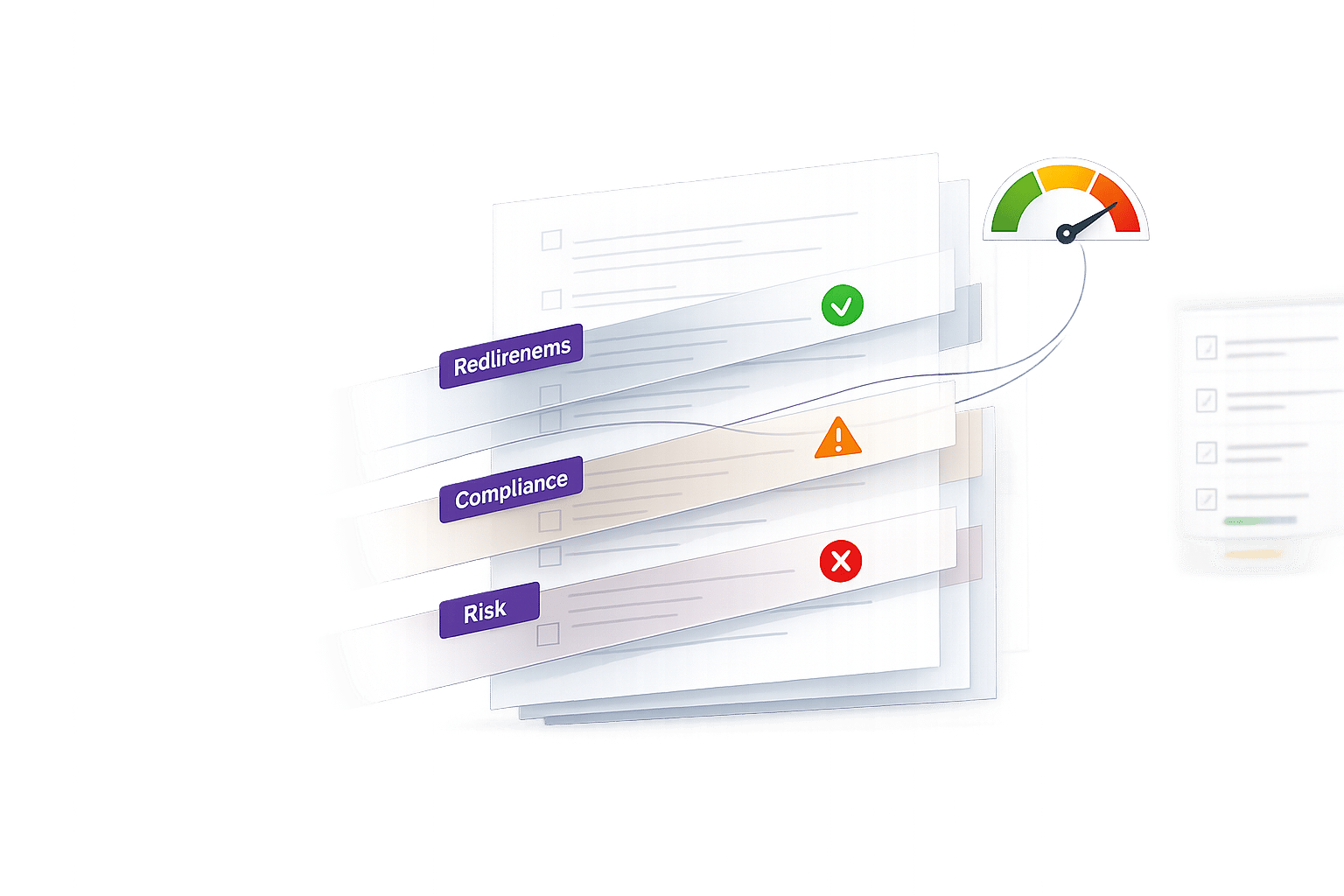
Manually reviewing RFPs is time-consuming and error-prone. Missing a single requirement could disqualify your bid, no matter how qualified you are. Narwin simplifies this process by using AI to analyze RFPs in under 10 minutes, extracting requirements, identifying risks, and providing actionable insights to help you decide whether to bid.
Key Highlights:
- Quick Analysis: Processes documents up to 2,000 pages in minutes.
- Automated Insights: Extracts compliance requirements, technical questions, and evaluation criteria.
- Risk Detection: Flags gaps and potential issues, like tight deadlines or missing certifications.
- Go/No-Go Recommendations: Offers clear bid decisions based on a color-coded risk score.
- Customizable Focus: Lets you prioritize specific sections or requirements using special instructions.
With tools like compliance mapping, risk scoring, and buyer intel, Narwin streamlines RFP analysis, saving time and helping teams focus on opportunities they’re more likely to win.
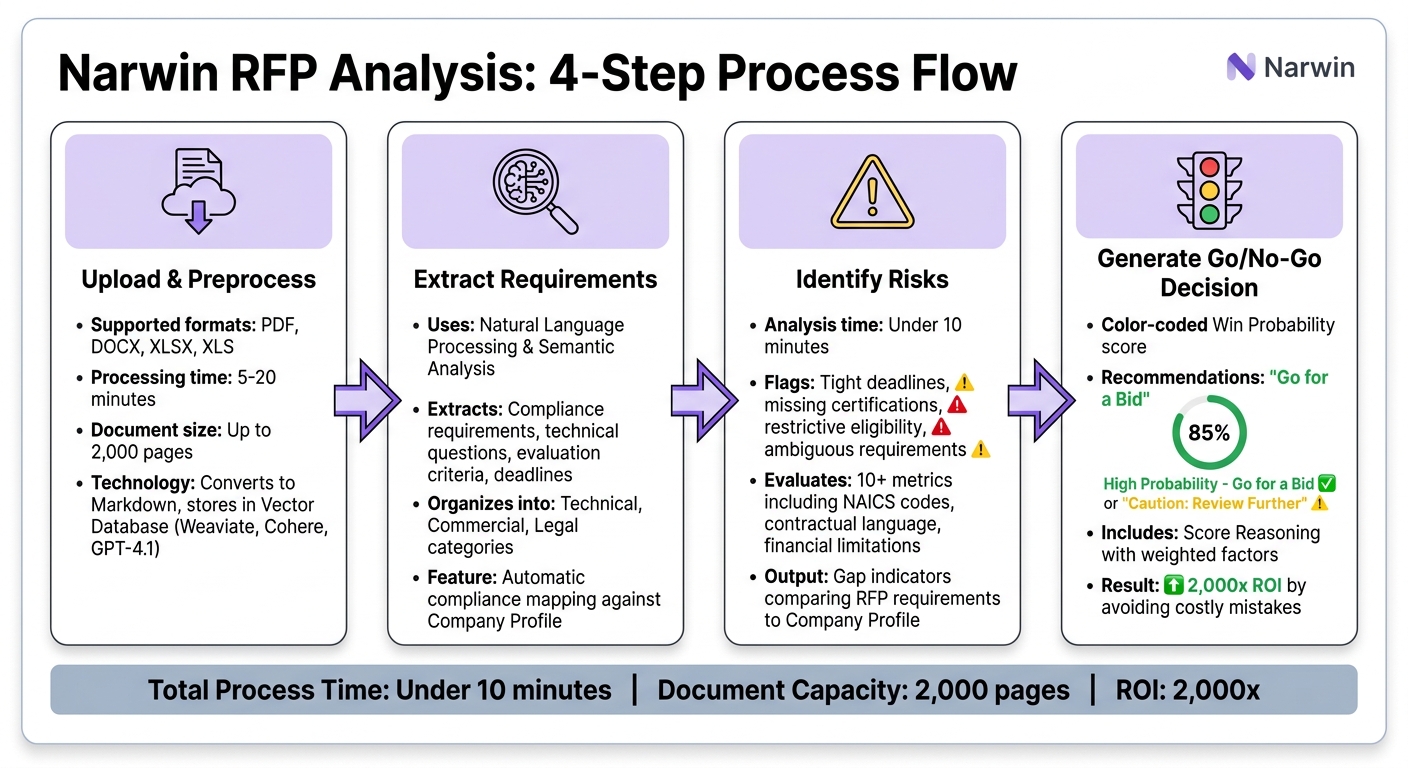
How Narwin Analyzes RFPs in 4 Steps: From Upload to Go/No-Go Decision
How to Upload and Process RFP Documents in Narwin
Document Upload Process
Uploading your RFP into Narwin is quick and straightforward. Head over to RFP Analysis Reports and click Analyze an RFP to begin. If you’ve already identified an opportunity in either the Government Opportunities or Matched Opportunities sections, you can simply select Generate RFP Analysis Report from the listing. This option automatically populates details like the agency name and submission deadline.
Narwin supports file formats like PDF, DOCX, XLSX, and XLS, which are commonly used for RFPs. Before uploading, you have the option to include Special Instructions in plain text. For example, you might note, "Focus on structural steel sections" or "Prioritize solar and BIPV requirements." These instructions guide the AI to focus on critical aspects of your bid. If you’re working with multiple files or prefer centralized storage, you can connect Google Drive through the App Connectors settings. Be sure to check the sync status and manually click Sync if any errors occur.
This streamlined process ensures your document is ready for AI analysis as soon as it’s uploaded.
AI Document Preprocessing
Once your document is uploaded, Narwin immediately gets to work. The platform converts the file into Markdown format, breaking down complex formatting into machine-readable text. This step is essential for ensuring the AI can accurately interpret compliance requirements and technical questions, even if the original document has formatting challenges.
After conversion, the extracted data is stored in a Vector Database using Retrieval-Augmented Generation (RAG) technology. Narwin’s tech stack – powered by Weaviate, Cohere, and GPT-4.1 – enables precise searching and retrieval of specific sections, even in massive documents of over 2,000 pages. Depending on the file size, preprocessing typically takes between 5 and 20 minutes. Once the status updates to "Completed", you can return to the RFP Analysis Reports to review the results.
This automated process ensures accurate extraction of risks and requirements, aligning with Narwin’s goal of simplifying RFP analysis.
sbb-itb-bb3960c
How Narwin Extracts Requirements Using Natural Language Processing
Identifying Mandatory Requirements
Narwin leverages classifiers and vector databases to pinpoint compliance requirements, technical questions, evaluation criteria, and submission deadlines. Unlike basic Ctrl+F searches that only locate exact keyword matches, Narwin uses semantic analysis to grasp the intent and relationships behind complex contractual language.
Once the requirements are extracted, the platform organizes them by section and category – Technical, Commercial, and Legal. These details are accessible in the Requirement Analysis tab, which acts as a central resource for all clauses and questions. Narwin also performs automatic compliance mapping, comparing the extracted requirements with your Company Profile. This profile includes data like certifications, safety records, and past project information.
If the system identifies any gaps between your profile and the mandatory criteria, it flags these as "gap indicators". This feature works seamlessly during the extraction process, allowing you to see where your profile aligns with the RFP and where adjustments might be needed.
After completing the extraction, Narwin condenses the information into summaries designed to support strategic decisions.
Generating Requirement Summaries
Narwin simplifies lengthy technical sections into summaries and provides "Win Ideas", helping your team zero in on the most critical elements of the RFP. These summaries highlight actionable insights and strategic opportunities that might otherwise get buried in dense documents.
The platform lets you customize the process by using Special Instructions when uploading your RFP. For instance, you can specify, "Focus on structural steel scope. Ignore mechanical and electrical divisions", and the AI will prioritize those areas during extraction. Additionally, the "Chat with RFP" feature allows you to ask follow-up questions directly within the report, helping to clarify ambiguous language without needing to comb through the entire document again.
How Narwin Identifies Risks Through Compliance and Gap Analysis
Risk Detection Methods
Narwin uses AI to scan RFPs for potential risks that could jeopardize your bid. In less than 10 minutes, it can analyze documents as lengthy as 2,000 pages, flagging issues like unrealistic timelines, restrictive eligibility criteria, and missing information – all of which might lead to disqualification.
The platform doesn’t stop at surface-level checks. It evaluates a wide range of risks, including operational challenges (e.g., tight deadlines), financial limitations, and ambiguous requirements that may need clarification. Narwin also reviews contractual language and NAICS code alignment to ensure everything complies with regulatory standards. As Mike W from Yolo County’s Innovation Office puts it:
Narwin’s detailed analysis and suggestions around things like NAICS codes, contractual wording, etc. are very on-point.
By benchmarking over 10 metrics, Narwin provides a thorough risk assessment, helping you identify potential problems early – before you’ve invested significant time or resources. Once risks are flagged, the system maps these findings against your Company Profile to evaluate your eligibility.
Compliance Gap Analysis
Narwin takes things a step further by comparing RFP requirements with your Company Profile, which includes your certifications, safety records, and project history. This process highlights any gaps where your organization doesn’t meet the listed requirements.
For example, if an RFP specifies LEED certification and your profile lacks it, Narwin will flag this as a gap. It even suggests solutions, such as partnering with external firms or subcontractors, to address critical deficiencies. These insights are displayed in the Requirement Analysis and Risks tabs for easy access.
The compliance mapping happens automatically during the document analysis, giving you instant clarity on whether pursuing the contract is feasible. Keeping your Company Profile updated with the latest certifications and project details ensures Narwin’s gap analysis remains accurate – helping you make informed decisions early in the process.
How Narwin Generates Risk Scores and Go/No-Go Signals
How Risk Scores Are Calculated
Narwin evaluates risk scores by matching RFP requirements to your Company Profile. It uses a color-coded win probability bar based on weighted factors like compliance gaps, buyer insights, operational risks, financial stability, and strategic alignment. Each RFP is assessed against more than 10 metrics, ensuring every detail is considered.
One standout feature is Score Reasoning, which breaks down the weighted factors behind the AI’s recommendation. Rather than just showing a score, it explains why an RFP received its rating. For example, it might highlight strong points like certifications or past performance while pointing out challenges such as tight deadlines.
This detailed risk score becomes a key tool for guiding your decision-making process.
Using Go/No-Go Signals for Decision Making
After calculating the risk score, Narwin provides a straightforward recommendation: "Go for a Bid" or "Caution: Review Further." These signals allow teams to make decisions quickly, saving both time and resources.
For RFPs flagged with "Caution", Narwin offers extra tools to help. The Risks tab provides AI-generated tips for addressing gaps, while the "Chat with RFP" feature lets you ask specific questions about problem areas. This system has enabled clients to achieve a 2,000x ROI by avoiding costly mistakes and focusing on opportunities they can win. The go/no-go signals also act as a concise executive summary, simplifying the entire bid qualification process.
How to Review and Use AI-Generated Analysis Reports
What’s Included in the Analysis Report
The analysis report is divided into six key sections: Overview, Buyer Intel, Requirement Analysis, Risks, Profitability, and Analysis Details. Each section is designed to provide clear insights that help you make informed decisions.
The Overview tab acts as your main dashboard. It includes "Win Ideas", which translate the opportunity into actionable strategies, and a color-coded Win Probability score for quick reference. The Requirement Analysis tab organizes all questions, clauses, and deliverables from the RFP into categories – Technical, Commercial, or Legal. It also includes compliance mapping to identify any gaps in your profile.
The Buyer Intel section offers valuable context about the issuing organization, such as its history, previous projects, and AI-inferred priorities. This helps you fine-tune your proposal’s tone and pricing. The Risks tab flags potential challenges, like tight deadlines or strict eligibility requirements, and provides tips for overcoming them. The Profitability section examines whether the project aligns with your financial and operational goals. Finally, the Analysis Details tab gives a detailed breakdown of the scoring methodology behind every recommendation.
How to Export and Share Reports
After reviewing the report, sharing and exporting it is straightforward. Use the "Export" button to choose a format that suits your needs: Word for editing, PDF for presentations, or Excel/CSV for data manipulation. Exports are formatted to match U.S. standards, such as MM/DD/YYYY for dates and $1,234.56 for currency, ensuring compatibility with tools like Microsoft Office, Google Drive, and SharePoint.
For teammates who don’t have direct access to the platform, you can use the "Share with Team" option in the action bar. Workspace administrators can invite specific team members – like estimators, CFOs, or proposal writers – through the "Company Settings" menu. Narwin also integrates with Slack for instant notifications and Notion for centralized document management, making collaboration seamless. If you need to share reports securely, export them as password-protected PDFs and distribute them through your preferred secure channels. To align your team, consider scheduling a quick 30-minute meeting to review priorities and assign tasks based on the report’s findings.
Key Takeaways
How Narwin Simplifies RFP Analysis
Narwin takes the complexity out of RFP analysis by processing massive documents – up to 2,000 pages – in just minutes. Using natural language processing, it extracts key details like compliance clauses, technical questions, and evaluation criteria. These are then mapped against your company’s certifications and project history to pinpoint any gaps. This compliance mapping helps avoid costly mistakes, like being disqualified due to overlooked requirements, before you commit resources to a proposal. By automating these tasks, organizations save time and gain insights, from identifying risks to understanding buyer priorities.
The platform’s Risk Detection and Go/No-Go Scoring tools highlight potential issues such as tight deadlines, strict eligibility rules, or missing information. It also offers actionable tips to address these challenges. Narwin provides a color-coded Win Probability score based on factors like strategic fit, profitability, and compliance, delivering a clear recommendation – whether to proceed with a bid or exercise caution – all in under 10 minutes. This data-driven process has already helped companies generate over $25,000 in added value, enabling smarter, faster decision-making.
Smarter Decisions with Narwin
Narwin’s Retrieval-Augmented Generation (RAG) technology taps into your Knowledge Hub, pulling from past proposals, case studies, and templates to craft responses tailored to the buyer’s criteria. The Buyer Intel feature digs into the issuing organization’s history and priorities, allowing you to adjust pricing and refine your proposal tone. By centralizing collaboration and automating task assignments, Narwin makes the proposal process more efficient and focused.
Clients have reported a 2000x ROI by using Narwin to automate compliance checks and risk analysis, avoiding expensive bidding errors. The system continuously learns from every submission, improving its performance over time. Whether handling a single RFP or managing a pipeline of 100+ opportunities, Narwin turns proposal development into a streamlined, strategic process. This blend of cutting-edge AI and collaborative tools redefines how organizations approach RFP analysis.
FAQs
How does Narwin handle scanned or poorly formatted RFP PDFs?
Narwin handles scanned or poorly formatted RFP PDFs by enabling users to upload files in formats such as PDF, DOCX, or XLSX. For scanned PDFs containing text as images, it uses OCR (Optical Character Recognition) to transform those images into readable text. This process ensures Narwin can thoroughly analyze requirements, identify risks, and address compliance issues, even when dealing with non-standard or low-quality documents.
What should I include in my Company Profile to improve gap checks?
When refining gap checks, it’s important to include thorough details about your organization. Highlight elements like certifications, safety records, past projects, and core strengths. This helps AI tools, like Narwin, assess where your profile aligns – or falls short – against RFP requirements.
Additionally, provide a clear overview of your services, project types, and relevant experience. This information supports more precise risk analysis, improves opportunity matching, and simplifies the proposal process.
Can I customize the risk score for my bid strategy?
Narwin lets you analyze and fine-tune risk scores to match your specific bid strategy. This approach allows you to align risk assessments with your proposal objectives, making the decision-making process more targeted and effective.
Related Blog Posts
- Narwin vs BidPrime, 1/10 price for same bids data and more advanced matching
- RFP Requirement Extractor
- How AI Simplifies RFP Compliance
- Ultimate Guide to Bid Recommendations by Sector