
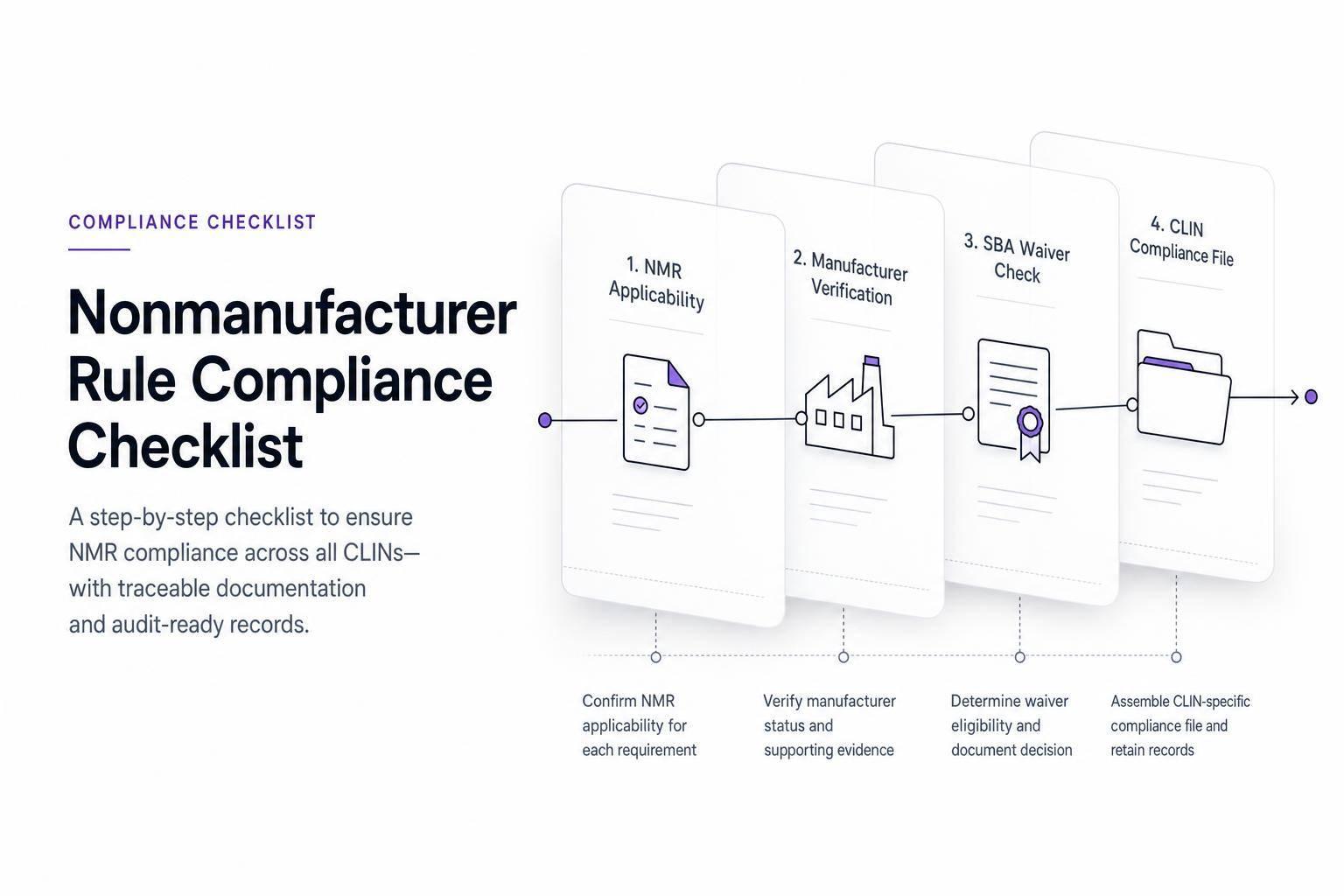
If you sell a product you did not make, one wrong source decision can sink the whole offer. I’d treat the Nonmanufacturer Rule as a simple pass/fail check: first confirm the rule applies, then prove who made each item, check whether that manufacturer is small, and confirm whether an SBA waiver is in place.
Here’s the short version in plain English:
- Being a small business by itself is not enough.
- If I’m a nonmanufacturer, I usually must supply an end item made by a small U.S. manufacturer unless SBA has issued a waiver.
- The rule often applies to small-business set-asides and socioeconomic buys like 8(a), HUBZone, SDVOSB, and WOSB.
- For some general small-business set-asides at or below the simplified acquisition threshold, current SBA guidance says the rule does not apply.
- A missing clause does not mean I can ignore the rule.
- For multi-item buys, the 50% value test can matter when no class waiver covers the items.
- I should stop submission if even one CLIN lacks proof on source, size, or waiver status.
What I like about this checklist is that it focuses on four things that decide the outcome:
- Does the solicitation trigger the rule?
- Who is the actual manufacturer for each item?
- Does a class or individual waiver apply?
- Can I prove all of it in the file before I submit?
A few facts stand out. The article points teams to 13 CFR § 121.406, flags the common 500-employee manufacturer size rule, and notes the 150-employee rule tied to NAICS 541519 IT VARs. It also stresses that the 50% review for multiple-item buys must be tied to the estimated contract value, not just one line item at a time.
If I had to sum it up in one sentence: this is a file-discipline checklist, not just a sourcing checklist. The point is not only to make the right call, but also to keep dated proof that lets a reviewer trace every item from the solicitation to the final offer.
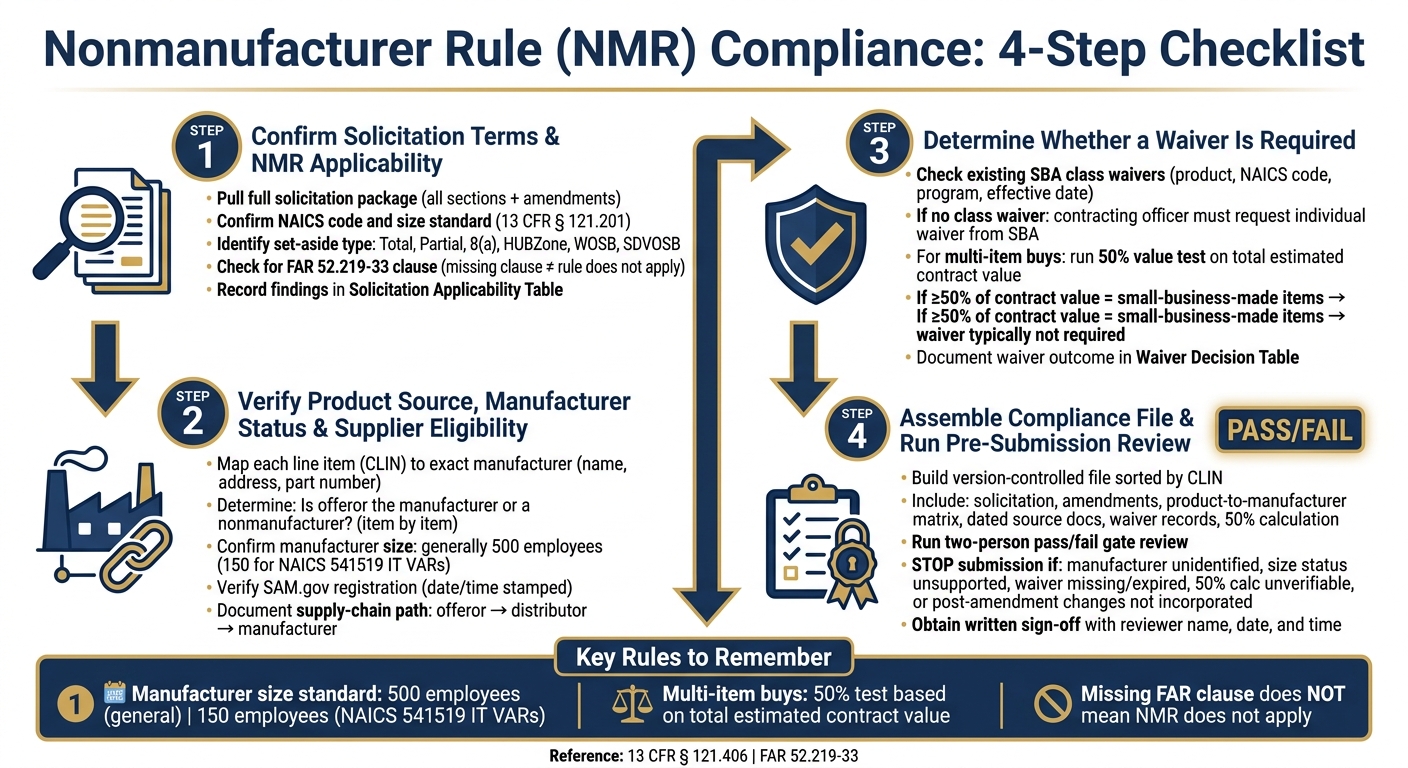
Nonmanufacturer Rule (NMR) Compliance: 4-Step Checklist
Step 1: Confirm Solicitation Terms and Whether the NMR Applies
Start by pulling the full solicitation package before you make any call. That means every section and every amendment. Portal labels by themselves don’t tell the whole story.
Record the solicitation number, issuing agency, NAICS code, set-aside designation, line items, and any mismatch between the portal and the solicitation. After you map the package, check whether the solicitation actually triggers the NMR.
Check the NAICS Code, Size Standard, and Set-Aside Type
First, confirm that the NAICS code in the solicitation matches the main nature of the buy. Then document the size standard from 13 CFR § 121.201 – average annual receipts or employee count, whichever applies.
Be careful here. Don’t lean on the contract’s general classification when mixed products or services show up on separate line items. A solicitation can look simple at first glance, then get messy once you read the CLIN structure.
Next, identify the procurement structure. For example:
- Total set-aside
- Partial set-aside
- Socioeconomic award: 8(a), HUBZone, WOSB, or SDVOSB
- MAC order
- Unrestricted acquisition
For MAC orders, confirm whether the order itself is set aside or issued straight to a small business. That detail can change the analysis.
Review FAR Clauses, Item Descriptions, and Source Restrictions
If the structure suggests NMR coverage, scan the solicitation for FAR 52.219-33, Nonmanufacturer Rule. Confirm the clause version and check for any agency-specific supplements.
If the clause is missing, submit a written clarification question through the allowed channel. Don’t assume the NMR does not apply. Also check whether an SBA waiver explains why the clause was left out.
For each product line item, note:
- The required end item
- Any brand-name-or-equal language
- Approved manufacturers
- Authorized distributor limits
- Place-of-manufacture terms
- Country-of-origin requirements
Keep NMR compliance separate from Buy American rules or agency-specific domestic-content rules. They may overlap in practice, but they are not the same thing.
Add a Solicitation Applicability Table to the File
Record your findings in a simple applicability table and keep it in the file.
| Line Item | NAICS Code & Size Standard | Procurement Structure | FAR 52.219-33 Status | Source Restrictions | NMR Preliminary Result | Evidence Retained | Owner / Status |
|---|---|---|---|---|---|---|---|
| Product CLIN 0001 | NAICS code and threshold | Total small-business set-aside | Included | Domestic-source term | Applies – manufacturer and waiver review required | Solicitation, specifications, clause | Contracts – complete |
| Product CLIN 0002 | NAICS code and threshold | Partial set-aside | Included | No named brand; place-of-manufacture requirement | Applies or requires clarification | CLIN schedule, Q&A, amendments | Proposal – open |
| Service CLIN 0003 | NAICS code and threshold | Unrestricted services | Not included | No end-item product requirement | NMR not indicated | Statement of work, clause matrix | Contracts – complete |
Mark each row as Applies, Does Not Apply, or Requires Further Review.
A missing clause is not proof that the rule does not apply. Write down your reasoning either way, and keep the file updated through each amendment cycle. If the NAICS classification doesn’t fit the items, the set-aside designation is unclear, or a source restriction could be read more than one way, send it up to contracts counsel or a small-business-program specialist.
That completed table becomes the working record for Step 2’s supplier and manufacturer verification.
sbb-itb-bb3960c
Step 2: Verify Product Source, Manufacturer Status, and Supplier Eligibility
Once your solicitation applicability table is done, the next move is to tie each offered product to a named manufacturer, a documented supply-chain path, and a checked eligibility status.
Treat every line item on its own. Don’t lean on a broad supplier statement and assume it covers the whole quote. If Step 1 shows the NMR applies, check each CLIN against the actual source and actual manufacturer before you draft the proposal.
Map Each Line Item to the Exact Manufacturer and Source Documents
Set up one compliance record for each line item or product family. At a minimum, include:
- Solicitation line-item number
- Item description
- Manufacturer’s legal name and address
- Brand
- Exact part number or model
- Country of manufacture
- Proposed quantity
- Applicable technical specifications
Then connect that record to objective source documents. That means documents you can point to and defend, not a general website and not an undated supplier statement.
Good source documents include:
- A dated manufacturer authorization
- Product datasheet
- Current price sheet
- Distributor or dealer confirmation
If the solicitation calls for a specific configuration, domestic production, or agency-specific support, get that in writing from the manufacturer or an authorized distributor. Direct confirmation matters here.
Give extra review to substitutions, private-label items, refurbished products, and multi-source assembled products. Those cases can change who the end-item manufacturer is.
Use the source record to decide whether the offeror is the manufacturer or a nonmanufacturer for that item.
Determine Whether the Offeror Is the Manufacturer or a Nonmanufacturer
The test is simple: Does the offeror manufacture the end item in its own facilities? If the answer is no, treat the offeror as a nonmanufacturer for that item.
An offeror may be the manufacturer for some items and a nonmanufacturer for others. Record that finding item by item.
If a distributor claims manufacturer status but can’t show actual transformation, that’s a red flag. Don’t smooth it over with a general authorization letter. Escalate it before submission.
Confirm Size Status, Program Eligibility, SAM.gov Records, and Supply-Chain Relationship
Keep two separate findings in your file: offeror status and manufacturer status. Mixing them up is where teams get into trouble.
For the offeror, record the solicitation NAICS code, the size standard, the small-business representation, and an active SAM.gov registration.
For the manufacturer, record its legal name, production role, size evidence, and whether the solicitation requires the end item to be produced by a small business in the United States or its outlying areas.
Manufacturer size is generally 500 employees, or 150 for NAICS 541519 IT VARs. A small offeror does not automatically meet the product-source rule when the NMR applies. The proposed manufacturer must qualify on its own.
For socioeconomic set-asides, check program eligibility as a separate step from the product-source review. Confirm the required certification, active program status, and that the legal name and Unique Entity Identifier in the proposal match the government records tied to that program.
Record the verification date and time. That may sound picky, but registrations and size status can change. SAM.gov confirms entity identity and representations. It does not confirm the manufacturer, the country of production, or the supply-chain relationship.
Log each item-level check in the file as you go. Use the table below to track each verification.
| Review Element | What to Document |
|---|---|
| Offeror status | NAICS code, size standard, employee count or receipts, SAM.gov registration date |
| Manufacturer status | Legal name, address, production role, size evidence under applicable NAICS code |
| Supply-chain relationship | Offeror → distributor → manufacturer chain, authorization, ordering path, ownership or possession, delivery and warranty responsibility |
| Program eligibility | Certification type, active status, ownership/control confirmation, UEI match |
| Country of manufacture | Place-of-manufacture confirmation, U.S. production evidence if required |
Step 3: Determine Whether a Waiver Is Required
Use Step 3 to verify whether the offered product source needs an SBA waiver. SBA manages waivers, and only the contracting officer can request an individual waiver. Use the manufacturer details from Step 2 to check waiver coverage. If no current waiver covers the item, move to the individual-waiver review.
Check Class Waivers and Product-Level Coverage
Before you assume a new request is needed, start with any existing class waiver. Review current SBA waiver records using the product description, NAICS code, and set-aside program. Then confirm the waiver is current and applies to the exact product or product class.
For each line item, compare the waiver against the item’s description, part number, specs, NAICS code, and effective period. If the scope feels fuzzy, get written clarification and keep it in the file.
Your file should include the official SBA waiver notice or a dated copy of the main waiver record, plus:
- Product description
- NAICS code
- Program type
- Effective date
- Any limits
An informal vendor statement or an undated printout isn’t enough.
Identify When an Individual Waiver Must Be Requested by the Contracting Officer
If no class waiver covers the product and the NMR applies, the contracting officer must request an individual waiver from SBA. That request needs market research showing that no small-business manufacturer can reasonably meet the solicitation requirements.
If an individual waiver seems necessary but hasn’t been issued, treat the proposal as incomplete. Flag the issue with the contracting officer before submission.
Use a Waiver Decision Table and 50% Value Check for Multiple-Item Buys
For multiple-item buys, test the total acquisition value, not each line item by itself. Use the 50% test only after confirming that no class waiver covers the acquisition.
If at least 50% of the estimated contract value consists of items made by small-business concerns, a waiver usually isn’t required. Any time quantities, options, or pricing change, rerun the 50% value test. Then document the assumptions, item values, manufacturer size status, and the calculation date.
Use the table below to record the outcome for each product or line-item group before final submission approval.
| Review Outcome | Typical Condition | Required Evidence |
|---|---|---|
| NMR does not apply | Procurement or line item is outside NMR scope, or solicitation does not impose the small-business supply restriction | Solicitation clause review, NAICS and set-aside analysis, contracting officer clarification if needed |
| NMR applies; no waiver required | Qualifying small-business manufacturer supplies the end item, or at least 50% of the estimated value in a multiple-item acquisition consists of items made by small businesses | Manufacturer confirmation, size-status evidence, product mapping, and documented 50% calculation |
| NMR applies; class waiver confirmed | Current SBA class waiver expressly covers the product, program, and solicitation circumstances | Official SBA waiver record, product-to-waiver comparison, effective-date check, and applicability approval |
| NMR applies; individual waiver required or must be confirmed | Product is supplied by an other-than-small manufacturer, no class waiver applies, or the multiple-item value test shows more than 50% other-than-small content | Contracting officer request or SBA decision, market-research support, solicitation-specific waiver evidence, and escalation record |
Use a two-person review for classification and waiver checks. You can use Narwin.ai to organize solicitation excerpts and value checks, but check every result against current SBA records and contracting officer documentation.
Step 4: Assemble the Compliance File and Run the Pre-Submission Review
Once the waiver decision is on record, build a version-controlled compliance file and run one last go/no-go review before you submit. Use the Step 1 applicability finding, Step 2 source mapping, and Step 3 waiver decision as the file’s control points. That way, every conclusion from Steps 1–3 is traceable in the final proposal file.
Compile the Documents Needed to Support Compliance
Set up the file in clearly labeled subfolders so a reviewer can find proof without chasing anyone down. At a minimum, include:
- The solicitation and every amendment
- Applicable provisions and clauses
- Line-item descriptions
- The NAICS code and size standard
- Set-aside designation
- Representations and certifications
- Size-status support
- The product-to-manufacturer matrix
- Dated supplier and manufacturer source documents
- Waiver records
- Domestic-source proof
- Pricing for any 50% test
- Legal approval
Then sort the file by CLIN so each row points to the exact proof for that item.
Each row should tie one CLIN to a specific source document and record the manufacturer’s legal name, exact part number, country of manufacture, supplier relationship, whether the offeror is the manufacturer or nonmanufacturer, proof supporting the manufacturer size finding, waiver reliance, and the backing documents. A general product catalog or a reseller quote by itself is not enough. The matrix needs to trace each item back to specific proof.
Supplier and manufacturer confirmations should be dated and should identify the legal entity, product or part number, manufacturing location, size status or the basis for that status, supply relationship, and validity period. An undated letter – or one that points only to a product family instead of a specific model – creates a gap reviewers will spot fast.
Stop Submission If Any Core Issue Is Unresolved
If any item below is still open, stop the submission. Treat the pre-submission check as a pass/fail gate: either the file is complete and every NMR issue is resolved, or the offer does not go out. Put the submission on hold if any of these remain open:
| Red Flag | Why It Stops Submission |
|---|---|
| Product source or manufacturer not identified | Core NMR fact cannot be proven |
| Offeror cannot establish whether it is a manufacturer or nonmanufacturer | NMR eligibility is unresolved |
| Manufacturer size status unsupported or inconsistent | Offer may not qualify under the set-aside |
| Entity data conflicts with SAM.gov records | Representation accuracy is at risk |
| Required waiver missing, expired, or out of scope for the item | No valid basis to supply an other-than-small product |
| Amendment issued after review not incorporated | Compliance analysis may be based on outdated terms |
| Product, manufacturer, pricing, or delivery changed after approval | Earlier review no longer applies; matrix must be updated |
| 50% calculation cannot be reproduced | Value test is unverifiable |
The final approval sheet must record the solicitation number, submission deadline, reviewer, date and time of review, applicable NAICS code, set-aside type, NMR determination, waiver status, unresolved issues, and final disposition. That record should let a reviewer retrace the NMR decision path from the solicitation to the waiver and then to the final offer.
Also, link every checklist item to a file name, page number, or exact evidence location. If someone asks, “Where’s the proof for this CLIN?” the answer should take seconds, not a half hour.
Use Narwin.ai to Organize Review Inputs, Not to Replace Validation
Narwin.ai can help organize solicitation excerpts, amendments, and the product-to-manufacturer matrix. It’s useful for structuring the review and keeping inputs in one place.
But don’t treat it as the final word. Every compliance conclusion still needs to be checked against the official solicitation, SBA, SAM.gov, and waiver records.
Conclusion: Final Nonmanufacturer Rule Submission Check
Use this last review to check every line item before you submit. The Nonmanufacturer Rule is a pass/fail test. You need proof for applicability, product source, offeror status, supplier eligibility, and waiver coverage before submission. For buys with more than one item, the 50% calculation must be easy to reproduce using the estimated contract value and the recorded value of qualifying items. If even one answer is missing, stop and fix the file before submission.
A two-person review helps keep things tight. One person puts the file together. The other checks each item against the solicitation, source documents, and waiver record. Written sign-off, with a clear record of who reviewed what and when, makes the review traceable.
The last review should confirm that the Step 1 applicability finding, Step 2 source trace, Step 3 waiver decision, and Step 4 file are complete and consistent. Submit only when every line item has traceable proof, every waiver matches the item, and every open issue is closed.
FAQs
How do I know if I’m a nonmanufacturer?
Review the solicitation and your business status. In most cases, a nonmanufacturer sells products it didn’t make itself.
Check your business size and socioeconomic status in SAM.gov against the solicitation’s NAICS code. If the buy is tied to a set-aside, make sure you qualify for programs like 8(a), HUBZone, WOSB, or SDVOSB. Also look for any required clauses or representations in the solicitation.
What proof should I keep for each CLIN?
Keep one central, searchable file for each CLIN from the solicitation stage through final performance.
That file should include all key support records, such as pricing records like cost or price analyses, labor rate justifications, and CLIN pricing. It should also include technical and personnel records like resumes, commitment letters, and past performance narratives.
On top of that, keep all contract and performance records in the same place, including signed contracts, modifications, performance logs, acceptance notices, and compliance certifications.
When do I need an SBA waiver?
You need an SBA waiver when you can’t meet a mandatory requirement. One example: if you can’t make a required representation about your company’s use of prohibited telecommunications equipment under Section 889 of the FY2019 NDAA.
If you can’t meet specific solicitation requirements, ask for clarification or request changes during the Q&A period. Narwin.ai can help by pulling out mandatory requirements and flagging high-risk clauses early.