
I can’t rank U.S. industries by bid volume from these data: the reported 201,765 active opportunities mix U.S. and Canadian records – not U.S.-only postings for 2026 YTD.
My takeaway: filter by industry and work location, then check eligibility before spending time on a bid. For January 1–October 29, 2026, I outline how to:
- Compare federal, state, and local notices using the same dates and counting rules.
- Remove duplicates and separate new solicitations from amendments and awards.
- Narrow searches from national to local using where the work happens, not the buyer’s address.
- Check deadlines, licenses, staffing, and other bid requirements.
- Use AI for first-pass review, then verify its findings against source documents.
<u>More notices don’t mean better-fit bids.</u> I focus on what the data can support – and how you can turn search results into a bid/no-bid decision.
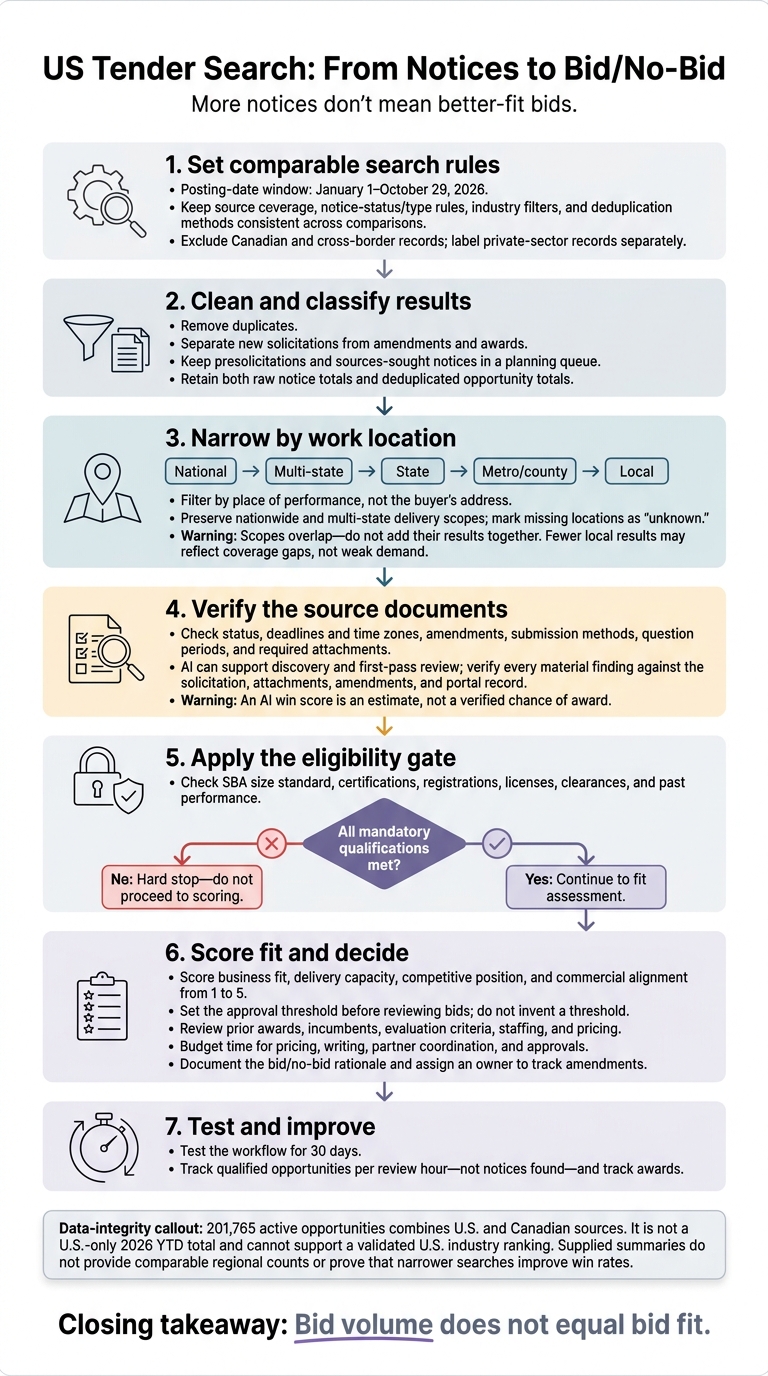
US Tender Search: From Notices to Bid/No-Bid
Bid Posting Volume by Industry
The supplied data do not support a validated U.S. industry ranking for 2026 YTD. The figure of 201,765 active opportunities combines U.S. and Canadian sources. Regional filtering is the next useful test, since geography can sharply reduce the number of bids.
The supplied summaries also lack enough record-level data to calculate sector response times, disclosed values, or eligibility shares. Classify eligibility as set-aside, socioeconomic, geographic/licensing, registration/certification, preference only, or unknown.
Industry volume is just a starting point. A sector may look busy nationally but offer few usable bids after filtering for U.S.-only sources, removing duplicates, and applying regional limits. The next section shows how much those regional limits change the volume.
sbb-itb-bb3960c
How Regional Filters Affect Bid Volume
After industry filtering, geography is the fastest way to reduce bid volume. Regional filters also affect how usable the remaining bids are.
Keep the comparison rules fixed: use the same posting-date window, October 29, 2026, cutoff, notice-status rule, and deduplication method for every query. The table below shows how search scope shifts from national to local.
| Search scope | Filter definition | Source coverage |
|---|---|---|
| National | All covered U.S. notices and nationwide opportunities | Federal sources plus covered state, county, city, school-district, and special-district portals |
| Multi-state | A fixed group of named states | Federal and jurisdiction-specific sources across those states |
| State | One state, including statewide work | Federal and state sources with usable location fields |
| Metro/county | Defined metro boundaries or one named county | Relevant federal, state, county, and municipal sources |
| Local | Defined city, school-district, or special-district boundaries | Jurisdiction-specific portals and covered aggregators |
Note: Counts and timing cannot be calculated from the supplied summaries.
Work Location vs. Agency Address
Filter by place of performance, not the buyer’s address. Keep nationwide and multi-state delivery scopes intact rather than assigning them to one state. For remote work, check on-site, travel, security, and residency requirements.
Mark missing locations as unknown. Don’t infer them from the issuing office. School district, water authority, and transit agency boundaries may not follow city or county lines, either.
Federal opportunities are centralized, but state and local notices are spread across jurisdiction-specific portals. Record which sources you checked, when you last checked them, and whether you included amendments and archived notices. A low local bid count may reflect gaps in coverage – not weak demand.
These search scopes overlap. Do not add national, state, county, and local results together.
Measuring Volume Changes from Narrower Searches
Calculate absolute change as narrower count − baseline count. Calculate percentage change as (absolute change ÷ baseline count) × 100. If source coverage, dates, industry filters, or deduplication rules differ between queries, label the comparison not comparable.
| Comparison | Baseline search | Narrower filter |
|---|---|---|
| National → multi-state | Covered U.S. locations | Fixed named-state group |
| National → state | Covered U.S. locations | One named state |
| State → county | One named state | County within that state |
| County → local | One named county | City or district within that county |
For each result, keep both the raw notice total and the deduplicated opportunity total. Calculate industry shares with the same primary-industry hierarchy, and report uncategorized records separately.
Measure median response windows from posting to the original deadline in calendar days. Disclose any records excluded because deadlines were missing. Use the smaller result set to check licensing, bonding, staffing, travel, and compliance limits – not just whether the count dropped.
Using the Findings to Qualify Bids
Use volume to filter your search, not to decide whether to bid. The supplied summaries don’t prove that narrower searches improve win rates. Test the workflow by tracking your team’s qualified opportunities, review time, and awards.
Set Filters and Check Bid Requirements
After narrowing the search, shift from counting notices to checking bid requirements. Build saved searches around NAICS codes, scope keywords, place of performance, notice type, set-aside status, and deadlines. Keep presolicitations and sources-sought notices in a planning queue – not with work that’s ready for a bid.
Before scoring a solicitation, check its SBA size standard and all required certifications, registrations, licenses, clearances, and past performance. A missing mandatory qualification is a hard stop.
For opportunities that pass, score business fit, delivery capacity, competitive position, and commercial alignment from 1 to 5. Set your approval threshold before reviewing bids. Check prior awards, incumbents, and evaluation criteria, then budget time for pricing, writing, partner coordination, and approvals.
Assign an owner to track amendments and document the bid/no-bid rationale. Test the process for 30 days, measuring qualified opportunities per review hour – not notices found.
Using Narwin.ai to Find and Review Bids
Apply the same screening steps during search and review. Narwin.ai can help with discovery and first-pass review through location and category filters, matching opportunities to capabilities and certifications, RFP automation, go/no-go signals, risk analysis, and drafting support. An AI win score is an estimate, not a verified chance of award.
Check every material AI finding against the solicitation, attachments, amendments, and portal record. Review staffing and pricing separately.
For this U.S.-only study, exclude Canadian and cross-border records, and label private-sector records separately. Keep each record’s source, country, notice type, and posting date. Use Narwin.ai only as a workflow example here – not as the study source.
Conclusion: Bid Volume Does Not Equal Bid Fit
The study points to a clear lesson: filters reduce notice counts, but they don’t tell you whether a bid fits your business. These year-to-date counts cover notices from the sources studied – not the entire U.S. market. They don’t measure spending, performance, or win probability, and they don’t support a single U.S.-only industry ranking.
Narrower geographic filters usually return fewer notices. How much fewer depends on the industry, source coverage, and whether location data reflect the agency’s address or the place of performance. To assess fit, check deadlines, amendments, submission methods, question periods, and required attachments. Eligibility screening comes next; notice volume alone isn’t enough.
Compare national and regional searches only when they use the same date range, notice type, deduplication, industry, and geography rules. Before committing resources, verify each notice’s status, deadline, time zone, and attachments, then check mandatory eligibility requirements. Make the bid/no-bid decision based on geography, eligibility, capability, and capacity to bid – not the size of the search results.
FAQs
How can I identify industries with steady bid demand?
Use Narwin.ai to analyze buyer behavior and review procurement forecasts. These forecasts often point to opportunities 6 to 18 months before formal announcements. Review expired contracts on SAM.gov to spot recurring recompetes.
Check these updates daily to track steady demand and build a pipeline that fits your firm’s long-term capabilities, technical expertise, and geographic reach.
When should I expand my bid search beyond my state?
If your search returns too few results or misses related tenders that use different terms, look beyond your state. Start with broader, plain-English keywords and related industry terms. Then apply location, NAICS, or date filters.
With Narwin.ai, you can set service areas across multiple states or provinces. Its AI-driven semantic matching helps you find relevant opportunities in those regions while staying focused on your expertise and technical requirements.
How can I spot gaps in local bid coverage?
Use semantic search filters to find different ways buyers describe the same services. Filter by place of performance, not just the buyer’s headquarters, to see where the work will happen. Narwin.ai brings federal, state, and local sources into one feed, with filters for service areas or municipalities.
Use qualification filters to check bid requirements against your current bonding capacity, certifications, and staffing. This helps you spot gaps in your ability to take on local work.