
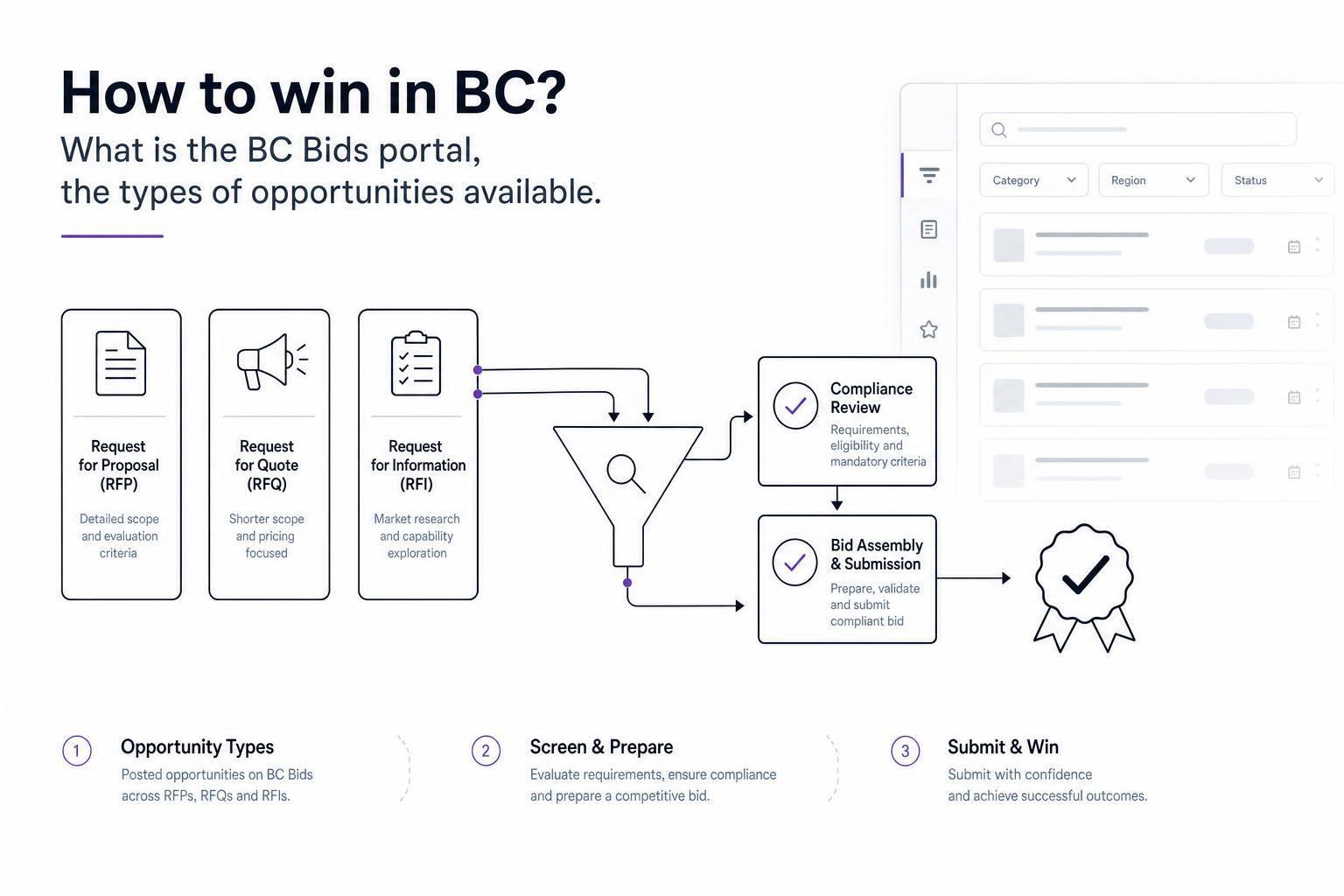
If I want to win public-sector work in British Columbia, I need to do 3 things well: find the right BC Bid posting, read the solicitation type correctly, and submit a fully compliant bid before the deadline.
BC Bid is the main portal for BC public purchasing. It shows open opportunities, addenda, and past award data. The article explains the main posting types – ITTs, RFQs, ITQs, RFPs, prequalification RFQs, standing arrangements, notices of intent, and information notices – and shows how each one points to a different bid approach.
Here’s the short version:
- ITTs / RFQs / ITQs usually lean toward lowest-priced compliant bid
- RFPs usually score technical response + price
- Prequalification RFQs are often used to build supplier lists for later work
- Standing arrangements are for repeat purchasing over time
- Notices of Intent may allow suppliers to challenge a planned direct award
- Information notices give an early heads-up before a full solicitation
A few points matter more than anything else:
- BC Bid deadlines use Pacific Time
- Missing one mandatory item can lead to disqualification
- A missed addendum can sink a bid
- Past award data can help me size up the market
- A simple go/no-go check can stop wasted bid effort
Quick Comparison
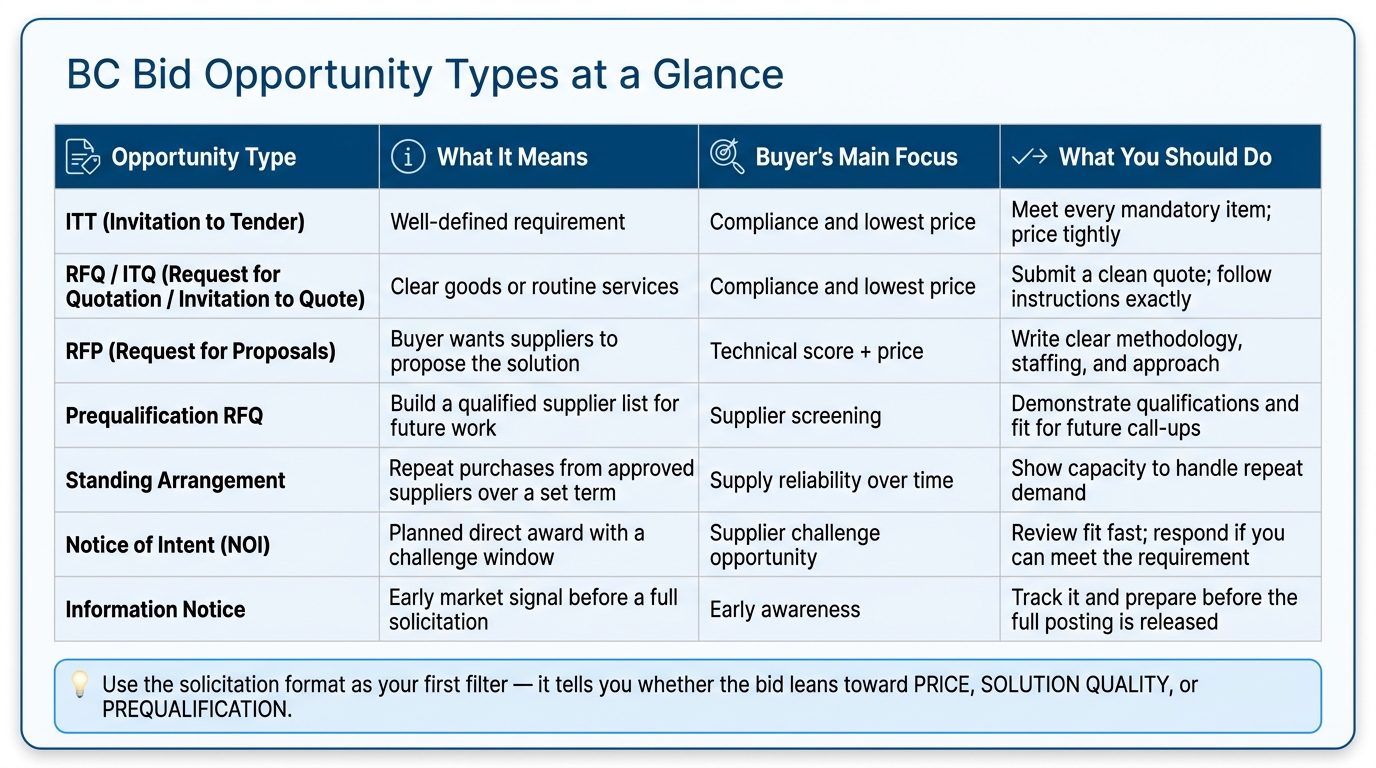
| Opportunity type | What it usually means | Main buyer focus | What I should focus on |
|---|---|---|---|
| ITT | Well-defined requirement | Compliance and price | Meet every mandatory item and price tightly |
| RFQ / ITQ | Clear goods or routine services | Compliance and price | Submit a clean quote and follow instructions exactly |
| RFP | Buyer wants suppliers to propose the answer | Technical score plus price | Write clear responses, proof, staffing, and approach |
| Prequalification RFQ | Build a list for later work | Supplier screening | Show qualifications and fit for future call-ups |
| Standing arrangement | Repeat purchases from approved suppliers | Supply over a set term | Show I can support repeat demand |
| Notice of Intent | Planned direct award | Challenge window | Review fit fast and respond if I can meet the need |
| Information notice | Early market signal | Early awareness | Track it and prepare before release |
The core takeaway is simple: I should treat the solicitation format as the first filter. It tells me whether the bid leans toward price, solution quality, or prequalification, which helps me decide if it is worth chasing at all.
sbb-itb-bb3960c
What BC Bid is and how to use the portal
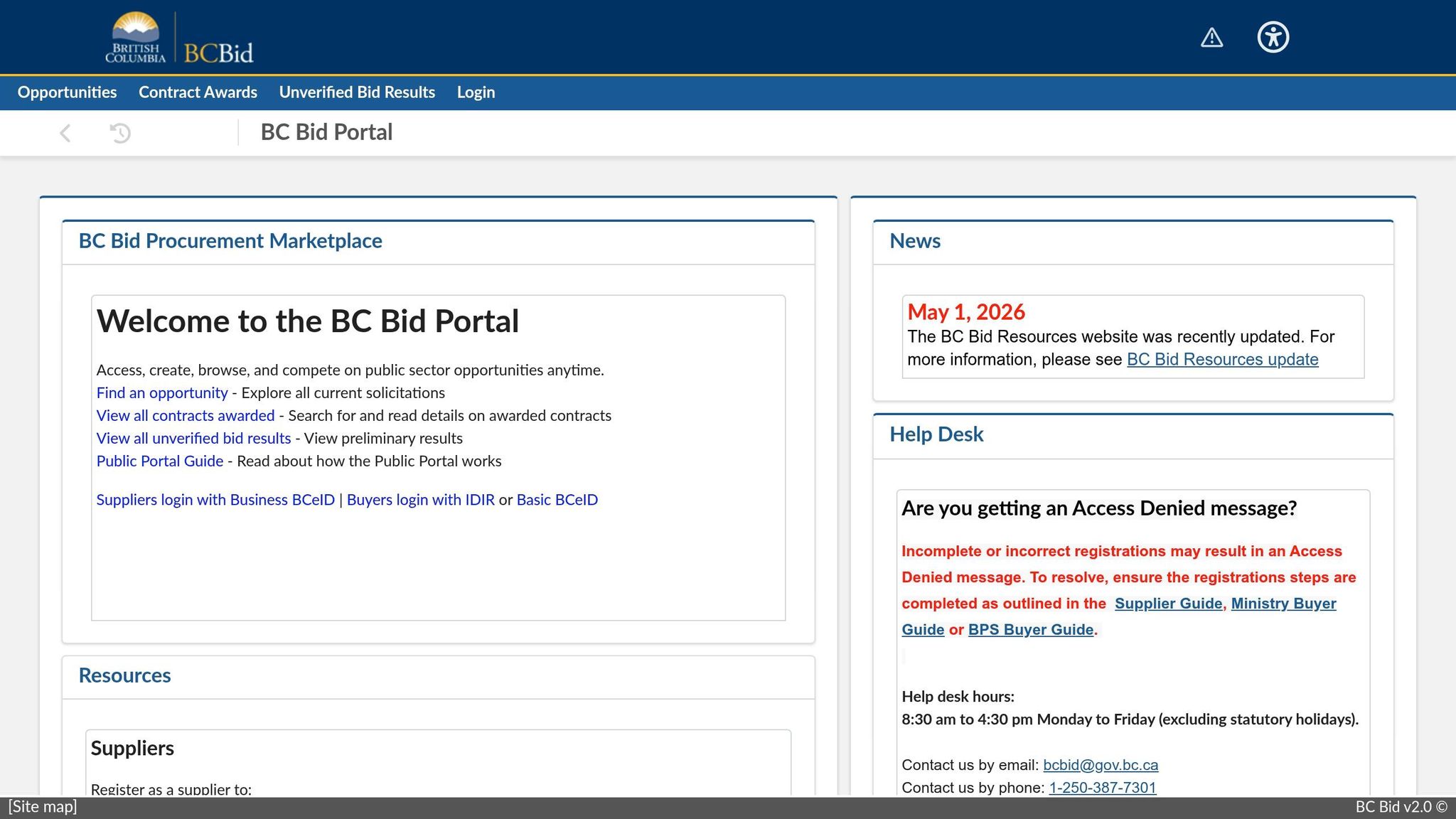
BC Bid is the main place suppliers use to find, follow, and submit public-sector bids in British Columbia. If you’re just browsing, you can review opportunities and read bid documents. If you’re a registered supplier, you can do more: submit bids, get alerts when something changes, and keep track of your active files in one spot.
That split matters. Before you spend time sizing up an opportunity, you need to know what public access gives you and where it stops.
Public access vs. registered supplier access
Anyone can browse BC Bid without signing in. Public access lets you:
- view open opportunities
- review bid documents
- look up past contract award information
That award history is handy for market research. It can show you who won before and what the contract was worth, which gives you a better sense of the field.
But public access only gets you so far. If you want to submit a response online, get notices about amendments or closing-date changes, or track bids in one place, you need a registered supplier account. Miss an addendum or amendment, and you could end up disqualified. That’s not a small detail. It can knock out an otherwise solid bid.
How to register and set up your supplier profile
Registration is fairly simple, but small setup choices can cause big headaches later. Start by assigning one account owner. That person should keep login details up to date and make sure notices reach the right team members.
Have your business details ready during setup, including your business number. After registration, choose commodity codes that match your products or services as closely as possible. Those codes decide which notices are sent to you automatically. If the codes are off, relevant bids may never land in front of you.
How to search, filter, and track opportunities
BC Bid lets you sort opportunities by keyword, buyer organization, category, posting status, and closing date. In plain terms: the more specific your search terms are, the better your results usually get.
When you spot an opportunity that looks promising, open the full posting right away and check for addenda. Changes can affect scope, pricing rules, or mandatory criteria. So the version you read on day one may not be the version evaluators use at closing.
A simple habit helps here:
- log the opportunity
- record the closing date
- assign one person to monitor addenda until the bid is submitted
Once you know how to find and follow postings, the next move is to read each opportunity type the right way.
The main BC Bid opportunity types and what they mean for suppliers
BC Bid Opportunity Types: Which One Should You Pursue?
Not every posting on BC Bid works the same way. And that matters more than it might seem at first glance.
The solicitation format tells you a lot before you even open the full document: how bids will be scored, how hard price will be pushed, and how much work the response will take. For suppliers, the main thing is simple: does this opportunity favor low price, solution quality, or prequalification? If you read that early, you can avoid spending time on bids that were never a good fit.
ITTs, RFQs, and ITQs: compliance-first bids
Invitations to Tender (ITTs), Requests for Quotation (RFQs), and Invitations to Quote (ITQs) are usually the most direct formats on BC Bid.
These are often used when the requirement is already well defined, such as:
- specific goods
- a construction scope
- a routine service
In many cases, the contract goes to the lowest-priced compliant bid among the bids that meet the stated requirements.
That makes the job pretty clear. A missed mandatory item can knock you out. Fancy extras often won’t carry much weight. Compliance and price usually do the heavy lifting, so your focus should be on reading the scope with care, meeting every mandatory item, and submitting a competitive price.
RFPs and prequalification RFQs: scored responses and prequalification paths
Requests for Proposals (RFPs) work in a different way. The government uses them when it knows the requirement but wants suppliers to propose the answer. This format fits suppliers whose edge comes from solution design, know-how, or method. If your strength is how you solve the problem, not just how low you can go on price, RFPs are often where you want to look.
RFPs are scored on a mix of technical merit and price. The technical side often looks at your methodology, experience, staffing, and grasp of the requirement. So yes, the way you write and structure the response can make a big difference.
Prequalification RFQs follow another route. Instead of awarding work right away, they are often used to build qualified supplier lists for later work. Getting onto one of these lists does not promise revenue. But it can put you in line for future work that may not go through a full open competition every single time.
Standing arrangements, notices of intent, and information notices
Standing arrangements, sometimes called standing offers, are frameworks that let government buyers purchase from approved suppliers over a set period. In many cases, that means they don’t need to run a new competition for each purchase. This setup tends to fit suppliers that can handle repeat demand over time.
Notices of Intent (NOIs) and information notices do something else.
An NOI signals that a buyer plans to award a contract directly. It also gives other suppliers a chance to challenge that choice if they believe they can meet the requirement.
Information notices are early signals of upcoming requirements, such as early-stage research or pre-solicitation outreach. They don’t call for a response, but they can give you an early heads-up before a full solicitation shows up.
Use the format as your first filter. It will tell you whether the opportunity leans toward price, solution quality, or prequalification. Once you know that, you can decide if the bid is worth your time before you start drafting anything.
How to improve your chances of winning in BC
Winning starts with a fast go/no-go screen. Knowing the portal matters, but that’s only half the job. The other half is picking the right opportunities and then submitting a clean response once you decide to move forward.
Choose the right opportunities before you bid
A disciplined go/no-go process saves time and keeps your team focused on bids that actually fit. Before you open a full ITT, RFP, RFQ, or standing arrangement solicitation, ask one direct question: Can you meet every mandatory requirement, including certifications, security clearances, and licensing, without stretching your team too thin?
Think of mandatory requirements as a hard gate. If you can’t meet even one item, don’t bid. It’s that simple.
Put your energy into bids where you have:
- clear past performance
- realistic delivery capacity
- a strong match with the scope and your core capabilities
Once a bid clears that screen, your response needs to be easy to review.
Build compliant responses that are easy to score
Once you commit to a bid, the goal changes. Now you need to make the evaluator’s job easy. Start by reading all sections, attachments, and addenda before closing.
Match the buyer’s headings and order. Then answer each scored item directly so evaluators can find what they need without digging around. Use specific examples and proof, not broad claims. If a form is unsigned, an attachment is missing, or the documentation is incomplete, you can end up non-compliant.
This is one of those areas where small mistakes can sink an otherwise strong bid.
Build a repeatable internal process for deadlines, amendments, and reviews
A lot of bid losses come down to process problems: a missed amendment, the wrong time zone on the submission deadline, or a compliance review that never happened.
Assign one opportunity owner for each bid. That person should track the solicitation number, watch for addenda, maintain the compliance checklist, and confirm the closing time.
For each response, build a simple checklist that covers:
- mandatory criteria
- required forms
- pricing attachments
- certifications
Before submission, run at least one structured compliance review. This should be a deliberate check against the solicitation requirements, not a casual read-through.
A repeatable process also makes opportunity tracking and requirement review much faster.
Using Narwin.ai to monitor BC Bid and qualify bids faster
Once your screening process is set, the next slowdown is simple: finding the right BC Bid opportunities and sorting them fast. Narwin.ai helps as a monitoring layer on top of BC Bid. It does not replace the official submission process.
For BC Bid monitoring, Narwin.ai pulls relevant notices into one feed and lets you search in plain English. For example, you can search for "IT support services for BC public sector" and get results matched to your company’s capabilities and geography. It can also send daily AI-curated alerts, so relevant BC opportunities land in your inbox without constant manual checking.
Find relevant BC opportunities with AI search and matching
After you spot a possible bid, the next time drain is digging through the full posting to check fit and eligibility. Narwin.ai handles that first review by pulling key signals from PDFs, Word documents, and HTML postings. That includes closing dates, deliverables, evaluation criteria, and mandatory requirements flagged by terms such as "shall" and "must."
Use AI scoring and requirement extraction to support go/no-go decisions
The platform also generates a match score and a go/no-go recommendation for each opportunity. That helps your team focus on the bids that are worth the effort, instead of chasing every posting that looks close at first glance. In practice, it gives your team a faster first review before putting hours into a full response.
Conclusion: Pick the right BC Bid opportunities and execute cleanly
BC Bid gives suppliers access to a steady stream of public-sector work across British Columbia. The teams that win on a regular basis know the solicitation type, screen opportunities with care, and submit clean, compliant responses every time. A monitoring layer can help make sure you don’t miss relevant BC Bid postings before your team spends time on a response.
FAQs
Do I need to register to bid on BC Bid?
Yes. You need to register to bid on BC Bid.
You can browse the site and look for public-sector opportunities for free. But to download the full tender documents and submit an official bid, you need a registered account.
How do I know which solicitation type fits my business?
Match your capabilities to BC Bid notice types and what each one asks for.
Use Solicitation notices when you’re ready to submit a full proposal by the due date. Go after RFQ/RFQs and ITT opportunities when you can meet the exact quote request or scope of work.
If you’re earlier in the sales cycle, Presolicitation and Sources Sought notices can help you plan before a formal bid goes live. You can narrow results with keyword or commodity filters, plus due date, and it’s smart to check often for amendments.
What usually causes bids to be disqualified?
Bids are often thrown out because they miss mandatory criteria. These are checked on a strict pass-fail basis.
Common reasons include:
- Missing required attachments
- Failing to address specific requirements
- Ignoring amendments
- Using the wrong format
- Going over page limits
- Leaving out required sections
- Letting registrations, certifications, or representations expire
The tough part is that contracting officers can’t waive mandatory requirements. So if a bid is incomplete or noncompliant, it may be removed right away.