
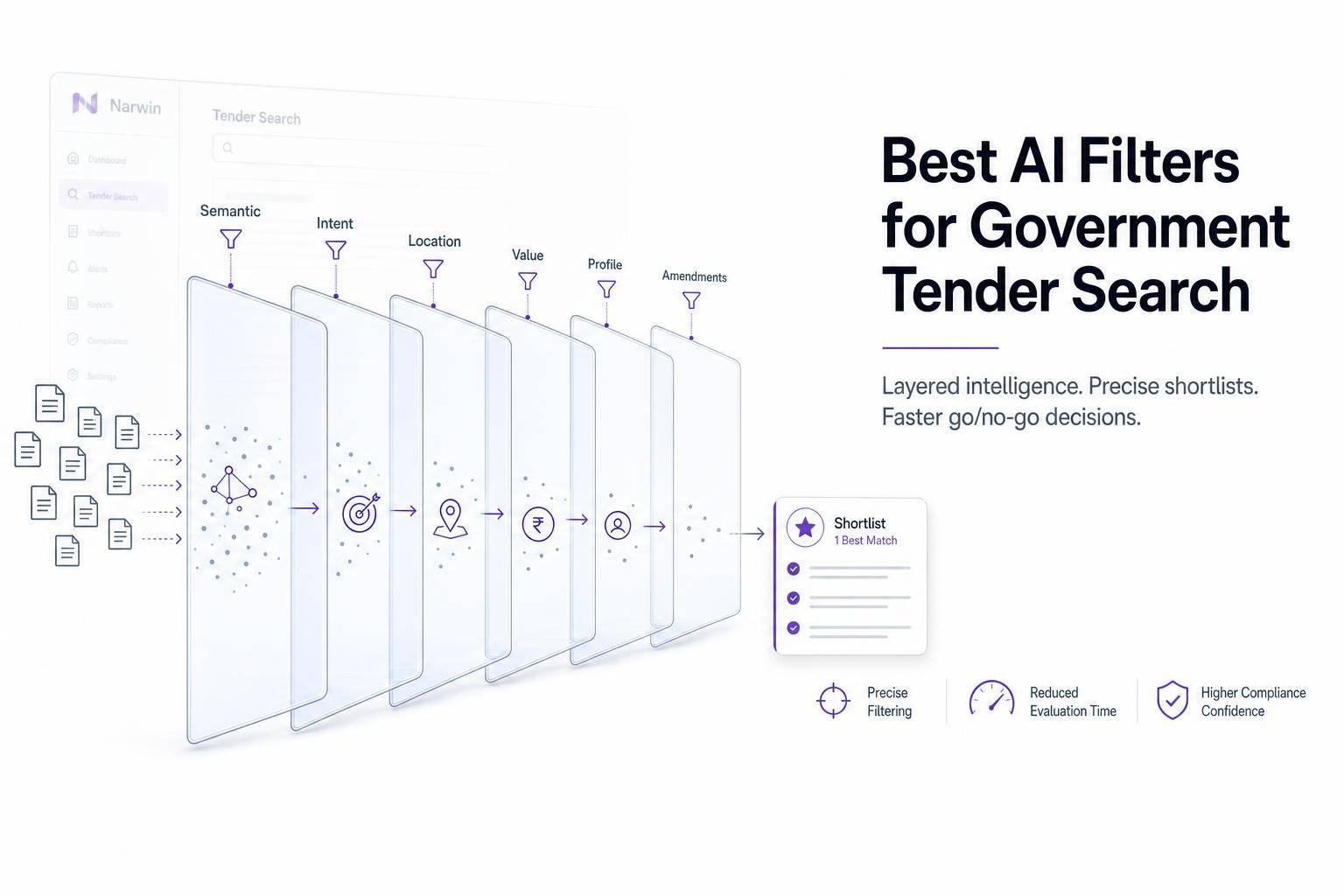
Most tender searches fail for one simple reason: keyword search misses too many good-fit bids. If I want better results, I need a filter stack that checks meaning, buyer intent, location, contract size, company fit, and post-release changes.
Here’s the short version:
- Semantic search helps me find bids even when buyers use different terms for the same work.
- Intent filters separate open bids from sources sought, forecasts, awards, and amendments.
- Region and buyer filters cut out notices from places or agencies I don’t serve.
- Value and capacity checks help me avoid bids that are too small, too large, or too hard to deliver.
- Profile matching compares the notice with my NAICS, certifications, past work, team, and service area.
- Amendment tracking matters because one update can change scope, due dates, pricing sheets, or compliance rules.
A strong setup does three jobs: it finds more relevant tenders, cuts review time, and improves early go/no-go calls. That matters when public opportunities are split across U.S. federal, state, local, and Canadian portals, and when small wording changes can hide a fit.
Quick comparison
| Filter | What I use it for | Main check | Main problem it helps avoid |
|---|---|---|---|
| Semantic search | Find related bids | Similar terms, NAICS, PSC, deliverables | Missing bids due to wording differences |
| Intent filter | Sort notice type | Open bid, sources sought, forecast, award, amendment | Chasing non-bid notices |
| Place-of-performance filter | Check delivery area | On-site, remote, multi-site, region | Geography mismatch |
| Buyer filter | Narrow by agency type | Agency, city, school, hospital, university | Poor buyer fit |
| Value/capacity filter | Match deal size to team | Budget, ceiling, staffing, bonding, timeline | Overreach or low-value pursuits |
| Profile match | Test fit with my company | Capabilities, certifications, past work, set-aside status | Low-fit bids |
| Amendment monitoring | Track changes after shortlist | Q&A, addenda, attachments, deadlines | Missing updates that change fit |
If I had to keep the process simple, I’d use this order: plain-English search → semantic expansion → intent → location → buyer → contract value → deadline/status → amendments → go/no-go review.
That’s the core idea of this article: AI filters help me find the right tenders faster, but I still need to confirm every shortlist on the official buyer portal before I bid.
sbb-itb-bb3960c
Core AI Filters That Improve Search Accuracy
Keyword Clustering and Semantic Matching
Start with semantic matching, then narrow by intent and geography.
Keyword clustering groups related procurement terms so one concept can cover the many ways buyers describe the same need. One search term almost never matches how buyers write a notice.
For cybersecurity, build a cluster around terms like penetration testing, vulnerability assessment, SOC, incident response, and zero trust. Include the right NAICS and PSC codes too. Then add deliverable terms like assessment report, continuous monitoring, and remediation plan. Buyers often describe work by the outputs they want, not by the service label a vendor would use.
Classification codes give you a solid second layer. NAICS codes identify the industry tied to a federal acquisition. PSC codes describe the product or service being bought. SAM.gov lets you search by NAICS code directly, which helps you catch notices that use different wording but still sit in the same procurement bucket. Negative keywords help clean up the results. A facilities management firm, for example, might exclude janitorial, vehicle, or training to cut repeat false positives.
Use Narwin.ai to begin with a plain-language query. Then narrow by category, source, country, location, and due date before checking the original notice for scope and eligibility.
Intent Filters for Real Buying Signals
A mention is not the same thing as a bid-ready chance. That gap is exactly what intent filtering handles.
AI can read scope language, deliverables, eligibility terms, deadlines, and response instructions to sort what a notice actually is. A sources-sought notice on SAM.gov, for example, is meant to identify capable businesses, not to request priced proposals. If you treat it like an open bid, you burn time for no reason.
| Matching level | What the AI checks | Effect on result quality |
|---|---|---|
| Keyword presence | Whether a term or code appears in the title, description, attachment, or metadata | Broad recall, but many irrelevant results |
| Semantic relevance | Whether the notice describes related services, deliverables, and capabilities | Fewer irrelevant results and better coverage of synonyms |
| Procurement intent | Whether the buyer is actively seeking responses, with scope, eligibility, deadline, or anticipated award timing | Best prioritization of actionable opportunities |
A well-set intent filter applies direct labels such as open solicitation, sources sought, presolicitation, forecast, award, and amendment. Open solicitations should go to the bid queue. Sources-sought notices belong in pipeline intelligence. Awards should move out of active review.
Region and Buyer Filters
Once intent is clear, filter by where the work will happen and who is buying it.
Where the work is performed matters just as much as the work itself. A federal agency based in Washington, DC may issue a contract performed across the country or at contractor facilities. So if you filter only by buyer location, you can get misled fast. Place of performance is what tells you whether the job fits your footprint.
Buyer identity matters too. Agency, subagency, contracting office, municipality, school district, hospital, and university are all different buyer types. An architecture firm, for instance, might run separate searches for:
- Municipal capital projects in states where it holds licenses
- Federal projects with remote design work
- University construction programs
Each search would use a different buyer filter.
Narwin.ai monitors major public sources at federal, provincial, and city levels across the United States and Canada. That matters because good-fit opportunities are spread across federal, state, and local systems. Before bidding, check deadlines, attachments, and amendments on the original portal.
That narrows discovery; the next step is qualification.
Qualification Filters That Help Teams Prioritize the Right Bids
Contract Value and Capacity Cues
Use qualification filters to screen value, capacity, and fit.
AI qualification filters can pull signals on value, staffing, bonding, coverage, and timeline straight from the solicitation. That matters because a five-year contract with a $10 million ceiling may look like a great shot at first glance, then fall apart once you spot the fine print: 24/7 coverage, specialized equipment, or nationwide deployment.
A ceiling amount is not guaranteed revenue. That’s where a solid qualification filter earns its keep. It should separate base-period value, option-period value, funded amount, and maximum ceiling so your team doesn’t chase a headline number that may never turn into actual work.
| Capacity scenario | Typical signals | Qualification effect |
|---|---|---|
| Under capacity | Value or workload is smaller than your target size | Deprioritize unless it advances a strategic opportunity or has low pursuit cost |
| In range | Value, staffing, geography, compliance, and timeline align with current resources | Advance to detailed bid/no-go review |
| Over capacity | Required scale, bonding, staffing, or coverage exceeds current resources | No-go, or pursue only with a documented teaming strategy |
AI can also flag exact capacity gaps. For example, it might spot a construction solicitation that calls for a $2 million performance bond and licensed personnel across multiple states. Better yet, it can tie each flag back to the exact solicitation section, so your team can check the reading before spending time and money on a proposal.
Capacity tells you whether you can deliver. Profile matching tells you whether you should bid.
Company-Profile Matching and Go/No-Go Signals
Capacity checks day-to-day feasibility. Profile matching checks strategic fit and compliance fit.
The solicitation should be matched against your company profile: services, NAICS codes, certifications, past performance, service area, staff, clearances, and internal priorities. It also needs to reflect your exclusions. Maybe you don’t serve certain industries. Maybe you can’t support some locations. Maybe some contract types fall below your margin floor. Those limits matter just as much as your strengths.
Eligibility screening needs its own hard gate. A small-business set-aside, 8(a), HUBZone, WOSB, or SDVOSB requirement involves ownership, control, certification, and recertification rules that go far past a simple keyword match. AI can flag likely eligibility; compliance staff must confirm it.
As part of the discovery → qualification → go/no-go workflow, Narwin.ai adds a preliminary match score, go/no-go signals, win-probability scores based on compliance, buyer history, and risk, and surfaces risk gaps such as missing certifications, bonding shortfalls, or geographic mismatches.
A practical go/no-go output should sort each bid into Go, Conditional Go, or No-go. And it shouldn’t stop there. Each result should come with a next step attached, such as:
- confirm bonding capacity
- identify a certified teaming partner
- obtain a named key-person commitment
That way, the decision keeps moving instead of getting stuck in a review queue.
Once a bid clears qualification, keep tracking amendments, Q&A, and deadline shifts before submission. After qualification, the next filter is change monitoring.
Amendment Tracking and Continuous Tender Monitoring
After qualification, one more filter matters: change tracking.
Good filters don’t stop when they first find a tender. They keep watching for updates that can change whether that bid still fits. Amendments can shift deadlines, forms, certifications, scope, or place of performance. So even shortlisted tenders need another look every time something changes.
Amendments, Q&A Changes, and Deadline Updates
Some of the biggest shifts are easy to miss because they’re buried in updates.
Track changes to:
- deadlines
- delivery instructions
- scope
- technical requirements
- certifications
- pricing schedules
- evaluation criteria
- place of performance
Q&A updates need the same level of attention. They can change scope or compliance requirements without any rewrite of the RFP. That means a changed notice might stop fitting your capabilities or geography. In plain terms, amendment review is part of search, not only a compliance check.
One amendment can do a lot at once. It might extend the due date, add revised Q&A, and reset the questions deadline. If your alert only flags the deadline change, you’ll miss the rest.
That makes amendment review part of search quality, not just compliance.
How Narwin.ai Supports Post-Search Review
Narwin.ai tracks updated documents and highlights changed requirements so teams can review the latest version.
When an amendment changes the record, Narwin.ai helps teams look at the update in context and share changes through shared workflows. That keeps the bid team aligned as new documents, deadlines, and requirements come in.
With amendments tracked, the final step is choosing the right filter stack for search and bid decisions.
Best AI Filter Stack for Government Tender Search
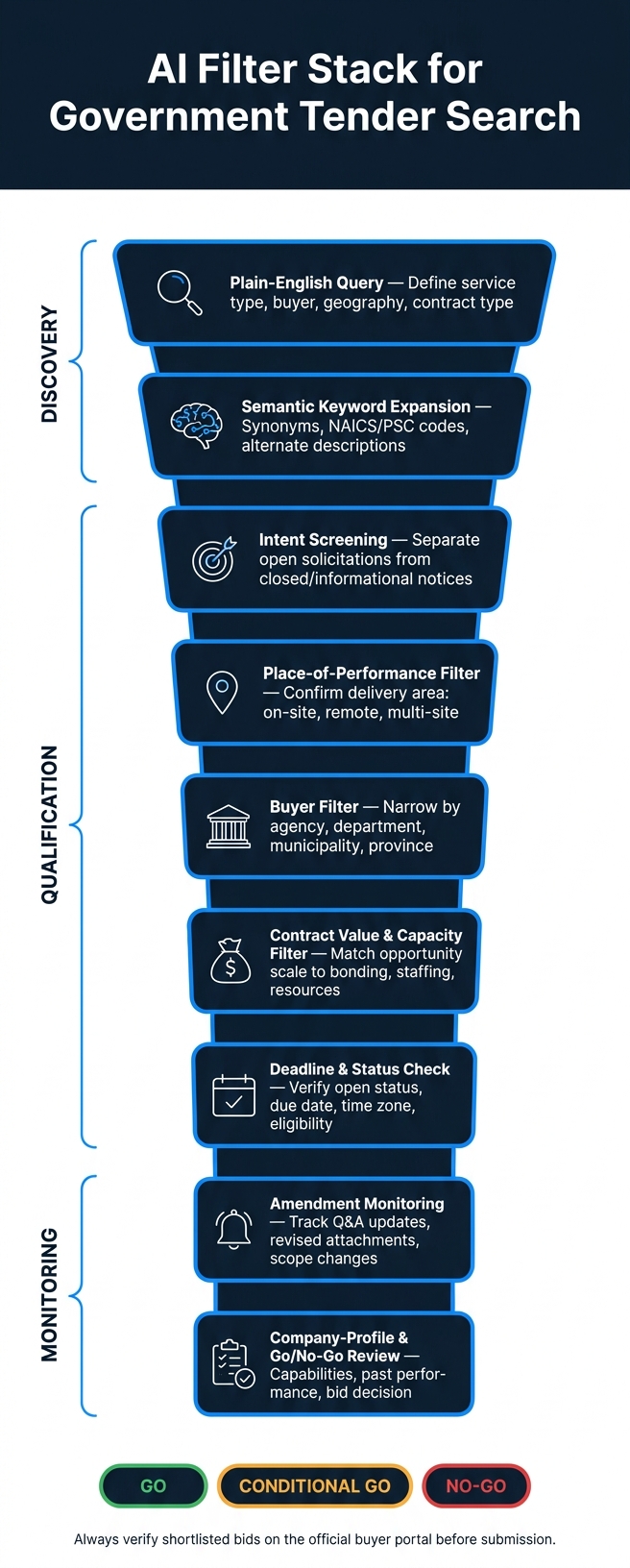
AI Filter Stack for Government Tender Search: Step-by-Step Workflow
Recommended Order: From Search to Bid Decision
Once you’ve checked relevance, fit, and monitoring, this is the order that makes the most sense. It takes a broad tender search and turns it into a clear bid decision.
Start with a plain-English query that describes the actual work: service type, buyer, geography, and contract type. For example, you might search for an IT service desk modernization opportunity by agency, budget, and location. Then use semantic keyword expansion to pull in related procurement language, such as synonyms, NAICS codes, PSC codes, and alternate service descriptions. That way, you’re not stuck relying on exact-match wording.
From there, move through the filters in this sequence: intent, place of performance, buyer, contract value limits, deadline and status, amendments, and then qualification.
Use intent screening first to split open solicitations from early-stage, closed, or informational notices. After that, apply place-of-performance and buyer filters in that order. First confirm where the work will happen, then narrow by the agency or department doing the buying. Next, set contract value limits based on your delivery capacity, bonding limits, and staffing. A deadline and status check helps confirm the notice is still open and current. Amendment alerts keep each shortlisted bid up to date. Last comes the qualification review, where you compare the opportunity against your company profile and make the go/no-go call.
These three stages – discovery, qualification, and amendment tracking – match the framework used throughout this article.
Summary Table: Filters, Signals, and Risks Reduced
Use the table below as a quick reference.
| Filter | Purpose | Signal Evaluated | Risk Reduced |
|---|---|---|---|
| Plain-English query | Define the search scope | Service, buyer, geography, contract type | Misaligned results |
| Semantic keyword expansion | Capture alternate procurement language | Synonyms, NAICS/PSC codes, bilingual variants | Missing relevant tenders due to wording gaps |
| Intent screening | Separate open solicitations from early-stage, closed, or informational notices | Solicitation type, active status, closing date | Wasted effort on non-actionable notices |
| Place-of-performance filter | Confirm delivery feasibility | Service area, remote/on-site, multi-site requirements | Geographic mismatch |
| Buyer filter | Prioritize relevant contracting organizations | Agency, department, municipality, province, authority | Poor buyer fit |
| Contract value and capacity filter | Match opportunity scale to resources | Estimated value, options, bonding, certifications | Overextension or inability to perform |
| Deadline and status check | Verify the team can submit a compliant bid | Open/closed status, due date, time zone, eligibility | Late or ineligible submissions |
| Amendment monitoring | Keep the bid aligned with the latest requirements | Amendments, Q&A responses, revised attachments | Pricing, compliance, and scope errors |
| Company-profile and go/no-go review | Convert search relevance into a bid decision | Capabilities, past performance, mandatory requirements | Pursuing low-fit or unwinnable work |
Narwin.ai supports this workflow for U.S. and Canadian tender search, including search, alerts, go/no-go signals, and amendment tracking.
That said, no AI filter replaces a direct review of the official solicitation. Every shortlisted bid should be checked against the controlling buyer portal before any submission decision is final.
FAQs
How do AI filters improve tender search beyond keywords?
AI filters do more than scan for keywords. They use semantic and intent matching to pick up term variations and connect what a buyer means to what your team can deliver.
That matters a lot in procurement, where the same need can show up in different language from one RFP to the next.
They can also pull requirements from long RFPs, including which items are mandatory and which ones are scored.
On top of that, they add another layer of signal through buyer behavior data, compliance gap flagging, and amendment or addenda tracking. That helps you spot relevant opportunities sooner and catch requirement changes after the initial posting.
Which AI filters should I apply first?
Start with intent-and-fit filters. Look for evaluation-focused intent signals first. Then apply hard eligibility and compliance filters so you don’t waste time on bids that would knock you out right away. After that, use match scoring to rank each chance against your company profile.
Next, narrow the list by geography and contract value. Then use amendment tracking to compare the current solicitation with addenda, Q&A, and past awards. That helps you spot delay risk, preference shifts, and compliance intensity early.
Why is amendment tracking so important in tender search?
Amendment tracking matters because addenda and Q&A can change deadlines, scope, mandatory requirements, pricing formats, and compliance expectations after the RFP goes out.
Miss one update, and your proposal can become noncompliant. In some cases, that means automatic disqualification.
There’s another reason this matters: amendments often hint at what the buyer is thinking. A late change can point to shifting priorities, new concerns, or a tighter read on risk. If you catch that in time, you can adjust your win themes, strengthen your compliance evidence, and tighten your contingency plans before the response window closes.