
If you need post-award contract tracking, only one tool in this list has strong public proof for U.S. federal use: Icertis Federal Government Edition. Most of the other tools look stronger for pre-award review, first-pass analysis, or clause checks than for day-to-day compliance after award.
Here’s the short version:
- Icertis Federal Government Edition looks like the best-documented fit for U.S. federal post-award work
- Narwin.ai looks strongest for pre-award teams working across the U.S. and Canada
- GovComply, FARSITE, GovCheck AI, Apex Intelligence, and CLEATUS need a live demo before I’d trust their post-award claims
- The main test is simple: can the tool track clauses, amendments, due dates, evidence, owners, and audit history on a signed contract?
- That matters because missed obligations can cost organizations 8.6% of contract value on average, based on 2024 World Commerce & Contracting research
If I were screening these tools, I’d judge them on:
- clause extraction from the full contract file
- recurring and one-time alerts
- amendment handling
- evidence attachment
- audit logs
- U.S. federal fit
- Canadian fit
- pricing transparency
Quick Comparison
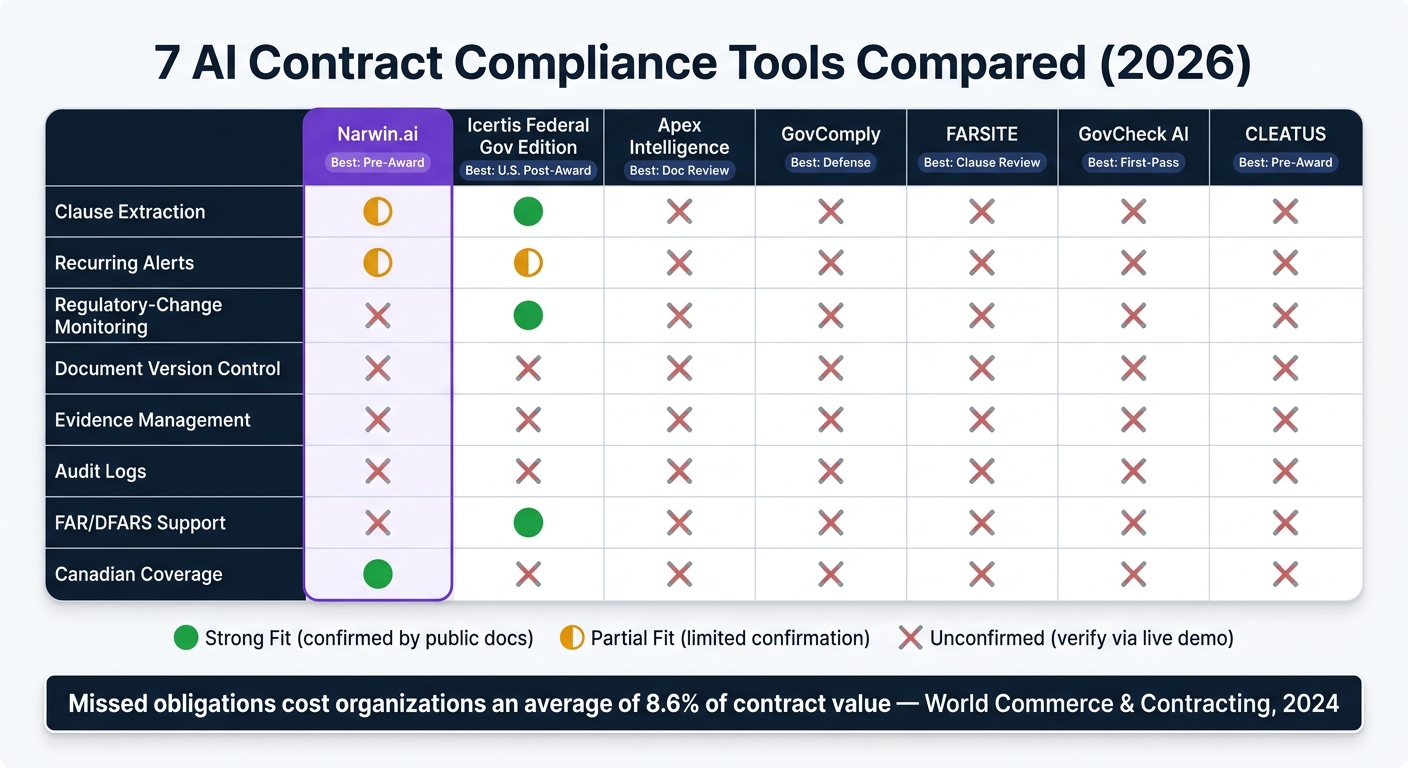
7 AI Contract Compliance Tools Compared: Post-Award Fit & Key Capabilities
| Tool | Best fit | Post-award proof from public info | U.S. fit | Canada fit | Main caution |
|---|---|---|---|---|---|
| Narwin.ai | Pre-award bid review | Limited | Yes | Yes | Post-award tracking not clearly shown |
| Icertis Federal Government Edition | U.S. federal post-award | Strongest in this list | Yes | Unclear | Canada support needs checking |
| Apex Intelligence Platform | Early document review | Unclear | Partial | Unclear | Alerts and audit controls not shown |
| GovComply | Defense compliance review | Partial | Yes | Unclear | Recurring deliverable alerts need proof |
| FARSITE | U.S. clause and flowdown review | Partial | Yes | No public proof | Renewal and milestone tracking unclear |
| GovCheck AI | First-pass federal review | Limited | Yes | No public proof | Post-award workflow not shown |
| CLEATUS | Pre-award solicitation review | Limited | Yes | Unclear | Post-award monitoring still unclear |
My takeaway is simple: don’t buy based on feature pages alone. Ask each vendor to run a live test on a signed contract with an amendment that changes a reporting schedule from quarterly to monthly. If the tool can’t update the clause, owner, alert cadence, and audit trail, it’s not ready for contract compliance monitoring.
That’s the lens I’d use for the full review below.
sbb-itb-bb3960c
What to Look for in an AI Contract Compliance Monitoring Tool
Not every tool handles post-award compliance the same way. Use the criteria below to judge the seven tools that follow.
For post-award monitoring, clause extraction comes first. A solid tool should pull obligations from the full contract package, including the base agreement, SOWs, amendments, exhibits, incorporated clauses, and related correspondence. It should also link each obligation to its exact page and paragraph. That part matters more than it may seem. If there’s no page-and-paragraph citation, you can’t check the output with confidence. For U.S. federal contracts, that also means spotting FAR clauses and audit-and-records requirements.
The next layer is deadline and recurring-obligation alerts. The tool should track one-time milestones, notice periods, renewal windows, and repeat duties like monthly subcontractor reports or quarterly certifications. A good alert should show the contract, the obligation, the due date, the owner, the source clause, and the evidence required. According to World Commerce & Contracting’s 2024 contract-management research, organizations lose an average of 8.6% of contract value from missed obligations, and that number went above 10% during the pandemic. That’s not a small miss. It’s money left on the table, and in many cases, it can be avoided with the right alert setup.
Document tracking and version history matter more than many buyers expect. Say an amendment moves a reporting deadline from the 15th to the 10th of the month. The system should apply the new language without wiping out the earlier version. In a demo, upload a base contract and then add a conflicting amendment. Then check whether the system uses the new deadline. That simple test tells you a lot.
Audit logs and evidence retention round out the core requirements. The log should show who changed what, when, and why. That includes AI-generated recommendations, human overrides, and deadline changes. Evidence should attach right to the obligation, with timestamps and reviewer identity kept in place. Teams in the U.S. and Canada should also check retention settings against the governing clause and any file-retention rules that apply.
One more thing: ask whether alerts are auto-generated from extracted clauses or created by hand for each document. During the demo, upload a PDF and confirm whether the system creates the deadline and alert on its own. Use these checks as you read the comparison table below.
Quick Comparison of All 7 Tools
Use this table for a quick scan of each tool’s documented fit. Strong fit means public docs confirm the feature. Partial fit means it shows up in a limited way. Requires verification means public sources don’t confirm it.
This comparison uses the same post-award checks across the board: clause extraction, alerts, version control, evidence, and auditability. One thing to note: Narwin.ai is mainly a pre-award platform, so its post-award compliance fields should be viewed as limited or not yet confirmed.
| Capability | Narwin.ai | Icertis Federal Government Edition | Apex Intelligence Platform | GovComply | FARSITE | GovCheck AI | CLEATUS |
|---|---|---|---|---|---|---|---|
| Clause extraction | Partial fit (RFP requirement extraction) | Strong fit | Unconfirmed | Unconfirmed | Unconfirmed | Unconfirmed | Unconfirmed |
| Recurring alerts | Partial fit (bid deadlines) | Partial fit (amendment alerts documented) | Unconfirmed | Unconfirmed | Unconfirmed | Unconfirmed | Unconfirmed |
| Regulatory-change monitoring | Unconfirmed | Strong fit (FAR/DFARS sync and amendment alerts) | Unconfirmed | Unconfirmed | Unconfirmed | Unconfirmed | Unconfirmed |
| Document version control | Unconfirmed | Unconfirmed | Unconfirmed | Unconfirmed | Unconfirmed | Unconfirmed | Unconfirmed |
| Evidence management | Unconfirmed | Unconfirmed | Unconfirmed | Unconfirmed | Unconfirmed | Unconfirmed | Unconfirmed |
| Assignment & remediation workflows | Unconfirmed | Partial fit (workflow support documented) | Unconfirmed | Unconfirmed | Unconfirmed | Unconfirmed | Unconfirmed |
| Audit logs | Unconfirmed | Unconfirmed | Unconfirmed | Unconfirmed | Unconfirmed | Unconfirmed | Unconfirmed |
| FAR/DFARS support | Unconfirmed | Strong fit | Unconfirmed | Unconfirmed | Unconfirmed | Unconfirmed | Unconfirmed |
| Canadian coverage | Strong fit (federal, provincial, city) | Unconfirmed | Unconfirmed | Unconfirmed | Unconfirmed | Unconfirmed | Unconfirmed |
| Integrations | Strong fit (Google Drive, Slack, major CRMs and ERPs, API) | Partial fit (SAM.gov sync documented) | Unconfirmed | Unconfirmed | Unconfirmed | Unconfirmed | Unconfirmed |
| Human review controls | Unconfirmed | Partial fit | Unconfirmed | Unconfirmed | Unconfirmed | Unconfirmed | Unconfirmed |
| Pricing transparency | Strong fit ($199/month published) | Unconfirmed | Unconfirmed | Unconfirmed | Unconfirmed | Unconfirmed | Unconfirmed |
Two points jump out.
Icertis Federal Government Edition has the strongest documented fit for U.S. federal compliance. Public materials point to FAR and DFARS clause libraries, automated clause insertion, prime/sub compliance tracking, and support for agency supplements.
Narwin.ai stands out for Canadian coverage and published pricing. It’s also the strongest pre-award option here for teams working across the U.S. and Canada.
The other five tools are harder to judge from public information alone. In plain English: most of their capabilities should stay in the unconfirmed bucket until you see them in a live demo.
Use this snapshot to narrow the field before you dig into the next sections. And before any vendor call, ask them to show live proof of:
- clause extraction
- reminders
- amendment handling
- evidence attachment
- remediation assignment
- audit history
- reporting
- U.S. and Canadian examples
1. Narwin.ai
Website: narwin.ai | Starting price: $199/month | Free trial: 14 days
Narwin.ai is at its best before award, when teams need to spot requirements, track deadlines, and decide whether a bid is worth pursuing. It’s a pre-award tool built for finding bids, pulling requirements from RFPs, and tracking submission timelines across the U.S. and Canada.
Clause and obligation extraction
Narwin pulls out requirements, deadlines, and risk flags from RFPs so teams can build a cleaner obligation list before submission. It also flags possible disqualifiers and creates a bid matrix, which gives you a structured view of whether the proposal covers each requirement.
That matters because pre-award compliance can get messy fast. One missed clause buried on page 87 can throw off the whole bid. Narwin helps surface those items early. Still, the extracted requirements should be treated as a starting draft, not the final word. Before review, teams should check the clause text, owner, due date, frequency, and source page.
Alerts for deadlines, renewals, and recurring deliverables
Narwin’s documented alerts center on bid deadlines and solicitation windows. It offers real-time notifications and tailored email alerts, which can help teams stay on top of close dates without living in procurement portals all day.
Audit trails, evidence, and exportable reports
Narwin can export qualification reports, win-score analysis, compliance matrices, and proposal drafts to Word, PDF, or Excel. Those files can work as pre-award evidence showing how a bid was screened and why the team made a bid decision.
There’s one thing to check closely, though. Public materials do not confirm a full activity log that tracks every user action, model version, or post-award change event. If audit depth matters for your process, verify:
- Version history
- User-level activity logs
- Retention settings
US/Canada government fit and regulatory coverage
Narwin fits best with U.S. and Canadian tender coverage. It monitors more than 1,000 public tender sources across the U.S. and Canada, including federal, provincial, state, and municipal portals. It also supports English and French, which is useful for Canadian teams.
For pre-award use, the big test is simple: can the extracted requirements move cleanly into your internal compliance register? That handoff is where a lot of tools look good on the surface but create extra work later.
2. Icertis Federal Government Edition
Icertis Federal Government Edition helps U.S. federal contractors track post-award obligations, including performance, modifications, and closeout. It covers both prime contracts and subcontract obligations, with clause-level compliance controls for FAR, DFARS, and CMMC. The big thing to check is simple: do those obligations stay linked to the source clause and the latest amendment?
Clause and obligation extraction
Icertis can identify clauses, obligations, deliverables, milestones, modifications, funding details, and line-item data from federal contracts and subcontracts. It comes with prebuilt FAR and DFARS clause libraries, supports automated clause insertion and compliance checks, and says it syncs with Acquisition.gov and GovInfo.gov as rules change.
That said, federal contracts can get messy fast. Agency-specific language, incorporated provisions, amendments, and exceptions can throw off even a good system. So it makes sense to treat extracted obligations as a draft until a contracts professional confirms the clause text, owner, due date, and source.
Alerts for deadlines, renewals, and recurring deliverables
The platform includes role-based dashboards and automated alerts for obligations, deliverables, deadlines, modifications, renewals, and recurring submissions.
Before you commit, check whether alerts can be set by:
- contract type
- clause
- owner
- escalation path
- recurrence
- business-calendar rules
That level of control matters more than it may seem at first glance. A reminder is only useful if it lands with the right person at the right time and follows the right schedule.
Audit trails, evidence, and exportable reports
Alerts only help if the evidence trail holds together. Icertis keeps contract actions, approvals, clause revisions, and supporting documents in one audit trail. Its government materials also mention audit-ready records and automated closeout workflows.
During evaluation, ask for an export that shows:
- every open obligation
- assigned owner
- due date
- source clause
- current status
- supporting evidence
- history of changes
If a vendor can show that cleanly, you’re not just looking at a dashboard. You’re looking at whether the system can stand up during review, dispute, or closeout.
US/Canada government fit and regulatory coverage
Icertis is strongest for U.S. federal contractors and agencies that manage portfolios governed by FAR, DFARS, agency supplements, and related cybersecurity requirements. The federal solution runs on Microsoft Azure Government and is described as FedRAMP Moderate Ready with NIST 800-53 alignment. Still, confirm authorization status during procurement review.
For Canadian teams, the issue is whether the platform can track obligations without a lot of setup work. Public materials do not show native support for CanadaBuys, provincial rules, bilingual documentation, or data-residency needs.
3. Apex Intelligence Platform
Apex Intelligence looks more like a custom AI build than an off-the-shelf compliance tool. Its public materials center on document parsing, risk flags, key-term extraction, and summaries. That makes it useful for a first-pass review.
But there’s a catch: public proof for post-award monitoring isn’t there yet. So, for now, Apex looks better suited to early-stage review than day-to-day compliance work after award – unless it can show live post-award tracking on actual contract files.
Clause and obligation extraction
Public material points to pre-award extraction. It does not clearly show dependable post-award monitoring for executed contracts, amendments, task orders, or attachments.
Before you buy, ask for a live demo using your own contract set. Don’t settle for a polished sample file. You want to see whether Apex can pull out:
- Deliverables
- Due dates
- Notice periods
- Flow-down obligations
That’s the make-or-break test. You should also ask whether amendments override earlier clauses and whether version history remains intact. If it can’t handle those basics, it’s doing document review – not ongoing compliance support.
Alerts for deadlines, renewals, and recurring deliverables
There’s no public documentation showing configurable alerts for deadlines, renewals, recurring deliverables, or amendments.
That means you should test the alert system yourself before buying. Look at email notices, in-app alerts, and escalation rules. If those pieces don’t work well, deadlines can slip through the cracks fast.
Audit trails, evidence, and exportable reports
Public materials don’t confirm audit logs, evidence attachments, retention settings, or compliance exports.
Ask whether the platform can export data your team can actually use, such as open obligations, overdue items, upcoming deadlines, and amendment histories. Also keep human review as the final compliance call. That matters here. Without those controls, Apex doesn’t look ready for daily contract monitoring.
US/Canada government fit and regulatory coverage
Public materials seem focused mostly on U.S. federal use cases. Canadian coverage is still unconfirmed.
If your team works across the U.S. and Canada, confirm support for FAR-related workflows, bilingual documents, and local reporting duties before purchase. Until those workflows are proven on your documents, it’s safer to treat Apex as a review layer – not a full compliance-monitoring system.
4. GovComply
GovComply is a compliance platform built for mid-market aerospace and defense contractors. It centers on FAR, DFARS, and CAS requirements and pulls from the acquisition.gov database. The main issue isn’t whether it can read contract language. It’s whether that narrow focus turns into day-to-day post-award monitoring that people can actually use.
Clause and obligation extraction
GovComply automatically maps active contracts to the FAR and DFARS clauses that apply to them. It then builds a clause-by-clause compliance matrix that shows each requirement’s status, linked evidence, and open remediation actions in one place. Its validation workflow runs at contract intake, when documents are uploaded, and when FAR or DFARS rules change. In plain English: it keeps checking the file as the contract record shifts over time.
That sounds good on paper. The real test is your full contract package:
- Executed contract
- Modifications
- Attachments
- SOW
- Flow-downs
You want to see whether each obligation is picked up the right way. A useful example is a DFARS cybersecurity clause. The platform should spot the clause, summarize the obligation, assign an owner, link the right policy or assessment, and flag any unresolved gap. If it can’t turn clause text into tracked work, the extraction step doesn’t mean much.
Alerts for deadlines, renewals, and recurring deliverables
GovComply processes contracts automatically when documents come in or when regulations change. What public materials don’t clearly show is a recurring reminder system for deliverables or option periods.
That’s worth pressing on in a live demo. Ask them to show a monthly cybersecurity report trigger from start to finish, including escalation and acknowledgment history. If the system can’t show who was notified, when they were notified, and what happened next, that’s a weak spot for post-award follow-through.
Audit trails, evidence, and exportable reports
Once extraction and alerts are in place, the next check is simple: does the evidence trail hold up under review?
This is where GovComply looks strongest. It offers audit-ready evidence support with append-only application logs, AWS CloudTrail, and encrypted operational logging with retention controls. It also supports DCAA-ready evidence packages for incurred-cost audits, CPSR workflows, and floor checks.
When you test reporting, don’t stop at a sample dashboard. Export the data and verify that reports include:
- PDFs and spreadsheets
- Source citations
- Timestamps
- Filters by contract, clause, owner, and due date
That’s the stuff reviewers and internal teams usually need when they’re under pressure.
US/Canada government fit and regulatory coverage
GovComply is a fit for U.S. federal defense contractors working across FAR, DFARS, CAS, DCAA, and CPSR workflows. Public materials do not establish Canadian coverage, so don’t assume it works the same way there. If cross-border use matters, ask whether Canadian contract language can be uploaded, mapped, and tracked before moving ahead.
5. FARSITE
FARSITE is built for U.S. government contract compliance. It focuses on clause review, owner assignment, and remediation tracking. The big thing to test is simple: when the system flags a clause, does that finding turn into a clear action item with an owner, a due date, and proof attached?
Clause and obligation extraction
FARSITE reviews contracts, solicitations, task orders, and modifications to find applicable FAR, DFARS, and supplemental clauses. It also creates subcontractor flowdown lists and exportable checklists in Word, PDF, and Excel.
Here’s what that should look like in practice: if a defense contractor uploads a DFARS-heavy solicitation, the platform should return a clause-by-clause checklist that shows the responsible department, the action required, the evidence to keep on file, and whether a subcontract flowdown is required.
That leads to the next issue: can those obligations actually be tracked and completed on schedule?
Alerts for deadlines, renewals, and recurring deliverables
Public materials do not confirm native recurring alerts, renewal reminders, or calendar-based milestone tracking. That’s a gap worth checking in the demo.
Ask the vendor to show how due dates are handled, whether escalation rules exist, and which calendar integrations are available.
Audit trails, evidence, and exportable reports
FARSITE records electronic approvals and remediation activity. But public sources do not fully confirm document-version logs, user-action history, or AI decision logs.
Before you buy, verify those points directly. If your team may need to explain who changed what, when it changed, and why, this part matters a lot.
US/Canada government fit and regulatory coverage
FARSITE is U.S.-focused. Public information does not confirm Canadian procurement rules, bilingual workflows, or provincial requirements.
If your team works across both countries, treat FARSITE as U.S.-only unless the vendor can show Canadian coverage in detail.
6. GovCheck AI
GovCheck AI looks strongest as a fast document review layer. What’s less clear is how far it goes once the contract is signed and the follow-up work starts.
It’s a U.S. federal compliance platform built for contractors, procurement, legal, and compliance teams. The platform reviews uploaded contracts, SOWs, and policy documents. Based on public descriptions, it produces a scored report with severity-ranked findings, clause citations, and remediation steps. The main issue is simple: does that review turn into trackable post-award obligations, or does it stop at analysis?
Clause and obligation extraction
GovCheck AI says it covers 180+ federal regulatory frameworks, including FAR, DFARS, CMMC 2.0, HIPAA, the False Claims Act, NDAA requirements, Zero Trust, the NIST AI Risk Management Framework, CFIUS, the Berry Amendment, and Section 1260H.
Its stated purpose is to flag compliance gaps, missing clauses, obligations, and risk areas, then connect each finding to a regulatory citation and a recommended corrective action. That sounds useful for teams that need a first pass on dense contract language.
Still, the 180+ number should be treated as vendor-claimed until the current rule library is shown in a demo. That matters because broad coverage on a website and usable coverage in day-to-day contract review are not always the same thing.
Alerts for deadlines, renewals, and recurring deliverables
Document analysis only gets you part of the way. The harder part usually comes later, when teams have to track reporting dates, renewal windows, and repeat deliverables month after month.
Public materials mention document analysis and regulatory updates. They do not clearly mention:
- obligation calendars
- recurring reminders
- escalation workflows
- calendar integrations
So if your team needs the system to nudge people before something slips, that part is still uncertain from what’s publicly available.
Audit trails, evidence, and exportable reports
Public materials do confirm citation-backed remediation reports. That’s a good start.
But they do not confirm immutable audit logs, version history, evidence storage, or export formats. For teams that may face a DCAA review, an inspector-general inquiry, or a contract-file audit, that missing chain of custody is a big deal. A good report helps, but in a review, teams often need to show who did what, when they did it, and what evidence supports it.
U.S./Canada government fit and pricing
GovCheck AI is positioned for the U.S. federal market. No source confirms Canadian procurement coverage or bilingual support.
Capterra lists pricing starting at $49/month, with free and enterprise options, but the billing limits are unclear. That entry price may sound low, but without details on usage caps, user limits, or feature gates, it’s hard to know what that number gets you in practice.
For now, it makes sense to treat GovCheck AI as U.S.-focused unless Canadian framework coverage is shown in writing. U.S. federal teams that want fast first-pass review may find it useful, but they should expect to use separate controls for recurring obligations and audit files after award.
7. CLEATUS
CLEATUS looks strongest in pre-award review. By contrast, its post-award compliance monitoring isn’t clearly documented in public materials.
U.S./Canada government fit and regulatory coverage
CLEATUS is plainly aimed at U.S. government contracting. It covers federal, state, local, and education sources. Reported source coverage includes SAM.gov, DLA DIBBS, Grants.gov, USASpending, FPDS, GSA eBuy, SeaPort NxG, plus more than 40,000 state, local, and education sources.
It also says it provides compliance intelligence across more than 200 federal requirements, including FAR and DFARS updates and small-business size standards.
Canadian coverage is still unclear. Public materials do not show CanadaBuys, provincial or municipal sources, bilingual support, or a Canadian clause library. So before you buy, check Canadian sourcing and clause coverage yourself.
For this article, the main issue is simple: do those review outputs turn into tracked obligations after award?
Clause and obligation extraction
CLEATUS uses OCR and document analysis to pull requirements into a structured Section A–M breakdown and score the opportunity for compliance risk.
Its AI assistant can turn solicitation packages into:
- Checklists
- Compliance matrices
- Pricing tables
That said, post-award tracking for recurring reports, option periods, subcontract flow-downs, and clause-to-task workflows is still unconfirmed.
Alerts for deadlines, renewals, and recurring deliverables
This is where things get serious. Post-award monitoring is the real test.
CLEATUS provides alerts for matched opportunities, amendment changes, and workflow events. But public materials do not confirm a post-award calendar for recurring deliverables, invoice milestones, option years, or renewals.
If those reminders matter in your process, ask for a live walkthrough. You’ll want to see how the system handles recurring alerts, time zones, and escalation rules tied to contract clauses. That’s the kind of detail that can save a team from a missed deadline.
Audit trails, evidence, and exportable reports
CLEATUS tracks user actions in audit logs that can be filtered by date, user, action type, and resource, then exported to CSV.
Before purchase, confirm whether those logs include:
- Timestamps
- Before-and-after values
- Document or clause references
- Retention controls
Without that level of detail, the audit trail may not support a review record you can defend later.
If your team cares most about ongoing compliance, make sure these review features carry into live post-award tracking. If those controls aren’t documented, it’s safer to treat CLEATUS as a review tool, not a compliance-monitoring system.
Key Cautions Before You Buy
Don’t assume pre-award analysis equals post-award monitoring. Those are not the same thing. Before you buy, make the vendor prove the platform can track signed contracts, amendments, deadlines, and evidence after award. For Narwin.ai, verify post-award monitoring directly. And do it in a live demo, not from a polished slide deck.
Here’s a simple test that tells you a lot. Ask the vendor to process a contract where a quarterly reporting requirement was changed to monthly. The system should:
- identify the effective date
- mark the old schedule as superseded
- update the responsible party
- generate the correct new alert cadence
If it can’t show that change in a demo, don’t buy it.
You should also create separate contract administrator, delivery owner, and external auditor roles. Then confirm that each one sees only the permissions they need. That sounds basic, but it matters fast once several people touch the same contract.
Data handling needs the same level of scrutiny. Ask where your data is processed, not just where it is stored. Canadian teams working on federal contracts should verify where Protected B data is stored and processed, including whether AI inference occurs in approved Canadian facilities when required.
Source visibility is another hard line. Every finding must link back to the exact clause, page, and document version that triggered it. A risk score with no source citation is tough to defend when an auditor starts asking questions.
Use the table below to check the main purchase risks before signing.
| Risk | What to Verify | Why It Matters |
|---|---|---|
| Pre-award vs. post-award gap | Can the tool ingest a signed contract and track its lifecycle, or does it stop at proposal submission? | Missing post-award tracking means recurring obligations go unmonitored after award. |
| Modification tracking | Does the system detect changed clauses, mark superseded language, and update alerts automatically? | Untracked amendments create outdated obligations that lead to non-compliance. |
| Recurring deliverables and escalation | Does the platform support business-day rules, missed-deadline escalation, reassignment, and completion evidence? | A missed monthly invoice or lapsed cybersecurity attestation won’t be caught by calendar reminders alone. |
| Source-text visibility | Does every AI finding link to the exact clause, page, and document version that triggered it? | Without clause-level citations, findings cannot be defended in audits or disputes. |
| Audit log integrity | Are logs immutable, filterable by user and date, and exportable? Can an administrator alter or delete entries? | Tamper-evident logs are required to prove compliance to government reviewers and internal auditors. |
| Evidence versioning | Does uploaded evidence retain timestamps, uploader identity, and links to the obligation it supports? | Compliance decisions must trace back to the document version active at the time. |
| Access controls | Are role-based permissions enforced at the obligation and evidence level, with SSO and MFA available? | Granular access is required for contracts involving subcontractors and sensitive bid data. |
| Data residency | Where are documents, prompts, AI outputs, backups, and audit logs stored and processed? | U.S. federal and Canadian government contracts may impose specific hosting and disclosure requirements. |
| Jurisdictional coverage | Does the platform support state, county, city, provincial, and municipal procurement, including CanadaBuys and Canadian clause libraries? | Confirm actual source and clause coverage for every jurisdiction your team works in. |
If a tool fails these checks on your own contracts, take it off the shortlist.
Conclusion
After looking at all seven tools, the big issue is simple: where does your compliance gap begin?
If the problem starts after award, you’re dealing with contract administration. That means tracking deliverables, watching reporting deadlines, handling amendments, and keeping records ready for an audit. In that case, you need a post-award contract administration platform.
If the problem starts earlier, a pre-award intelligence platform makes more sense.
A lot of teams end up needing both, with a clean handoff between pre-award and post-award.
For Narwin.ai, the takeaway is straightforward. It fits the pre-award stage and helps U.S. and Canada teams find bids, pull out requirements, flag risk, and produce go/no-go guidance.
But before you treat it like a compliance monitoring system, check directly with Narwin on a few points:
- post-award obligation tracking
- recurring deliverable alerts
- amendment detection
- exportable audit logs
That matters because pre-award analysis is not the same thing as an ongoing contract administration workflow.
For post-award tools, ask for a live demo that shows the full chain on an executed contract: requirement, owner, due date, evidence, review, escalation, and audit trail. That’s the bar a post-award platform should meet.
Start with the pre-award/post-award split, use the purchase-risk checks above, and run a live pilot on a real contract with amendments, subcontracting, and recurring reporting. That test tells you more than any feature list.
FAQs
How do I test post-award fit in a demo?
In the demo, focus on how the platform moves from proposal compliance into post-award performance control.
Look closely at whether it clearly separates post-award duties from proposal-stage requirements, with extra attention on Section C and Section I. That split matters. If everything gets lumped together, teams can miss what applies before award versus what kicks in after the contract is live.
Make sure the demo shows:
- Automated tracking for recurring deadlines and deliverables
- Centralized records for modifications, invoices, and performance logs
- Real-time monitoring of regulatory updates
- A dedicated implementation tracker for post-award obligations
The main thing to watch is whether the system helps a team run the contract day to day, not just respond to the solicitation. It should be clear, organized, and built for post-award follow-through.
What features matter most for compliance tracking?
The most important features are automated requirement extraction and real-time mapping.
AI tools should spot mandatory terms like shall, must, and required. Then they need to match those terms against standards like FAR/DFARS or NIST.
They should also build dynamic compliance matrices to support traceability and audit readiness. On top of that, they should track amendments and version updates, and flag missing certifications or formatting errors that could lead to disqualification.
Can one tool handle both U.S. and Canadian contracts?
Yes. Narwin.ai supports contract and compliance monitoring in both the U.S. and Canada. It tracks federal, provincial, and city-level sources across both countries.
It can extract mandatory requirements, flag high-risk clauses, and update its compliance matrix when amendments are uploaded. That includes sources like SAM.gov, CanadaBuys, and BCBid.